
Print Professional Tax Computation Report in TallyPrime (Payroll)
The Professional Tax (PT) Computation Report is a monthly report that provides details of the PT amount payable by the employer to the Professional Tax department for the given month.
- Gateway of Tally > Display More Reports > Payroll Reports > Statutory Reports > Professional Tax > Computation Report.
- Select Professional Tax Ledger and press Enter.
- Press C (Configure) for print configurations.
- Specify the Period in the respective From and To fields.
- Select the required Employee Category, Employee/Group, Sorting Method, and Display name for Employees, and press Enter.
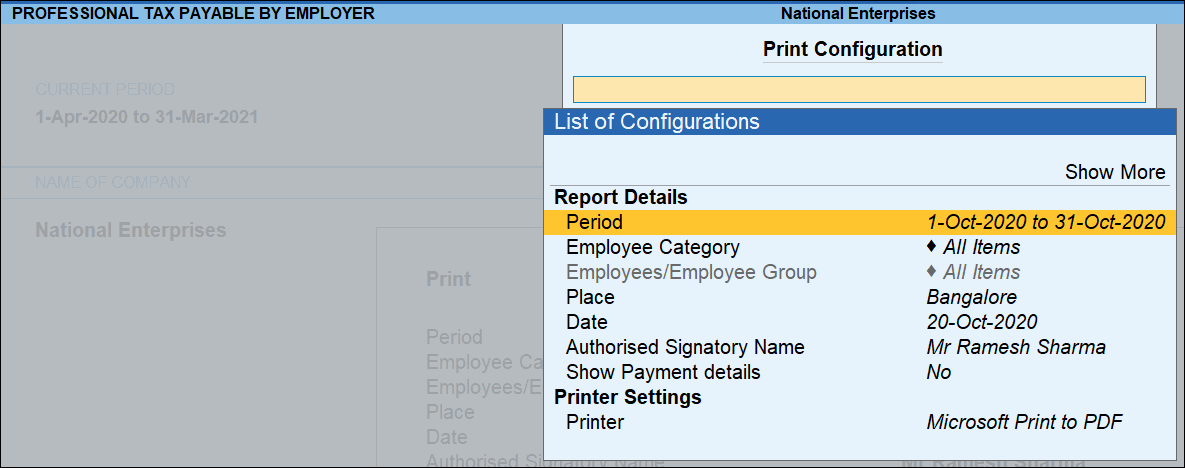
- Press I (Preview) or P (Print).
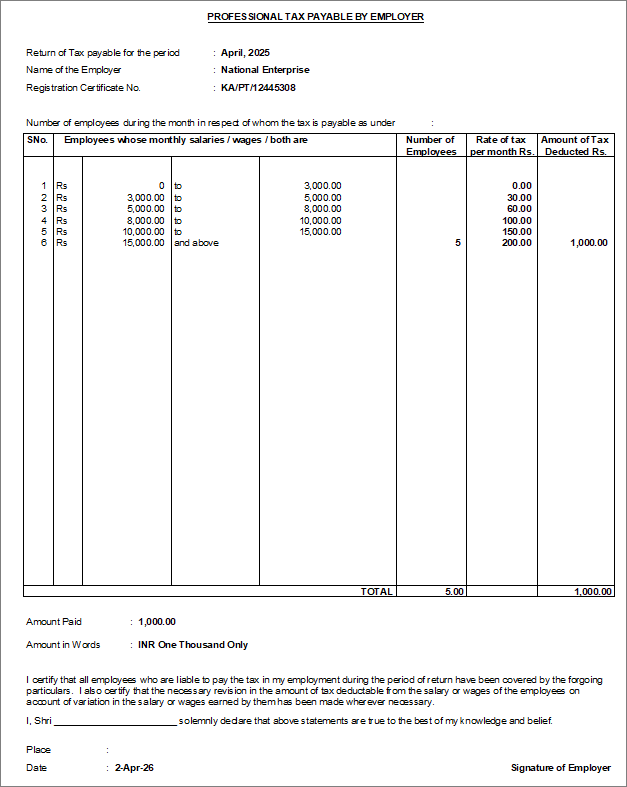
- Return of Tax payable for the period: Displays the month for which Professional Tax is payable, based on the period specified in the Print Configuration screen.
- Name of the Employer: Displays the company name as defined in the Company Master.
- Address: Displays the company address as specified in the Company Master.
- Registration Certificate No.: Displays the Professional Tax registration number of the company, as entered while creating the Professional Tax pay head.
Column Details:
- Employees whose monthly salary/wages / both are: Displays the Professional Tax slabs as defined while creating the Professional Tax pay head.
- Number of Employees: Displays the number of employees falling under each slab.
- Rate of Tax per month Rs.: Displays the Professional Tax rate applicable for each slab.
- Amount of Tax deducted: Displays the total tax deducted for employees within each slab.
Is this information useful?
YesNo


