
Print PF Form 10 in TallyPrime (Payroll)
PF Form 10 is a monthly report that provides details of employees who exit the Provident Fund scheme during the specified month.
- Gateway of Tally > Display More Reports > Payroll Reports > Statutory Reports > Provident Fund > Form 10.
- Press C (Configure) for print configurations.
- Specify the Period in the respective From and To fields.
- Select the required Employee Category, Employee/Group, Sorting Method, and Display name for Employees, and press Enter.
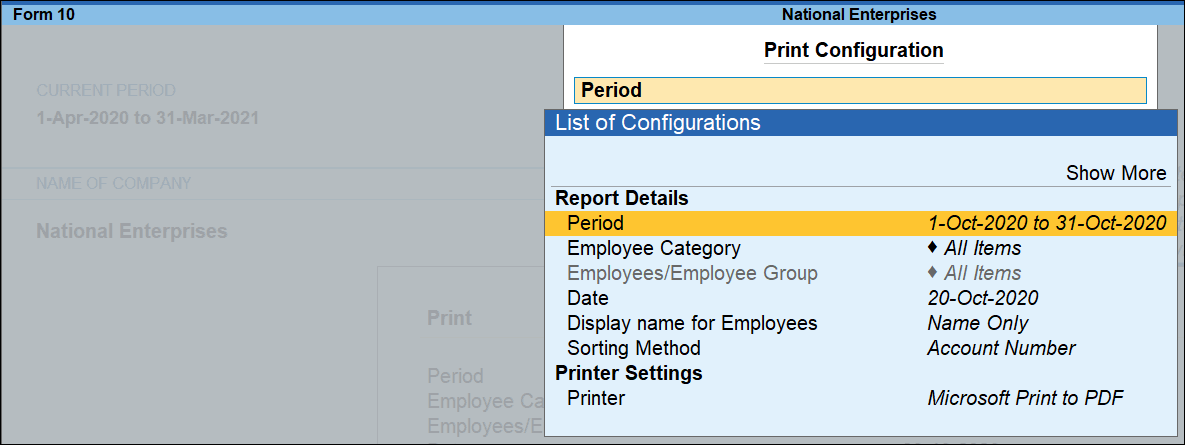
- Press I (Preview) or P (Print).
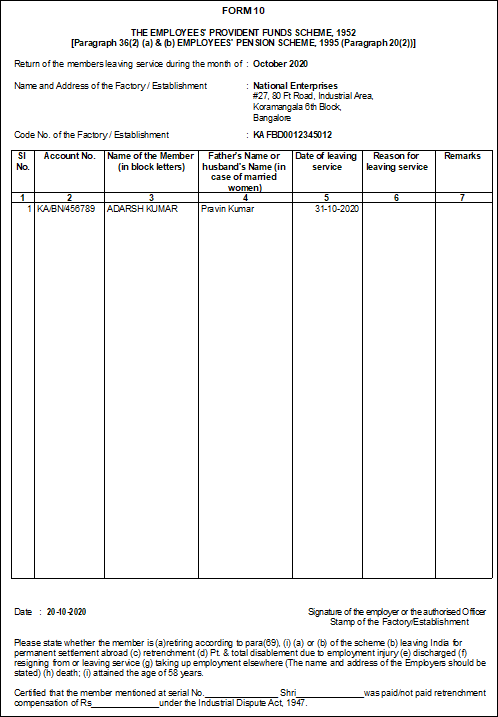
Column Details:
-
Account No.: Displays the PF account number for each employee as specified in the Employee Master.
-
Name of Member (in block Letters): Displays the employee’s name as specified in the Employee Master.
-
Father’s Name or Husband’s name (in case of married women): Displays the father’s or husband’s name of each employee as specified in the Employee Master.
-
Date of Leaving service: Displays the date of leaving service as recorded in the Employee Master.
-
Reason for Leaving service: Displays the reason for leaving service for each employee as recorded in the Employee Master.
Is this information useful?
YesNo


