
Provide Opening Balance for Unadjusted Advances Paid Under GST
If you have advances paid before the GST advance adjustment effective date that are still unadjusted, enter them as opening balances so you can adjust them in Purchase vouchers.
If the purchase amount is less than the advance amount, the remaining balance continues to appear under unadjusted GST advances paid for future adjustment.

- Press Alt+G (Go To) > GST Advances – Opening Balance > press Enter.
- Select Create Opening Balance (Advance Payment).
- If you have created multiple GST registrations, select the applicable registration.
- Provide Party Name and Place of Supply.
- Enable the option Supply attracts Reverse Charge, if applicable.
- Provide details of unadjusted advances paid before the applicable effective date.
- Date of GST Advances: Must be before the Applicable from date set while enabling advance adjustment in transactions.
- Taxability: Taxable.
- Enter GST Rate and Unadjusted Advance Amount, as applicable.
- Taxable Amount and tax values are calculated automatically.
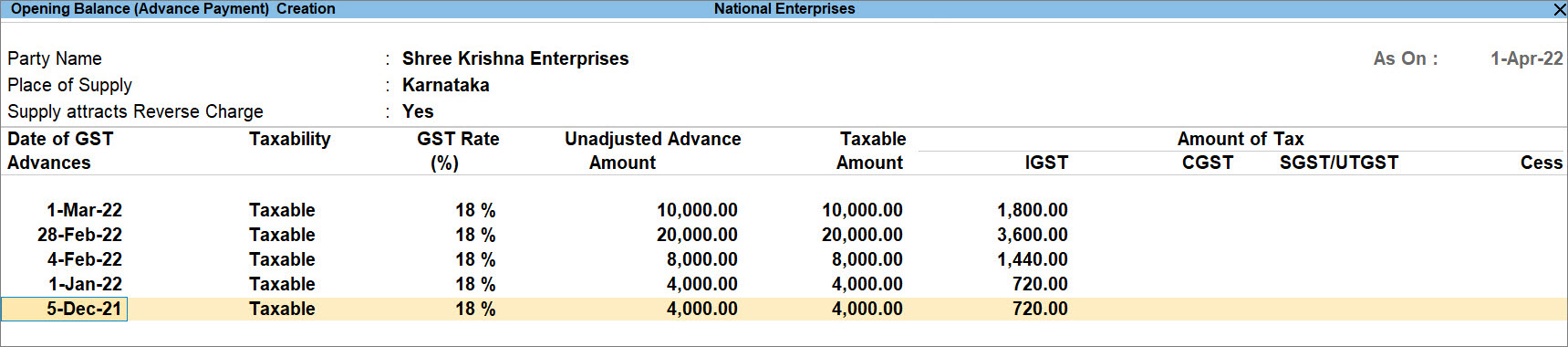
- You can add multiple advances in the same screen.
- Press Ctrl+A to save.
The opening balance appears as available for adjustment when you purchase voucher for this party.
Questions & Answers
- What happens to the balance under unadjusted GST advances paid if the purchase amount is less than the advance amount?
If the purchase amount is less than the advance amount, the remaining advance balance continues to appear under unadjusted GST advances paid. You can adjust the pending balance in the next purchase voucher by selecting the same advance reference.
Is this information useful?
YesNo


