
GST Registration Details of the Company are invalid or not specified
Cause
When the Company’s GST Registration Details are incorrect or missing in F11 > Enable Goods and Services Tax (GST) > GST Details screen.
Resolution
- Specify the correct GSTIN/UIN in the GST Registration master.
- Press F11 (Company Features).
- Enable Goods and Services Tax (GST): Yes.
- GSTIN/UIN: Enter the correct GSTIN/UIN.
- Press Ctrl+A to save.
- Press Y to update the transactions.
- Open the Return report.
- Press Y to accept the GST-related changes.
- Drill down from Mismatch in GST Registration Details between the GST Registration master and transaction.
- Press Enter on the transaction.
- Apply changes from: Master to Transaction.
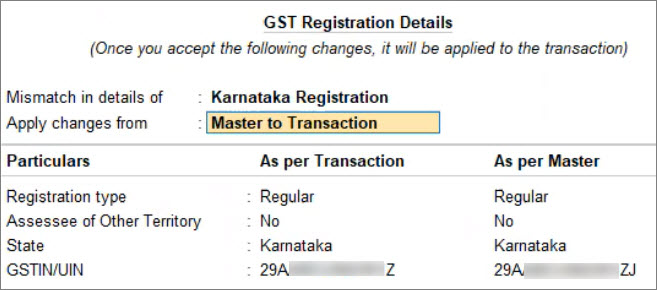
- Press Y to accept the changes.
The transaction becomes a part of the Return.
Is this information useful?
YesNo


