
File GSTR-1 Manually on GST Portal Using TallyPrime
You can also file GSTR-1 directly on the GST portal by manually entering the data from TallyPrime. This method is useful when there are fewer transactions or when minor corrections are required.

-
Checklist for Seamless GST Return Filing.
-
Resolve all exceptions and conflicts in GSTR-1.
-
Enable API access on the GST portal.
-
Log in to the GST Portal and connect via TallyPrime.
-
GSTR-3B filing: Ensure that GSTR-3B Return is filed regularly. If GSTR-3B is not filed for the previous two return periods, then GSTN will block the filing of GSTR-1 as well. To know more, refer to our blog.
-
Tax calculation: Ensure that the tax values of sales transactions are equal to or greater than the computed values.
- If your turnover exceeds ₹1.5 crore, enable the option Enable tax liability on advance receipts in the Company GST Details screen.
(For a turnover up to ₹1.5 crore, no tax is applicable on advance receipts)
- Log in to the GST portal.
- Select the Return Filing Period and click SEARCH.
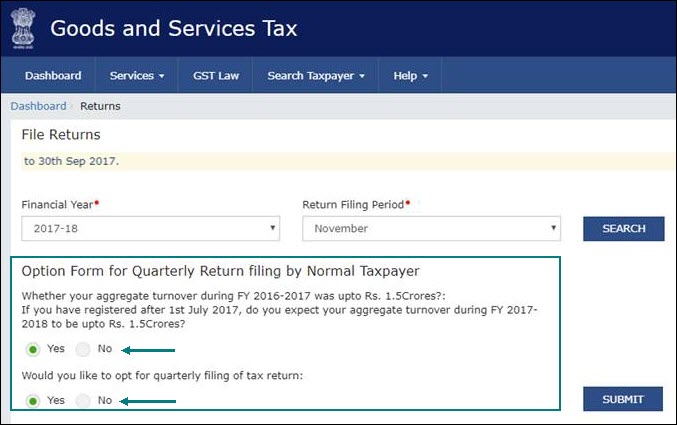
- Select Yes to file Quarterly return or No to file Monthly return, based on the annual turnover of your business.
- Click SUBMIT.
- Click PREPARE ONLINE.
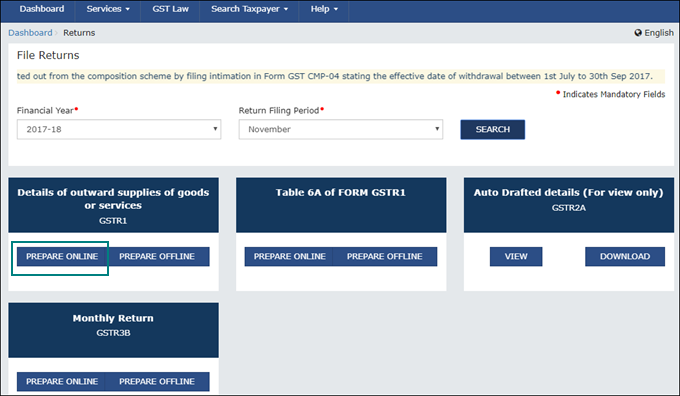
- Copy the data for each section from the GSTR-1 report in TallyPrime and paste it in the relevant table of GSTR-1. Alternatively, you can refer to the data in TallyPrime and manually enter the details on the portal.
- Submit the return and complete the filing by e-signing it.
Questions & Answers
- Where can I find advance receipt transactions in the GSTR-1 report?
Since tax liability on advance receipts is not included in GSTR-1 by default, these transactions appear under Not Relevant for This Return in the GSTR-1 report.
Is this information useful?
YesNo


