
Generate Bulk IRN/e-Invoice
You can generate an e-Invoice while recording a transaction or can also do it later using the Exchange menu in TallyPrime. While doing so, you can select one or more transactions, as needed, and generate the IRN for e-Invoices in bulk.
Click here to watch the Hindi version of the video.
Before you begin | Prerequisite
- Ensure that you have enabled e-Invoicing in TallyPrime.
- Ensure that you have registered your business on IRP
- Ensure that you have created an API user profile by selecting Tally (India) Pvt Ltd as the GSP.
- Press Alt+Z (Exchange) > Send for e-Invoicing.
In the Send for e-Invoicing screen, you can view the transactions that are pending for generation and cancellation.
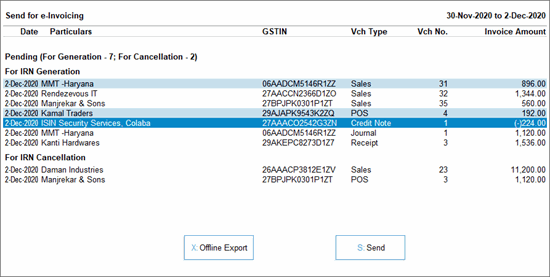
- Select the required transactions and press S (Send) to send the details.
If you press S without selecting any transaction, then all the transactions will be sent for e-invoicing.In TallyPrime Release 5.1 and later, if you have made any changes in the transaction/masters, then you will see a message about the potential conflict between the master and transaction. You can resolve the conflicts to proceed.
A confirmation screen will appear, displaying the number of transactions in queue for IRN generation and cancellation.
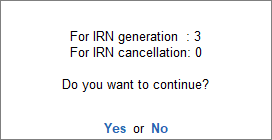
If you are on TallyPrime Release 3.0 or later, and using multiple GST registrations, then the total number of vouchers for IRN generation and cancellation from all GST registrations will be displayed. - Press Enter to continue.
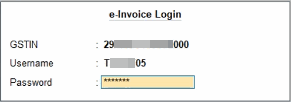
- Specify the details in the e-Invoice Login screen and press Enter.
Once the transactions are uploaded to IRP, the IRN details will be updated in the voucher, and the Exchange Summary will appear.
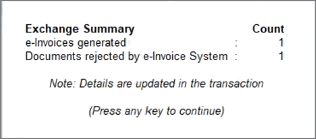
You will get an idea of the no. of e-invoices that were generated or rejected by the e-Invoice System, or if any transactions could not be uploaded due to any technical difficulties.
For more details, you can go the e-Invoice report.
TallyPrime offers a flexible and efficient way to generate bulk IRNs at your convenience through the Exchange menu. Whether managing single or multiple GST registrations, you can easily select, review, and generate e-invoices in one go.
Q&A
- Can I do bulk upload from drill-downs of e-Invoice report?
Yes. You can use the top menu option Exchange > Send for e-Invoicing anywhere across the product, including the drill-downs of the e-Invoice report. The report preview will display all invoices pending for generation/cancellation of IRN, and can be uploaded in bulk. - In case of offline IRN generation in bulk, can QR code details be downloaded from IRN portal and updated in TallyPrime through offline JSON import?
Download of QR code data (JSON) from portal and import to TallyPrime is not supported. You can use Get IRN info from the e-Invoice report, and the details will be updated in the transaction.
For any further queries, refer to e-Invoice – FAQ.


