Connectivity Settings in TallyPrime Server
In TallyPrime Server, a proxy server is an intermediary that manages communication between TallyPrime clients and the TallyPrime Server, especially in same network. This is needed when your network does not allow direct internet access. In such cases, all outbound communication (including license validation) must go through a proxy server.
As a result, TallyPrime Server can communicate properly with the license server and avoid connection or validation issues.
- Press F1 (Help) > Settings > Connectivity > Proxy Server Configuration.
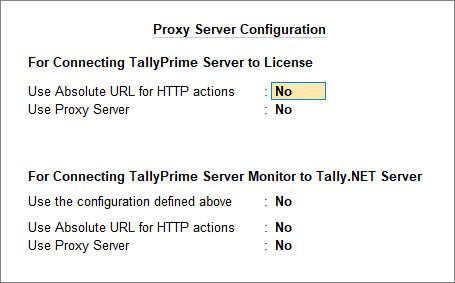
-
Set For Connecting TallyPrime Server to License to Yes.
These settings are used to ensure TallyPrime Server connects successfully to the license, especially in controlled or restricted network environments.-
Set Use Absolute URL for HTTP actions to Yes.
Without this, the communication between TallyPrime Server and the license server may fail or behave inconsistently. -
Set Use Proxy Server to Yes.
This is needed when your network does not allow direct internet access. In such cases, all outbound communication (including license validation) must go through a proxy server. Enabling this ensures that TallyPrime Server can reach the license server via the configured proxy.
-
-
Set Connecting TallyPrime Server Monitor to Tally.NET Server to Yes, if you want to use the same configuration defined for TallyPrime Server License.
Questions & Answers
- What proxy server does?
-
Acts as a bridge between client machines and the server
-
Helps route requests when direct connection is not possible
-
Supports secure and controlled access across networks (e.g., different subnets or remote setups)
-
-
Why it’s used?
-
To enable connectivity in LAN environments
-
To manage communication efficiently when multiple users access the server
-