
Introduction
A cloud application may need to retrieve reports or exchange business data with TallyPrime running on a customer’s local machine. Although the application can prepare a valid integration request, it still needs a network path to that machine. Dynamic IP addresses, network address translation (NAT) and restrictions on inbound connections can make this difficult.
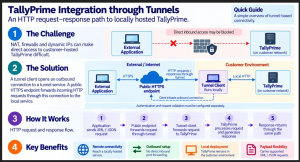
A tunnel addresses this connectivity requirement by linking a local client to an externally reachable endpoint. The application sends an HTTPS request to that endpoint, and the tunnel forwards it to the configured local service. TallyPrime continues to process the request through its supported integration interface. The below image provides a visual depiction of Integration through Tunnels.
Deployment Models
The location of TallyPrime determines how an external application reaches it. When both run within an accessible network, the application can use the configured local HTTP endpoint. A cloud-hosted application needs an additional connectivity arrangement when that endpoint is behind the customer’s network boundary.
|
Deployment |
Connectivity Requirement |
|
Same machine |
Use the configured loopback endpoint, such as http://127.0.0.1:9000. |
|
Accessible private network |
Use the permitted host and port with appropriate network access controls. |
|
Cloud application to customer host |
Provide a controlled route, such as a tunnel, when direct inbound access is unavailable. |
Tunnel Connectivity for Dynamic Networks
The local tunnel client establishes connectivity outwards. This commonly removes the need for a customer-side static public IP address or router port forwarding. It does not override network policy: outbound traffic, DNS resolution and any required proxy access must still be permitted.
A tunnel changes the route used to reach the service. It does not change the meaning of a TallyPrime request, create new business APIs, or automatically convert XML into JSON. In this model, the external application still uses HTTP request–response semantics through an HTTPS endpoint.
Choosing Visibility and Lifetime
|
Choice |
Meaning |
Practical implication |
|
Public |
An internet-facing HTTP endpoint. |
A standard HTTP client can call it; enforce caller access. |
|
Private |
Access through a private sharing mechanism. |
Requires compatible client access and configured permissions. |
|
Ephemeral |
A share intended for a temporary session. |
Suitable for short tests; do not rely on a reusable URL. |
|
Reserved name |
A persistent name reused by share sessions. |
Provides endpoint continuity; the active share still needs to run. |
Visibility and lifetime are separate choices. This blog uses a reserved public name because it illustrates a stable URL for a standard HTTP client. That choice is for the walkthrough; it is not a general recommendation for production access.
Tunnel-Based Architecture
Architectural Components
|
Component |
Responsibility |
Interface |
|
Third-party application |
Prepare requests, identify the intended company and operation, and interpret responses. |
HTTPS; XML/JSON |
|
Tunnel frontend |
Provide the public endpoint and route traffic into the share. |
External HTTPS |
|
Local zrok client |
Maintain tunnel connectivity and forward traffic to the configured target. |
Tunnel transport; local HTTP |
|
TallyPrime |
Execute supported operations against the intended company and return results. |
Configured HTTP endpoint |
A protected implementation adds a gateway or validation service before TallyPrime. The gateway authenticates callers, authorises company and operation access, and forwards only approved requests. Its role is distinct from the transport forwarding performed by the tunnel.
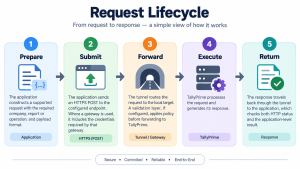
Request Lifecycle
JSON and XML Payloads
Use the format and schema supported by the installed TallyPrime release and the selected operation. JSON integration is supported from TallyPrime Release 7.0; individual APIs and request structures must still be checked. The examples here use XML to keep the connectivity exercise focused. A Content-Type change alone does not convert an XML request into a valid JSON request.
Security at the Integration Boundary
HTTPS protects the application-to-frontend connection. The forwarding target in this walkthrough is a local HTTP endpoint, so it would be inaccurate to describe the entire route as HTTPS to TallyPrime. Review the tunnel provider’s transport, TLS termination and data-handling model as part of deployment design.
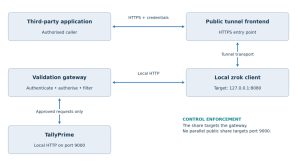
The above image is an example with a local validation gateway. This is an architectural extension, not a gateway implemented by the setup commands.
Authentication and Authorisation
Authentication must be enforced by a component that receives the request before TallyPrime. Sending a bearer token or API key from the application is effective only when that component validates it. The zrok account token enables the local zrok environment; it is not an API credential for callers of the public share.
Authorisation must then restrict the caller to approved companies and operations. A company name inside XML is routing context, not proof of access. For a read-only integration, allow specific report requests and reject write operations and arbitrary embedded TDL unless explicitly required and controlled.
Preparing the Local Environment
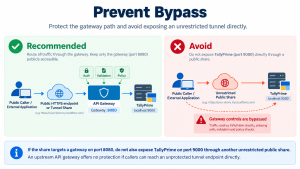
Use a test company with non-sensitive data for the connectivity walkthrough. The following steps demonstrate the direct route shown in Figure 1. Complete the access-control design before applying the pattern to customer data.
Confirm the Prerequisites
- TallyPrime is running, the intended test company is open, and the required integration operation is supported.
- The local host can establish outbound connections to the selected tunnel service under the organisation’s network policy.
- A zrok account and the zrok2 executable are available. Commands below use the v2 namespace model, rather than the older reserved-share syntax.
- PowerShell and curl.exe are available for the request test. Python 3 is needed only for the application sample.
Step 1 — Configure TallyPrime
In TallyPrime, open F1: Help → Settings → Connectivity → Client/Server Configuration.
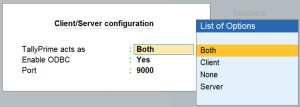
Configure it as an HTTP Server or Both and set the port to 9000, or another valid unused port. Use that same port consistently in every local URL and tunnel target.
First verify the request locally using the XML and curl example later in this blog. A successful local test separates payload and company configuration issues from tunnel-related issues. If another host is used for the tunnel client, localhost refers to that host, not the TallyPrime machine; configure a permitted target accordingly.
Step 2 — Install zrok2
Follow the official installation instructions for the host operating system. On Windows, make the executable available through PATH, or run it from its installation directory using .
\zrok2.exe in place of zrok2.
Step 3 — Enable the Environment
Obtain the account token through the zrok account setup process. Replace the placeholder below with your token; do not include angle brackets. Treat the token and local environment identity as credentials.
zrok2 enable <your_account_token>
zrok2 status
Step 4 — Reserve the Name
The example uses tally-demo. Choose an available name for your own environment. Specifying the public namespace explicitly avoids depending on the configured default.
zrok2 create name -n public tally-demo
Step 5 — Start the Share
For the direct, controlled demonstration, target the local TallyPrime HTTP port:
zrok2 share public http://127.0.0.1:9000 -n public:tally-demo
Copy the exact HTTPS endpoint reported by zrok2. Do not construct the hostname from an example: its domain depends on the service and namespace. The name remains reserved across sessions; availability still depends on the share, host, network and TallyPrime.
Step 6 — Validate the Request Path
Send the same locally validated XML request to the copied HTTPS endpoint. Compare the returned report with the local result for the same company and period. Opening the URL in a browser is only a reachability check; an actual integration POST is needed to validate request processing.
Step 7 — Stop and Restart
For a foreground share, keep its process running during the exercise and stop it with Ctrl+C when finished. To resume, run the same share command from Step 5. Do not repeat account enablement or name creation for each session. If using the zrok agent, manage the share through the agent; closing a terminal may not stop an agent-managed share.
Step 8 — Remove an Unused Name
After stopping the share and confirming that it is no longer required, delete the reservation:
zrok2 delete name -n public tally-demo
Targeting a Validation Gateway
For a gateway on the same host at port 8080, use an existing reserved name, or recreate it with Step 4, and target the gateway:
zrok2 share public http://127.0.0.1:8080 -n public:tally-demo
This command changes the forwarding target only. It does not create a gateway, configure token validation or add company-level permissions. Stop the previous share before reusing its reserved name.
Sample Request — Export a Trial Balance
Consider an external reporting application that needs the Trial Balance for a test company. The request below illustrates a read operation without creating or altering vouchers. Save it as trial_balance.xml using UTF-8 encoding.
<ENVELOPE>
<HEADER>
<VERSION>1</VERSION>
<TALLYREQUEST>Export</TALLYREQUEST>
<TYPE>Data</TYPE>
<ID>Trial Balance</ID>
</HEADER>
<BODY>
<DESC>
<STATICVARIABLES>
<SVCURRENTCOMPANY>Example Company</SVCURRENTCOMPANY>
<SVFROMDATE TYPE=”Date”>20260401</SVFROMDATE>
<SVTODATE TYPE=”Date”>20260831</SVTODATE>
<SVEXPORTFORMAT>$$SysName:XML</SVEXPORTFORMAT>
</STATICVARIABLES>
</DESC>
</BODY>
</ENVELOPE>
Understanding the Request
Replace Example Company with the exact name of the open test company and adjust the dates to the reporting period. XML-escape special characters in the company name; for example, write & for an ampersand.
The header identifies an export of report data and selects Trial Balance. The static variables specify the company, period and XML response format. The tunnel forwards the payload to its configured target; it does not select the company or alter the reporting logic.
Validate this request locally before changing the destination to a tunnel URL. The actual response depends on the company’s data, report settings and TallyPrime release. Check the returned values against the report displayed in TallyPrime.
Sending the Request from PowerShell
Test the Local Endpoint
Run the command from the folder containing trial_balance.xml. Use curl.exe explicitly in Windows PowerShell. A backtick continues the command onto the next line and must be the final character on that line.
curl.exe –connect-timeout 10 –max-time 60 `
–header “Content-Type: text/xml; charset=utf-8” `
–data-binary “@trial_balance.xml” `
–output local-response.xml `
–write-out “HTTP %{http_code}” `
“http://127.0.0.1:9000”
Test the Tunnel Endpoint
Replace the placeholder with the exact endpoint reported by zrok2. This command is for the controlled direct demonstration. It does not configure caller authentication.
$tunnelUrl = “https://<your-exact-share-host>/”
curl.exe –connect-timeout 10 –max-time 60 `
–header “Content-Type: text/xml; charset=utf-8” `
–data-binary “@trial_balance.xml” `
–output tunnel-response.xml `
–write-out “HTTP %{http_code}” `
“$tunnelUrl”
Interpret Both Layers of the Response
Check the curl exit status, HTTP status and saved response body. An HTTP 2xx response does not by itself confirm a successful report export. A gateway error, authentication page or TallyPrime error must be recognised before the data is consumed. Compare the intended company, reporting period and values with a local export.
Prepare the Python Client
The next two pages form one script. Copy both blocks into tally_tunnel_client.py in the same folder as trial_balance.xml. Install its dependencies:
python -m pip install requests defusedxml
For a local test, set TALLY_URL to http://127.0.0.1:9000. For a remote test, set it to a gateway-protected HTTPS endpoint and provide TALLY_API_TOKEN through your approved secret-management process. The sample assumes that the gateway validates a Bearer credential and accepts the XML body at that URL.
Python Client — Request Preparation
This client illustrates endpoint validation, a read-only request check and an authentication header for a separately implemented gateway. The local mode sends no gateway credential. It does not turn the direct public share into a protected endpoint.
import os
from pathlib import Path
from urllib.parse import urlsplit
import requests
from defusedxml import ElementTree as ET
MAX_BYTES = 5 * 1024 * 1024
def export_report():
url = os.environ[“TALLY_URL”]
target = urlsplit(url)
local = (target.scheme == “http” and target.hostname in
{“localhost”, “127.0.0.1”, “::1”})
if target.username or target.password or not target.hostname:
raise ValueError(“Use a host URL without embedded credentials”)
if not local and target.scheme != “https”:
raise ValueError(“Remote endpoints must use HTTPS”)
payload = Path(“trial_balance.xml”).read_bytes()
request = ET.fromstring(payload)
if request.findtext(“HEADER/TALLYREQUEST”) != “Export”:
raise ValueError(“This learning client accepts Export only”)
headers = {“Content-Type”: “text/xml; charset=utf-8”}
if not local:
token = os.environ[“TALLY_API_TOKEN”]
if not token.strip():
raise ValueError(“A gateway credential is required”)
headers[“Authorization”] = “Bearer ” + token
Configuration and Credential Boundaries
The token belongs to your receiving gateway’s authentication scheme. Do not substitute the zrok account token. A client-side Export check is a convenience for this example; the receiving gateway must independently validate the full operation and permitted company.
Keep TLS certificate verification enabled. Configure a trusted certificate chain when required by the deployment instead of disabling verification. Use a fixed, administrator-controlled endpoint; never let an untrusted caller choose the tunnel target.
HTTP client behaviour: Requests documentation
Python Client — Response Handling
Continue in the same tally_tunnel_client.py file:
with requests.post(
url, data=payload, headers=headers,
timeout=(10, 60), allow_redirects=False, stream=True,
) as response:
if not 200 <= response.status_code < 300:
raise RuntimeError(f”HTTP status {response.status_code}”)
data = bytearray()
for chunk in response.iter_content(chunk_size=65536):
data.extend(chunk)
if len(data) > MAX_BYTES:
raise RuntimeError(“Response exceeds the 5 MiB limit”)
result = ET.fromstring(bytes(data))
if result.tag != “ENVELOPE”:
raise RuntimeError(“Unexpected response: expected ENVELOPE”)
if result.find(“.//LINEERROR”) is not None:
raise RuntimeError(“TallyPrime returned LINEERROR”)
if result.findtext(“HEADER/STATUS”) == “0”:
raise RuntimeError(“TallyPrime returned failure status”)
Path(“trial-balance-response.xml”).write_bytes(data)
print(“Response saved. Verify report content before using it.”)
if __name__ == “__main__”:
try:
export_report()
except Exception as error:
# Do not print credentials or returned financial data.
print(f”Request failed ({type(error).__name__}).”)
raise SystemExit(1)
Running the Example
$env:TALLY_URL = “http://127.0.0.1:9000”
python tally_tunnel_client.py
The client limits the decoded response size, rejects redirects, parses XML using defusedxml and checks common TallyPrime failure indicators. The connect/read timeouts are not a complete end-to-end deadline. Report-specific validation, secure diagnostics and overall request deadlines belong in the application design. The script deliberately performs no automatic retries.
Reliability and Operational Readiness
A reserved name simplifies endpoint configuration, but does not guarantee uptime or recover unfinished requests. Plan for host restarts, tunnel interruption, TallyPrime availability and response delays as separate failure conditions.
Connection Recovery and Retries
For an unattended deployment, use an appropriate process supervisor or the documented zrok agent workflow, and verify restart behaviour. Read-only requests can use bounded retries with backoff where appropriate. For writes, a lost response leaves the outcome uncertain: reconcile the result before resubmitting. Neither a stable URL nor a tunnel supplies business-level idempotency.
Monitoring and Capacity
Record request identifiers, duration, HTTP status and an application outcome without logging tokens or full financial payloads. Monitor both public reachability and an authorised end-to-end operation. Bound concurrency and payload sizes according to measured TallyPrime processing capacity and provider limits; increasing tunnel connections does not increase business-processing capacity automatically.
Troubleshooting the Request Path
|
Symptom |
Check Next |
|
Local request fails |
HTTP mode, port, open company, request schema and report context. |
|
Local works; public URL fails |
Share state, copied URL, target port, outbound network access and provider status. |
|
HTTP 401 or 403 |
Gateway credentials, expiry, company permissions and access policy. |
|
HTML or redirect returned |
Authentication screen, frontend response or an incorrect URL; do not parse it as a report. |
|
HTTP success; no usable report |
TallyPrime error indicators, selected company, dates and report-specific content. |
|
Timeout during an operation |
TallyPrime workload, request size and tunnel connectivity; determine write outcome before retry. |
A browser-based application may also require a deliberate CORS policy at its API boundary. A server-to-server client avoids browser CORS restrictions, but still requires authentication and authorisation.
Production Readiness Considerations
The direct demonstration proves reachability. A customer deployment also needs evidence that the endpoint enforces access, handles failures predictably and can be supported over time.
- Access control: Reject missing, invalid and expired credentials before forwarding. Authorise each company and permitted operation.
- Request validation: Enforce supported methods, content types, schemas, payload limits and operation allowlists; constrain embedded TDL.
- No bypass route: Verify that the tunnel and any parallel endpoints cannot reach TallyPrime outside the intended control path.
- Transport and credentials: Confirm TLS trust, provider data handling, local network exposure and credential rotation procedures.
- Reliability: Exercise tunnel loss, host restart, TallyPrime unavailability, delayed responses and uncertain write outcomes.
- Capacity and support: Measure expected load, configure bounded concurrency, monitor failures and document endpoint ownership and recovery.
Selecting the Right Use Case
Tunnel-based connectivity is useful for demonstrations, proof-of-concept integrations and controlled testing where developers need a practical route to a local instance. Customer deployments require the additional controls described above. Private access may be more appropriate when both ends can participate in a managed private network.
For multiple customers, maintain a trusted mapping between each customer, endpoint, credential and allowed company context. A tunnel forwards to a target; it does not create tenant isolation. Assess alternative tunnelling products or private-network approaches against the same access, operations and deployment requirements.
Bringing It Together
Tunnel-based connectivity provides a practical route between external applications and locally hosted TallyPrime instances when direct inbound access is unavailable or impractical. A reserved public name offers endpoint continuity while the tunnel carries requests to the configured local service. Reliable integration depends on combining that connectivity with validated payloads, explicit company and operation permissions, controlled recovery and operational monitoring. With these responsibilities clearly defined, developers can move from a successful connectivity demonstration towards an implementation suited to the customer’s security and deployment requirements.


