
Record Transfer of Stock Items between Godowns in TallyPrime
When you move stock items between godowns, you can track their movement. In TallyPrime, you can:
- Record the movement of stock items between godowns using Stock Journal.
- Set a common destination godown in Journal Voucher if stock items are transferred from multiple godowns to a single destination godown.
- Reduce data entry by creating an inter-godown Stock Journal voucher class.

Ensure that:
- You have created stock items.
- You have created godowns.
Record Movement of Stock Items Between Godowns

- Press Alt+G (Go To) > Create Voucher and press Alt+F7 (Stock Journal).
- Under Source (Consumption), specify details of the stock items that you want to transfer.
- Select the stock item.
- Select the Godown from where you want to transfer the stock items.
- Enter the Quantity and Rate.
The Amount gets calculated.
- Under Destination (Production), specify details of the stock items.
- Select the same stock item as in the source.
- Select the destination godown to where you want to transfer the stock items.
- Enter the Quantity and Rate.
The Amount gets calculated.
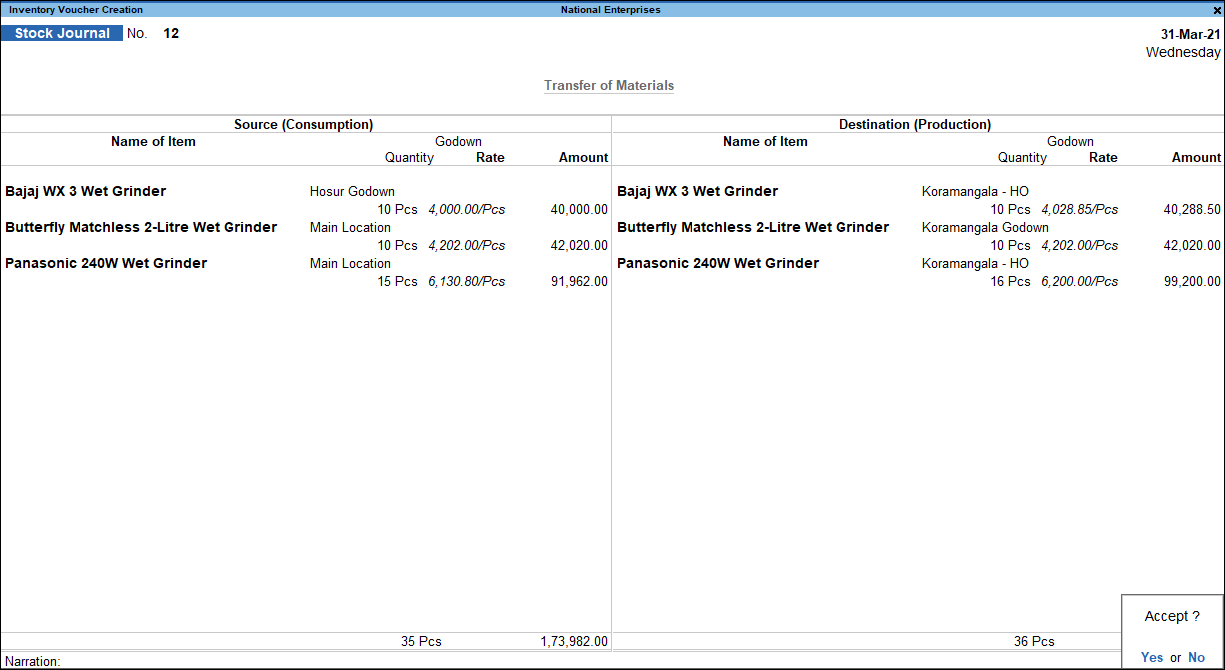
- Press Ctrl+A to save the voucher.
Set Common Destination Godown in Stock Journal
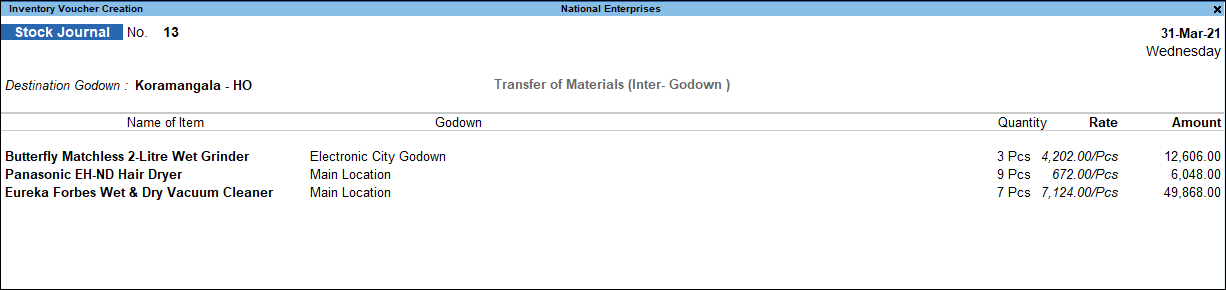
In case you are transferring stock items from one or more locations to a single destination location, you can pre-set the destination godown.
- In the Stock Journal screen, press Ctrl+H (Change Mode).
- Set the option Use for Inter-Godown Transfers to Yes.

- In the Stock Journal screen, select the Destination Godown.
Reduce Data Entry by Creating Stock Journal Voucher Class
When you create a voucher class, you will need to select the stock items only once. In the latter transactions using the voucher class, the stock items get selected automatically. In TallyPrime, you can create multiple Stock Journal Voucher Class to transfer specific stock items to a common destination godown.
- Create a voucher class.
- Use for Inter-location transfers: Yes.
Questions & Answers
- Why is my source Godown stock reducing but destination stock not increasing?
This can happen if:- The wrong destination Godown was selected.
- The Stock Journal entry was entered incorrectly.
- The transaction was altered after creation.
- Does a inter-godown stock transfer affect the total inventory quantity?
No, a stock transfer only changes the location of inventory. The total quantity of stock in the company remains unchanged.
- Can I select a different stock item as finished goods when the source stock item changes form during manufacturing?
Yes, you can select a different stock item as finished goods when the source stock item changes form, especially in manufacturing. For more information, refer to Record Manufacturing Journal in TallyPrime.
Is this information useful?
YesNo


