
Record TDS on Advance Payments in TallyPrime
You can record TDS on advance payments made directly to a party or through a third party.

Ensure that:
- You have enabled TDS in TallyPrime.
- You have created the requited TDS masters.
Record TDS on Advance Payment
You can deduct TDS while making an advance payment directly to the party.
In the Payment voucher:
- In the Account field, select the bank ledger.
- Under Particulars, select the party ledger and enter the advance amount.
- Select the TDS ledger.
The TDS amount appears automatically. - Enter the required Bank Allocation Details.
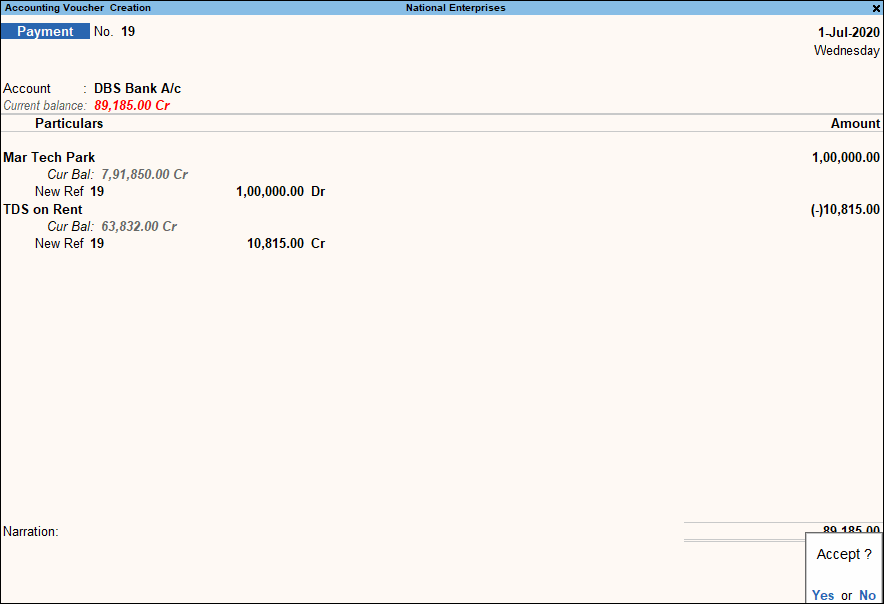
- Press Ctrl+A to save the voucher.
Record TDS on Third-Party Advance Payments
You can deduct TDS when an advance payment is made to a third party on behalf of the party.
In the Journal voucher:
- Debit the party ledger and enter the advance amount.
- Credit the third-party ledger and enter the advance amount.
- Select the TDS tax ledger.
The TDS amount appears automatically. - Enter the required TDS Details.
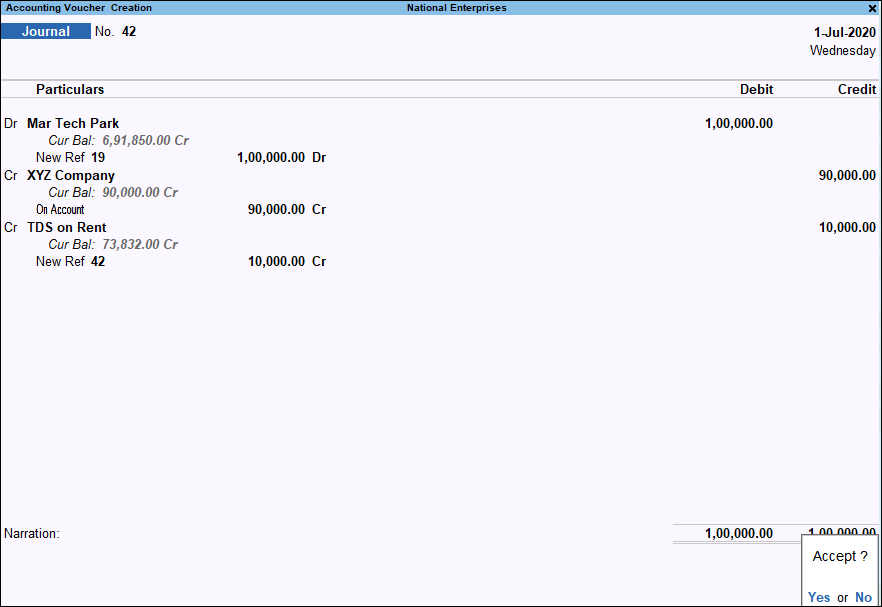
- Press Ctrl+A to save the voucher.
Record TDS on Advance Payments u/S 194Q
For advance payments to suppliers covered under Section 194Q, refer to Record TDS on Purchase of Goods under Section 194Q.
Is this information useful?
YesNo


