
Different Keyboards for Data Entry
TallyPrime supports Phonetic and System keyboards for data entry, along with the Avro and Bijoy keyboard layouts for Bangla.
Phonetic Keyboard
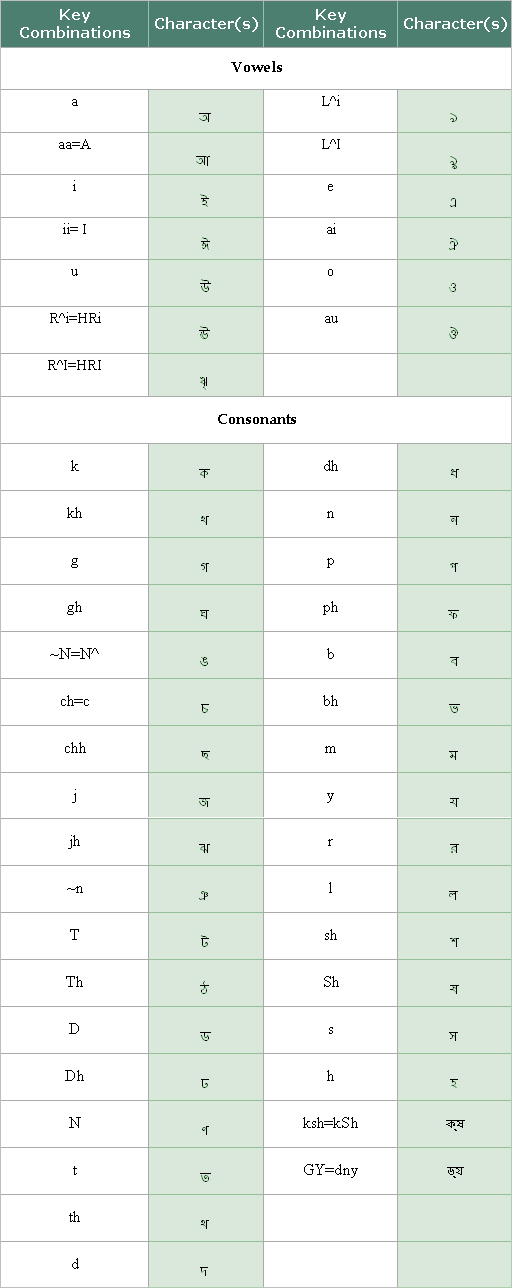
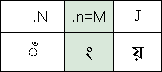
If you can read a language but are not familiar with typing it, use the Phonetic keyboard. It lets you type words based on their pronunciation, and TallyPrime automatically converts them into the selected language. This enables you to create masters and record transactions in Indian languages, including Bangla, without learning the keyboard layout.
Key Combinations for Bangla
Vowel Signs

Symbols
System Keyboard
If you know how to read and write your preferred language, you can use the System keyboard. Install the language on your operating system to use its keyboard layout. You can also use the On-Screen Keyboard to view the key mapping for the selected language.
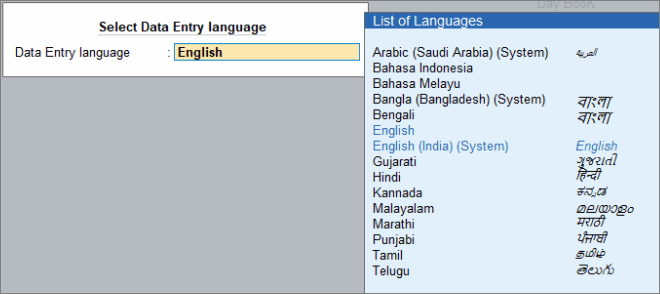
- Gateway of Tally > F1 (Help) > Settings > Language > Ctrl+W (Data Entry Language).
- Select the language from the List of Languages.
For example, if you want to select Bengali as your Data Entry Language then you must select Bangla (Bangladesh) (System).
Bangla Keyboard
Avro keyboard
The Avro keyboard is a free Unicode-compliant Bangla keyboard that lets you type Bangla phonetically. It works independently of the TallyPrime Phonetic keyboard.
Keep the following points in mind when using the Avro keyboard in TallyPrime:
- To enter Bangla correctly using the Avro keyboard, keep the Data Entry Language in English and set the Avro keyboard to Bangla. If both the Data Entry Language and the Avro keyboard are set to Bangla, junk characters may be entered.
- In numeric and alphanumeric fields, the Avro keyboard enters Bangla numerals when it is set to Bangla. Since TallyPrime accepts only English numerals in these fields, switch the Avro keyboard to English before entering numbers.
- When the Display Language is Bangla and the Data Entry Language is English, menus are displayed in Bangla while hotkeys remain in English. Hotkeys work only when the Avro keyboard is set to English, irrespective of whether the Data Entry Language is English or Bangla.
Bijoy keyboard
The Bijoy keyboard is a Unicode and ANSI-compliant Bangla keyboard layout supported on Windows, macOS, and Linux.
Keep the following points in mind when using the Bijoy keyboard in TallyPrime:
- When the Display Language is Bangla, the Data Entry Language is English, and the Bijoy keyboard is set to Unicode, you can enter Bangla data correctly. Changing the Data Entry Language to Bangla in the same setup may result in junk characters.
- The Phonetic keyboard works only when the Display and Data Entry languages are set to Bangla, and the Bijoy keyboard is set to English.
- To use the On-Screen Keyboard, set the Display Language to Bangla, the Data Entry Language to the Windows system language, and the Bijoy keyboard to English.


