
Record Purchase of Tobacco Products
In TallyPrime Release 7.1, you can record purchase of tobacco products with GST calculated on the tax-inclusive MRP, in accordance with CGST Notification No. 20 dated 31st December 2025, effective from 1st February 2026. To know more, refer to our blog.
As per the notification,
- Compensation Cess removed for tobacco products.
- GST revised to 40% for cigarettes/tobacco products and 18% for bidis.
- GST is calculated on RSP-based taxable value.

- Set Enable Goods and Services Tax (GST) to Yes in F11 (Features).
- Configure GST applicability in purchase ledger.
- Create relevant GST ledgers: SGST and CGST for local sales, and IGST for interstate sales.
- Set up the required GST details for your tobacco products in the Stock Item or update them in bulk from the GST Rate Setup report.
- While recording the purchase voucher in Item Invoice mode, enter the stock item, quantity, and rate.
The GST Rate and Related Details screen displays the purchase value of the item, while it calculates GST based on the tax-inclusive MRP.
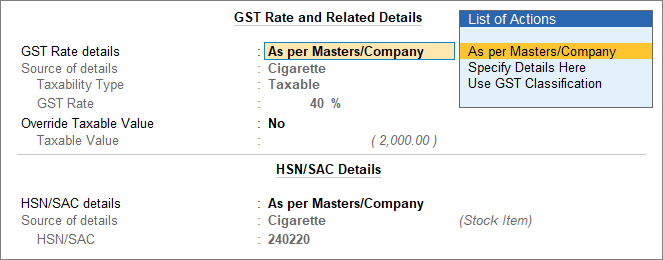
- Select the appropriate tax ledger in the purchase voucher.
- Press Alt+A (GST – Tax Analysis) to view the tax breakup.
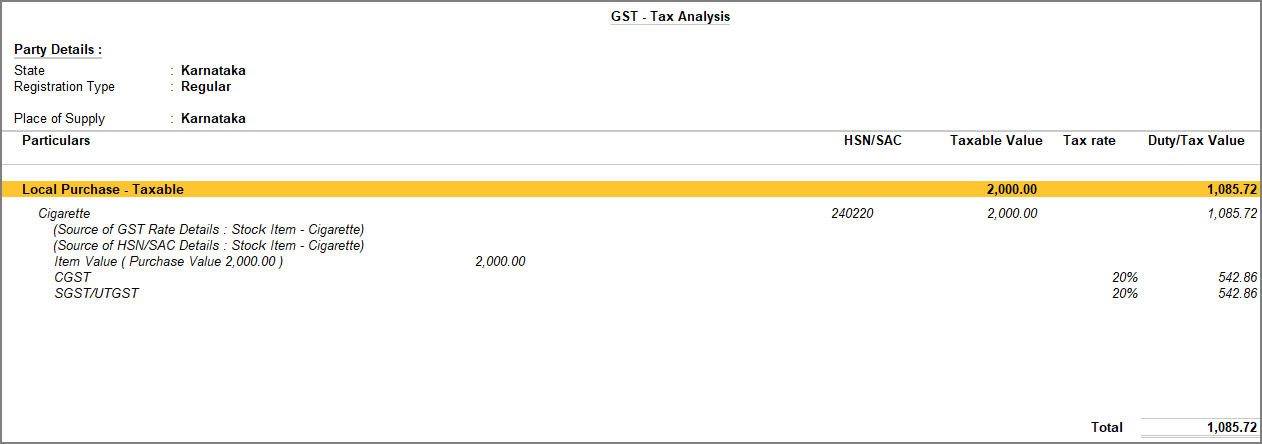
You can view the selling price of the item under Taxable Value, while it calculates GST on the tax-inclusive MRP. - Press Esc to return to voucher creation screen.
- Press Ctrl+A to save the voucher.
You can view the recorded transactions in GST reports such as GSTR-3B, GSTR-2A & GSTR-2B Reconciliation and Annual Computation. Download and compare your invoices with supplier invoices in IMS Inward Supplies, update the IMS Action Status, and monitor your ITC eligibility and status in the ITC Summary.
Is this information useful?
YesNo


