
Transaction was amended more than once. Such transactions cannot be uploaded
Cause
The invoice has already been amended and updated on the portal. In such cases, Department does not permit an invoice to be amended more than once.
Resolution
- Open the invoice in alteration mode and revert all changes made in the invoice, including the Amount, Date, or any other changes.
- In the GSTR-1 report, drill down from the uncertain transactions > Related Reports > GST portal view of Invoice.
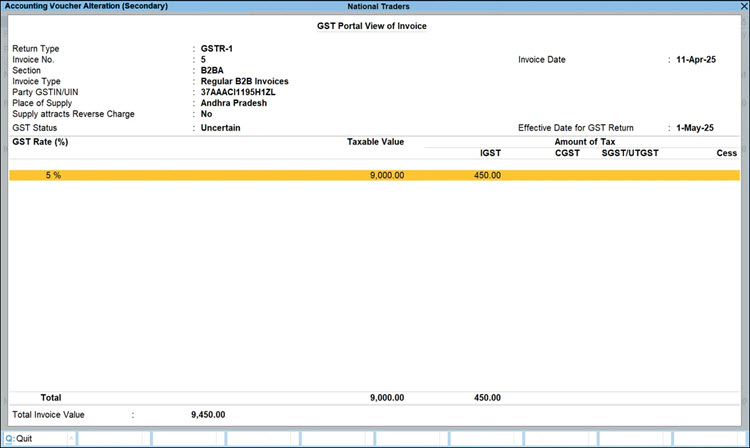
- Press F10 (Invoice History).
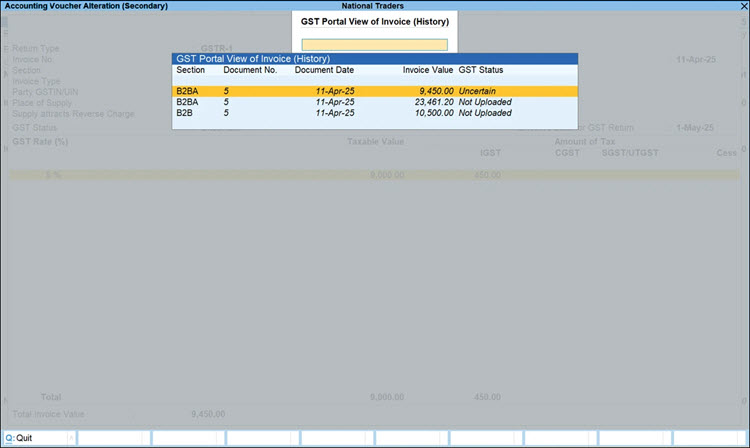
- Drill down from the previous value to check and update or revert the changes accordingly in the transactions, to resolve it.
This action will move the invoice from the “Uncertain Transactions” section to its original section.
Is this information useful?
YesNo


