
Map Top and Bottom Voucher Entries from Excel using Fixed Ledger Columns
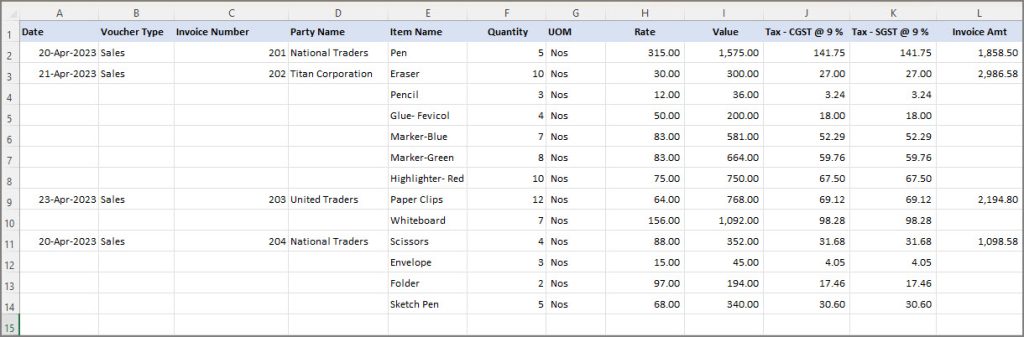
You may have entered the details of the sales vouchers in multiple columns in your Excel file. You may have also entered the top ledger and bottom ledger details of the sales vouchers in different columns in your Excel sheet.

Ensure that:
- The required import configurations are enabled and set up, and the required data format and structure are defined.
- The masters or other dependent data required for the import already exist in the company data. For example, Parent Group, Units of Measurement, and so on.
The required Excel file and mapping template are listed below:
 |
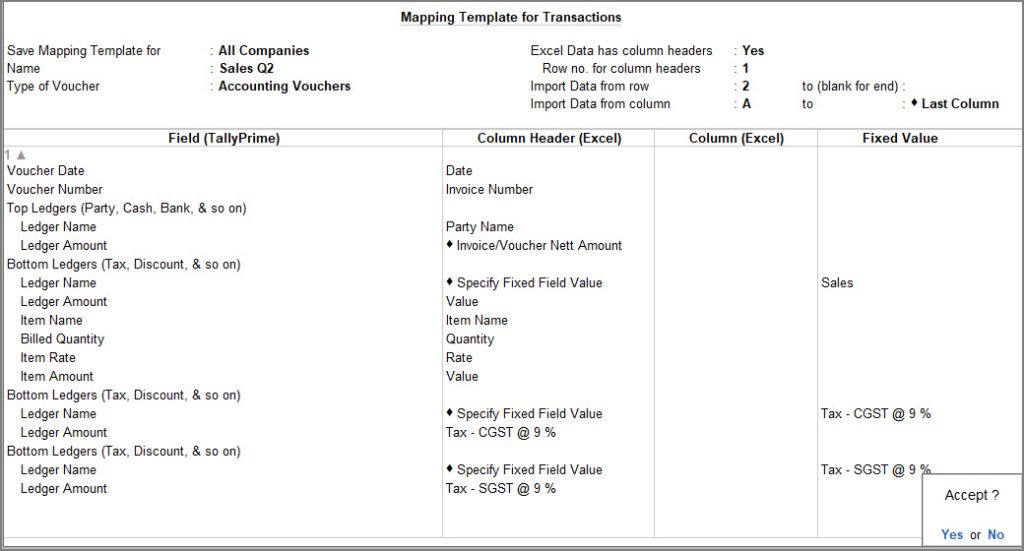 |
Once the Mapping Template is created, import the data in TallyPrime by using the respective mapping template.
You can view the Day Book to view the imported transactions in TallyPrime.
Is this information useful?
YesNo


