
View Reports with Foreign Currency
Your business may operate in one country but be part of a multinational company. If you need to share financial statements with the parent company, you can present them in the currency they use.
TallyPrime allows you to view reports in your base currency, any other currency you have created, or multiple currencies simultaneously.
National Handicrafts wants to generate their financial reports in different currencies for sharing with stakeholders in different geographies.
Before you begin | Prerequisites
- Make sure that you have the required currencies defined.
View Reports with Foreign Currency
- Open the report you want to view.
- Press Alt+A (Alter Column).
- Select the Currency in which you want to view the report.
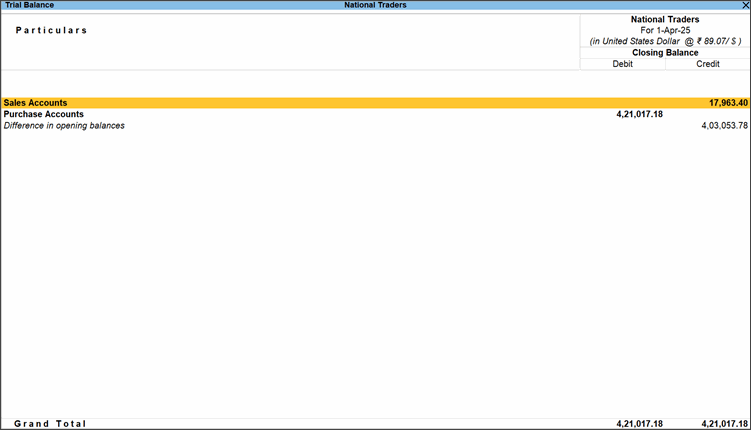
If the exchange rate isn’t specified, you can enter it here. You also have the option to modify the displayed rate.
You can also observe the exchange rate in the report.
View Reports in Multiple Currencies
- Open the report you want to view.
- Press Alt+C (New Column).
- Select a Currency.
- Repeat the steps #2 & #3 for all the currencies in which you want to view the report.
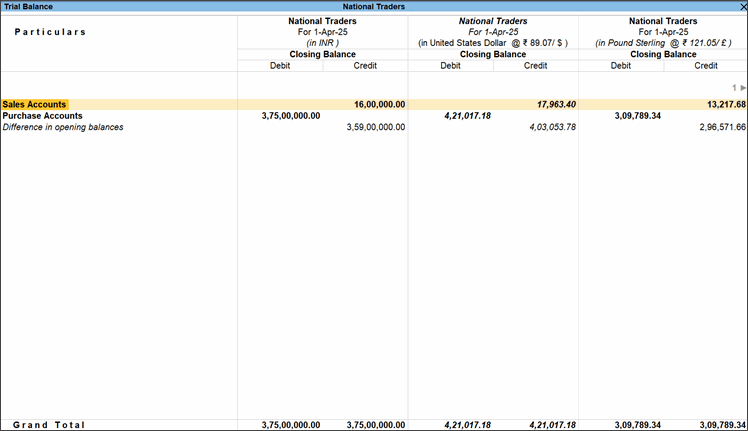
You can also observe the currency names and exchange rates in the report.
Questions & Answers
- Can I view my reports in a currency that I have not created in TallyPrime?
No. If currency is not defined, you will not be able to select the currency to view. - How can I view my reports in a currency that hasn’t been used in any transactions?
Once you create the currency, you can use it to view reports. It’s not necessary for transactions to be recorded in that currency. - At times, I can see the Base Currency name in the report, but other times it’s missing. What causes this inconsistency?
In the Alter Column option, if you select Base Currency, its name will not appear in the report. For any other currency, the name will be displayed. However, if you choose the Base Currency symbol, the currency name will be shown, but without the exchange rate.
Is this information useful?
YesNo


