
Review & Upload GST CMP-08
Now directly upload your CMP-08 to the GST portal right here from TallyPrime, without the need for any manual activity.
Moreover, the CMP‑08 report acts as a point of reference in your upload. It helps you in:
- Auto-calculation: Computes GST based on Composition rates, and eliminates manual errors.
- Data readiness: Structures your data exactly in the GST portal format, and enables seamless upload.
- Error resolution: Highlights missing or incorrect GST details, and ensures clean upload.
However, if you are on TallyPrime 4.1 or earlier releases, you will have to manually upload your CMP-08.
I. Review GST CMP-08
- Press Alt+G (Go To) > GST CMP-08.
- Press F12 (Configure) and enable Show breakup of Tax Amount.
- Press Alt+F5 for a detailed breakup of sales, purchase, and the corresponding returns.
If multiple tax rates are applicable in your return period, you can see the break-up of the net value for taxable sales.
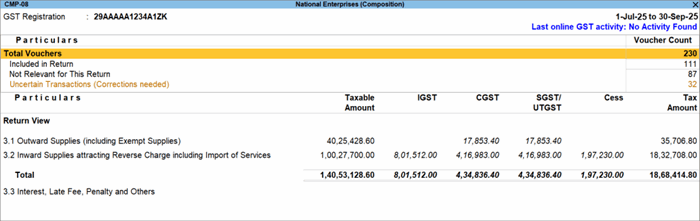
- Review the return summary:
- Total Vouchers: Drill down to view the Statistics of vouchers that are Included, Excluded, and Uncertain.
- Included in Return: View the sales and purchase vouchers included in this return period.
- Not Relevant for This Return: This includes vouchers that are not relevant in this return period and the ones manually excluded. You can also track receipts, payments, and journal vouchers, which do not affect your returns.
II. Resolve Errors
- Tax rate/tax type not specified
- Taxability, Reverse Charge Applicability, Taxable Value, Rate of Tax Modified in Voucher
- Taxability Type is invalid or not specified (Rel 3.0 & later)
- Vouchers with incomplete/incorrect adjustment details (Rel 2.1 & earlier)
- No Tax Ledger is debited (Rel 3.0 & later)
- Vouchers having Reverse Charge and Other than Reverse Charge Supplies
- Vouchers recorded before 01-Jan-2020 should not have State and Place of Supply as Ladakh
- Interstate Supply by Composition Dealers is not allowed (Rel 3.0 & later)
- Information required for generating table-wise details not provided
III. Directly Upload CMP-08
- Press Alt+Z (Exchange) > All GST Options > Upload GST Returns > CMP-08.
- Select the return period for which you want to upload your summaries.
If you have multiple GST registrations, then press F3 to select the required GSTIN/UIN. - Press S (Send) to upload.
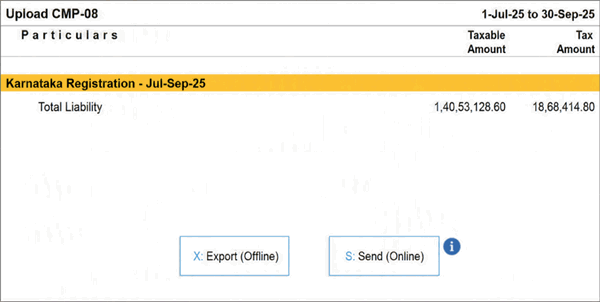
- Log in to your GST profile, if you have not done so.
Once the return is uploaded on the GST portal, you will receive a confirmation.
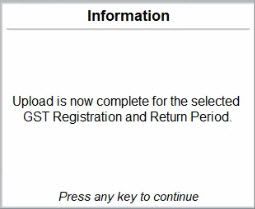
Now, on the portal, you can check the uploaded details, pay the tax amount, and complete your CMP‑08 filing.
Once all your quarterly filings are in place, you can file your annual returns, that is, GSTR-4.
Is this information useful?
YesNo


