
Print PF Form 3A in TallyPrime (Payroll)
PF Form 3A is an employee-wise annual report that provides details of the amounts deducted and contributed by both the employee and the employer towards EPF, VPF, and EPS accounts.
- Gateway of Tally > Display More Reports > Payroll Reports > Statutory Reports > Provident Fund > Form 3A.
- Press C (Configure) for print configurations.
- Specify the Period in the respective From and To fields.
- Include VPF Account: Set this option to Yes to print column 3b on Voluntary Provident Fund Contribution.
- Select the required Employee Category, Employee/Group, Sorting Method, and Display name for Employees, and press Enter.
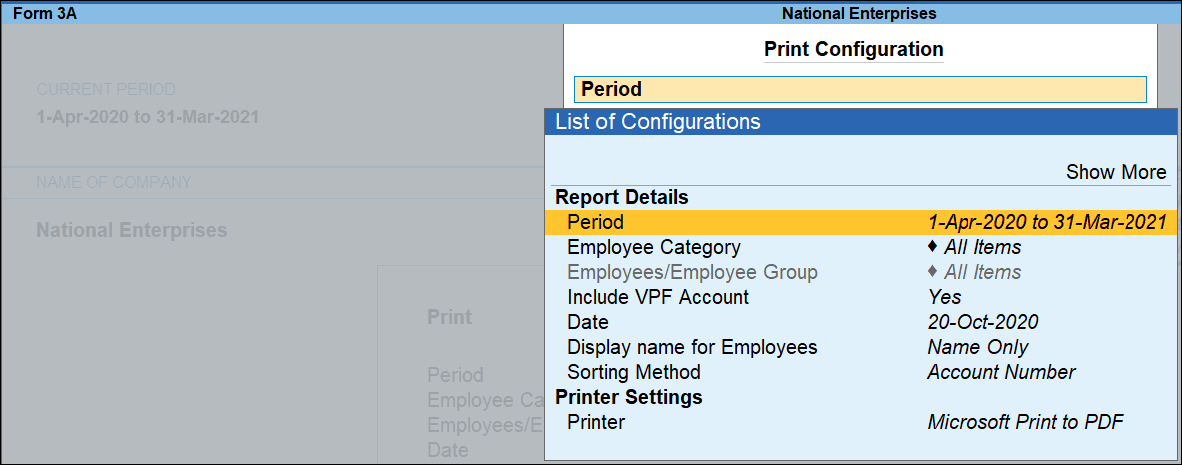
- Press I (Preview) or P (Print).
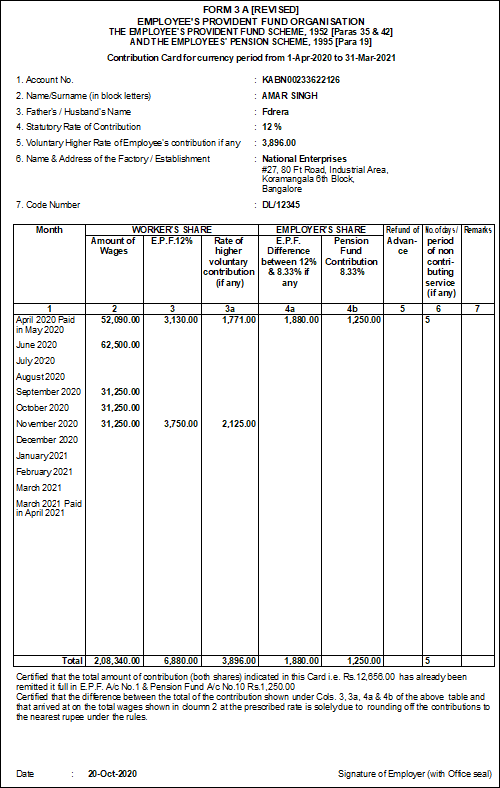
Column Details:
-
Month: Displays the month and year.
-
Workers Share- Amount of Wages: Displays the gross wages earned by the employee for each month.
-
Workers Share- E.P.F @ 12%: Displays the employee’s EPF contribution for each month.
-
Workers Share- Higher Rate of higher Voluntary Contribution (if any): Displays the employee’s VPF contribution for each month.
-
Employer’s Share- E.P.F.% Difference between 12% & 8.33% if any: Displays the employer’s EPF contribution (A/c No. 1) for each month.
-
Employer’s Share- Pension Fund Contribution 8.33%: Displays the employer’s EPS contribution (A/c No. 10) for each month.
-
Refund of Advance: Enter the details of any PF advance refunded.
-
No. of days/period of non-contributing service (if any): Enter the number of days or period for which PF contribution was not made.
-
Remarks: Enter any additional remarks, if required.


