View, Prepare, and Export Form 27Q in TallyPrime
Form 27Q is the quarterly TDS return used to report TDS deducted on payments other than salary. TallyPrime enables you to review TDS transactions, identify and correct incomplete or uncertain entries, and export the e-TDS return for submission.
With the introduction of the Income Tax Act, 2025, Form 27Q is replaced by Form 144 for quarterly TDS returns. In TallyPrime 7.1 & later, Form 140 currently provides the same report information and functionality as Form 26Q. To learn more, refer to the section Form 140 on this page.

Ensure that:
- You have recorded the TDS payment and reconciled it with the applicable challan details before exporting the return.
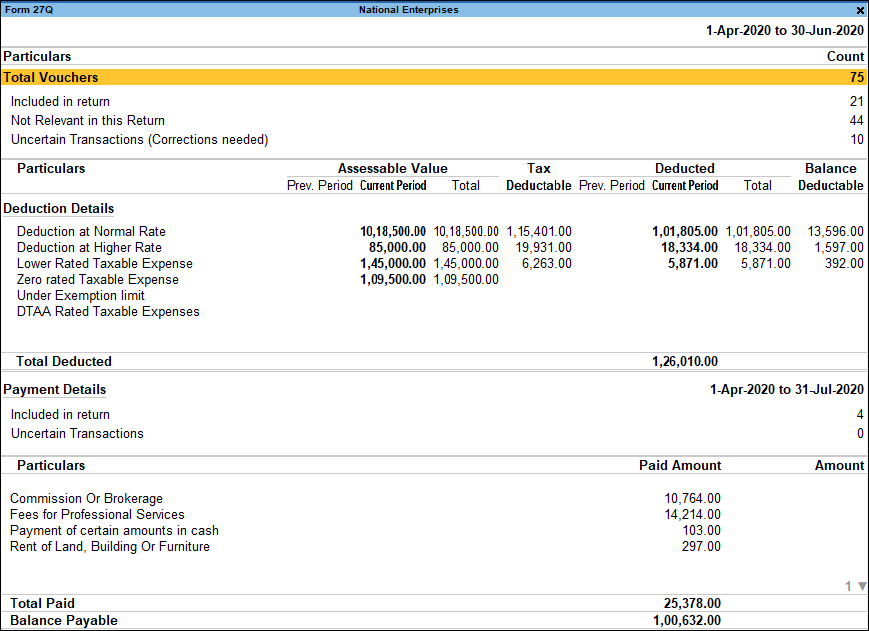
View Form 27Q
- Press Alt+G (Go To) > type or select Form 27Q > and press Enter.
- Press F2 (Period) and select the required period.
Review and Correct Details
You can review the transactions participating in your TDS return, and also correct the details if required. The report details are the same as in Form 26Q. For the detailed information, refer to Form 26Q.
Update Nature of Payment
Update the Nature of Payment for selected TDS parties or categories directly from Form 27Q when the transactions need to be mapped to a different Nature of Payment.
The process for updating the Nature of Payment is the same as in Form 26Q. For the detailed steps, refer to Update Nature of Payment in Form 26Q.
Updating the Nature of Payment can affect the information in Form 26Q and Form 27Q. Review the return after making the changes.
Save Form 27Q
Once you have reviewed the return and resolved the required exceptions in Form 27Q, you can save the return.
The process for saving is the same as in Form 26Q. For the detailed steps, refer to Save Form 26Q.
Export Form 27Q
After reviewing and saving Form 27Q, export the e-TDS return. The process for exporting is the same as in Form 26Q. For the detailed steps, refer to Export Form 26Q.
Update Form 27Q Text File as per File Validation Utility (FVU)
Depending on the FVU version applicable to your return, you may need to update certain fields in the exported Form 26Q text file before validation. Update the exported text file only when the FVU version applicable to the return requires the corresponding changes.
FVU 7.5/7.6 (Section 194P)
FVU 7.5/7.6 introduced two fields in the Batch Header (BH) record for Section 194P. These fields are not applicable to Form 27Q and should be left blank.
- In TallyPrime, export Form 27Q text file.
- Open the text file and in the Batch Header (BH) line, after the GSTIN field, add two caret symbols ^^ for:
- Field 70 – Count of Section 194P Details Record
- Field 71 – Batch Total of Gross Total Income as per Section 194P Details
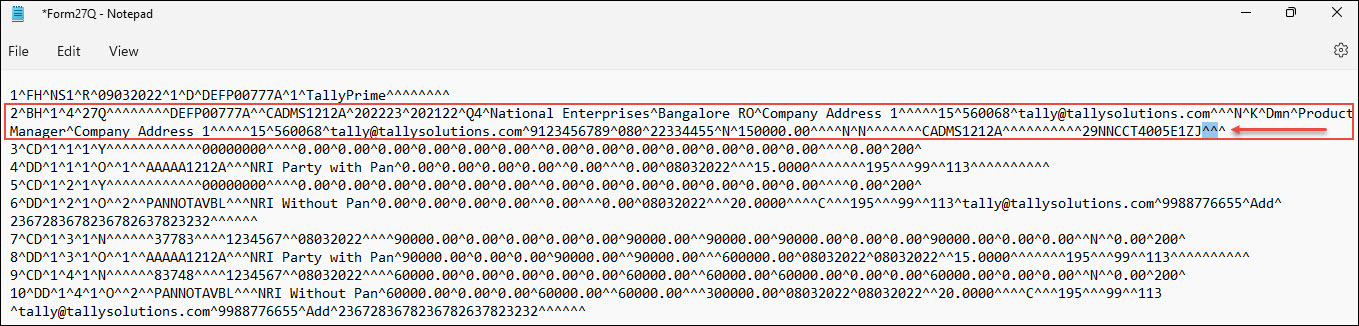
- Save the text file.
- Validate the updated file using FVU 7.5/7.6.
FVU 8.2
FVU 8.2 requires updates to specific fields in the Deductee Details (DD) record before validation.
Field 8: Deductee Code
Enter the applicable Deductee Code in Field 8 as per Annexure 11.
- In TallyPrime, export Form 27Q text file.
- Open the text file, and in the Deductee Details (DD) line, remove the existing value in Field 8.

- Enter the applicable Deductee Code as per Annexure 11.
- Save the text file.
- Validate the updated file using FVU 8.2.
Field 33: Section Code under which payment made
Enter the applicable Section Code in Field 33. TallyPrime derives this value from the Section specified in the TDS Nature of Payment.
For new transactions:
- Press Alt+G (Go To) > Create Master/Alter Master > TDS Nature of Payments.
- Enter the applicable Section and Payment Code.
- Use this TDS Nature of Payment while recording the transaction.
For existing transactions, you can Update the Nature of Payment.
Field 36: Nature of Remittance
Enter the applicable numeric Nature of Remittance code in Field 36 as per Annexure 8.
- In TallyPrime, export Form 27Q text file.
- Open the text file and in the Deductee Details (DD) line, update Field 36 with the applicable Nature of Remittance code.

- Save the text file.
- Validate the updated file using FVU 8.2.
Field 49: Taxation Regime under Section 115BAC(1A)
For statements pertaining to FY 2023–24 onwards, enter Y or N in Field 49 to indicate whether the deductee has opted out of the taxation regime under Section 115BAC(1A).
- In TallyPrime, export Form 27Q text file.
- Open the text file and in the Deductee Details (DD) line, enter Y or N in Field 49, as applicable.

- Save the text file.
- Validate the updated file using FVU 8.2.
Fields 50–53
Fields 50 to 53 are filler fields and should not contain any values.
- In TallyPrime, export Form 27Q text file.
- Open the text file and in the Deductee Details (DD) line, after Field 49, add four delimiters ^^^^ for Fields 50–53.

- Save the text file.
- Validate the updated file using FVU 8.2.
Form 144 for TDS Returns from Tax Year 2026–27
With the introduction of the Income Tax Act, 2025, Form 144 replaces Form 27Q for quarterly TDS returns for payments other than salary from Tax Year 2026–27.
For returns:
- Up to 31 March 2026 – use Form 27Q.
- From 1 April 2026 onwards – use Form 144.
In TallyPrime Release 7.1 & later, press Alt+G (Go To) > type or select Form 144 > press Enter.
Form 144 currently provides the same report information and functionality as Form 26Q. Enhancements for the revised Form 140 filing requirements will be introduced in subsequent releases.
Questions and Answers
- What should I check before exporting Form 27Q?
Review the transactions, resolve applicable exceptions, and ensure that the relevant TDS payments and challan details are reconciled.
- How can I check whether a transaction was deducted at the normal or higher rate?
In the Deduction Details section of Form 27Q, transactions are grouped under categories such as Deduction at Normal Rate and Deduction at Higher Rate.
- What should I do if a transaction is not included in Form 27Q?
Check the transaction under the relevant exception or uncertain category and correct the missing or incorrect TDS information in the affected master or transaction.