
GST Annual Computation Report in TallyPrime
The GST Annual Computation report in TallyPrime provides a consolidated view of GST transactions recorded in your books for the financial year. The report groups these transactions into sections to help you review GST liability, input tax credit, and other values relevant for annual return filing. You can use this report to compare the values in your books with those reported in periodic GST returns such as GSTR-1, GSTR-2, and GSTR-3B.
You can drill down from any section to view the overall summary, monthly-summary, voucher register, and vouchers, and make corrections if required. After reviewing, you can use the values from this report as the basis for preparing your GST annual return.
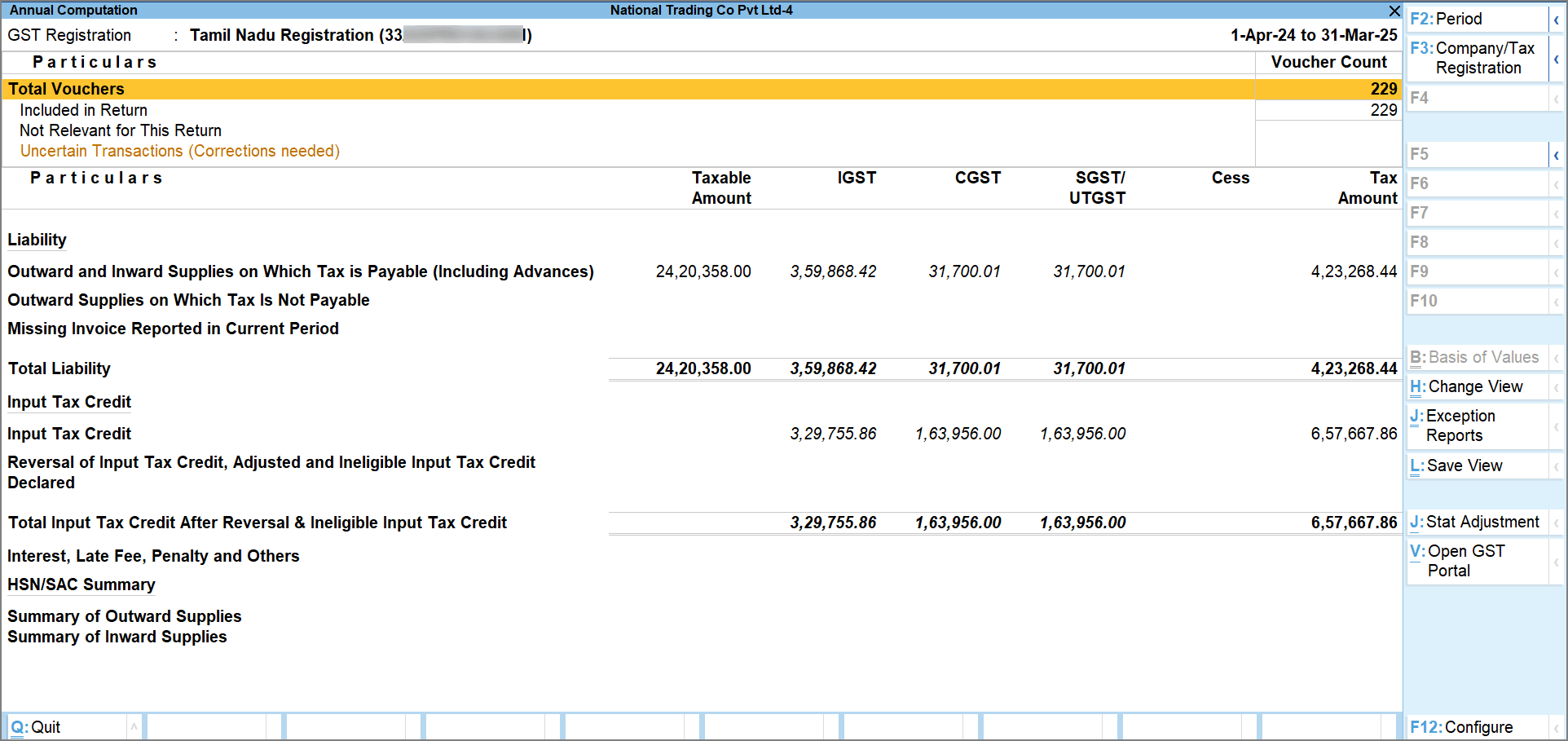
Total Vouchers
The top section of the report displays the total number of vouchers recorded in the report period. This includes all vouchers and not only GST transactions. You can drill down to view the statistics based on account types and voucher types.
Included in Return: Displays the number of vouchers that are included in the annual computation. These transactions contain complete and valid GST information. You can drill down to view the list of vouchers and their voucher-type breakup.
Included in HSN/SAC Summary: Displays the vouchers considered for HSN/SAC reporting. You can drill down to view the list of vouchers included in the summary.
Incomplete HSN/SAC information: Displays vouchers excluded from the HSN/SAC summary due to incomplete details. You can drill down to view the vouchers and update the required information.
Not relevant for this Report: Displays vouchers that have no GST implication or have been manually excluded from the computation. You can drill down to view the voucher list and include the vouchers again if required.
Uncertain Transactions (Corrections needed): Displays vouchers that have GST implication but are not included in the annual computation due to incomplete or incorrect GST information. You can drill down to view these transactions and resolve the exceptions.
Liability
This section displays the tax liability calculated from outward and inward supply transactions included in the annual computation.
The report shows the taxable value and tax amount under different supply categories. You can drill down from any category to view:
-
month-wise summary
-
place of supply or supply-type breakup
-
voucher-level transactions
For details about the supply categories displayed in this section, see Outward and Inward Supplies on Which Tax is Payable and Outward Supplies on Which Tax is Not Payable.
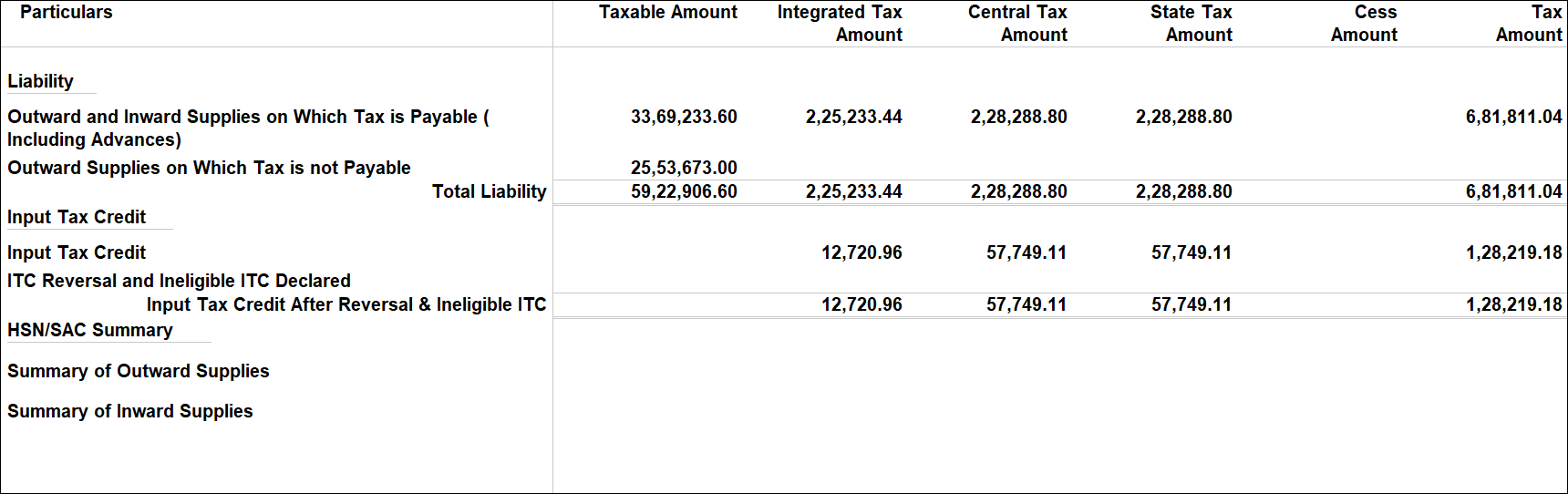
Input Tax Credit
This section displays the input tax credit (ITC) available from inward supplies recorded during the year.
The report includes ITC from different sources such as imports, reverse charge supplies, inward supplies from ISD, and other eligible purchases. It also displays ITC reversals and ineligible credit recorded through adjustment entries.
You can drill down from any category to view the underlying transactions.
For more details, see Input Tax Credit and ITC Reversal and Ineligible ITC Declared.
HSN/SAC Summary
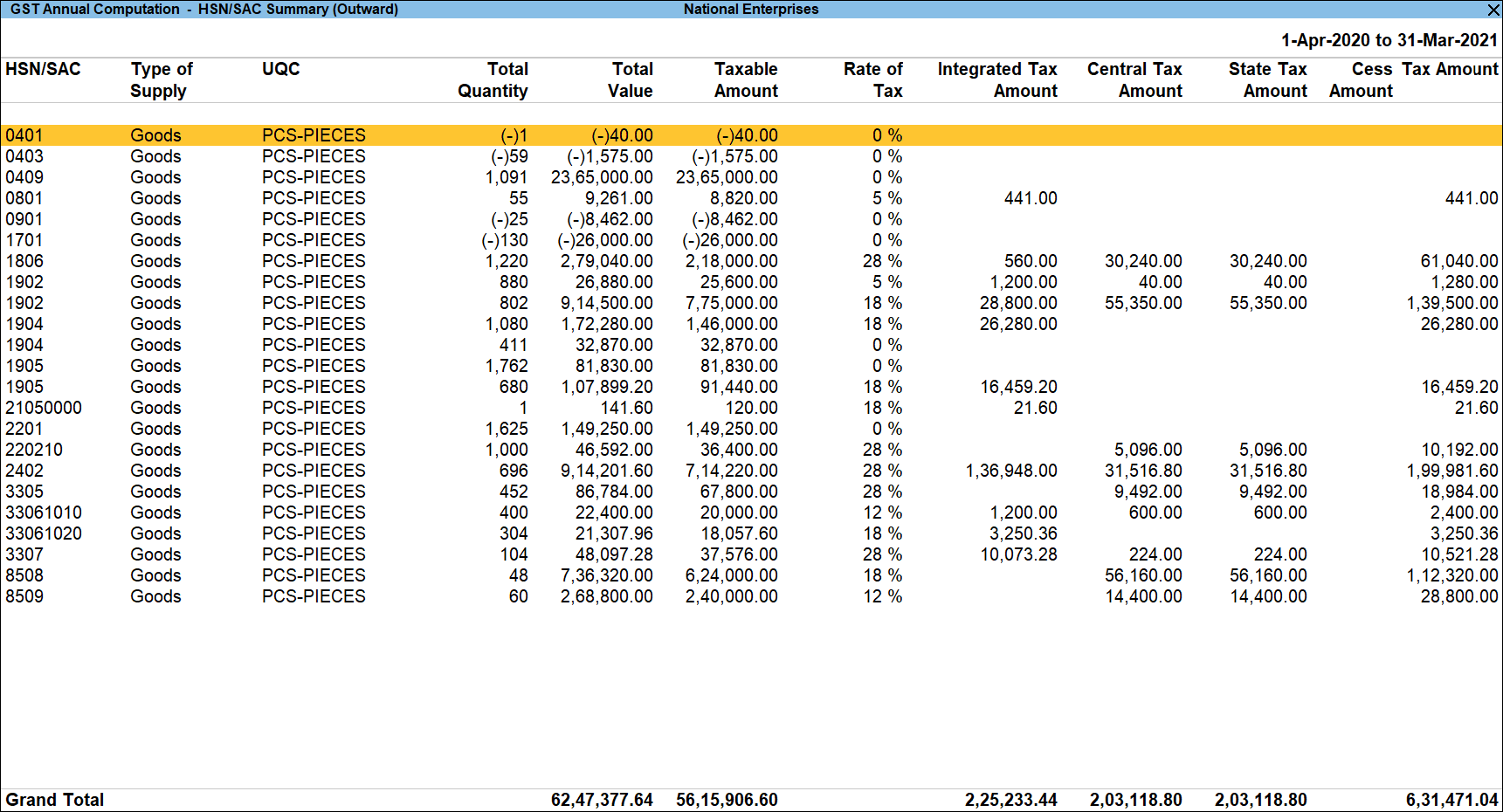
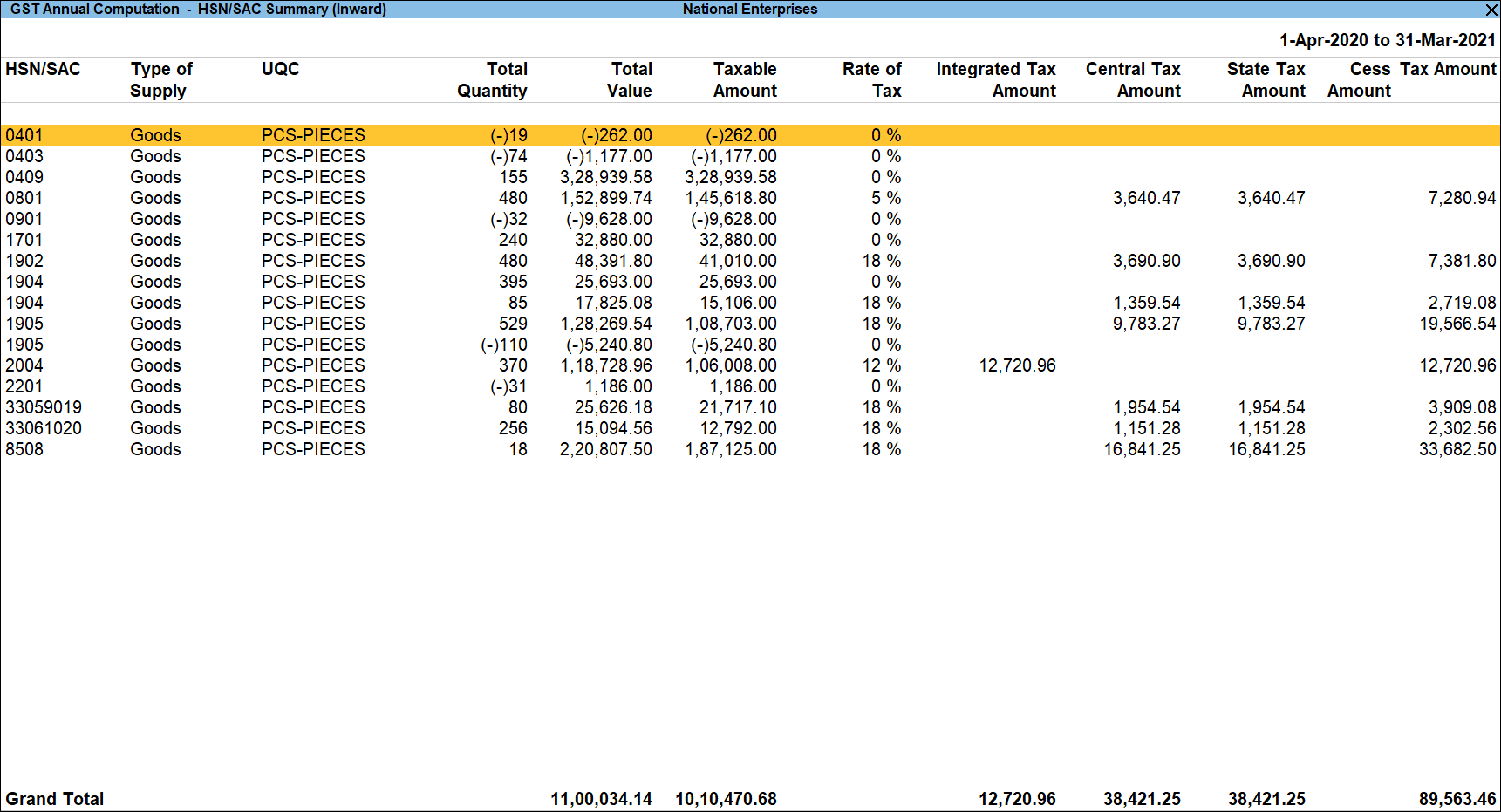
This section displays the HSN/SAC summary of outward and inward supplies recorded during the period. You can drill down to view the summary for the entire financial year or a specific period.
To view the the Summary View or Registration Period View,
- Drill down from Outward or Inward Supplies, and then select the required GST registration.
- Press F5 to switch between Summary View and Registration Period View.
- In Summary View, you can see the summary of the HSN/SAC and drill down to view the corresponding transactions.
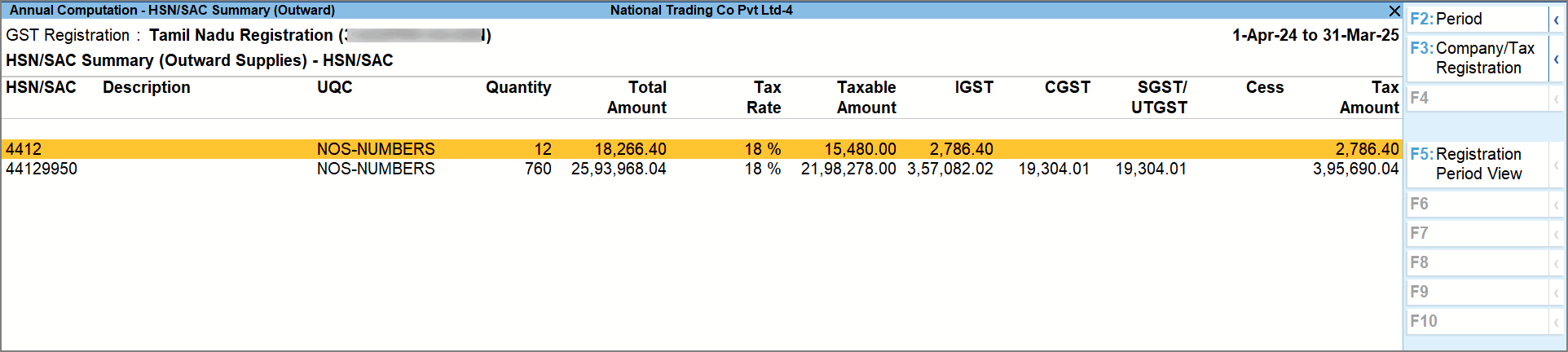
- In the Registration Period View, you can see a period-wise view and drill down from the required period and and select the required HSN/SAC.
You can further drill down to view the corresponding transactions.
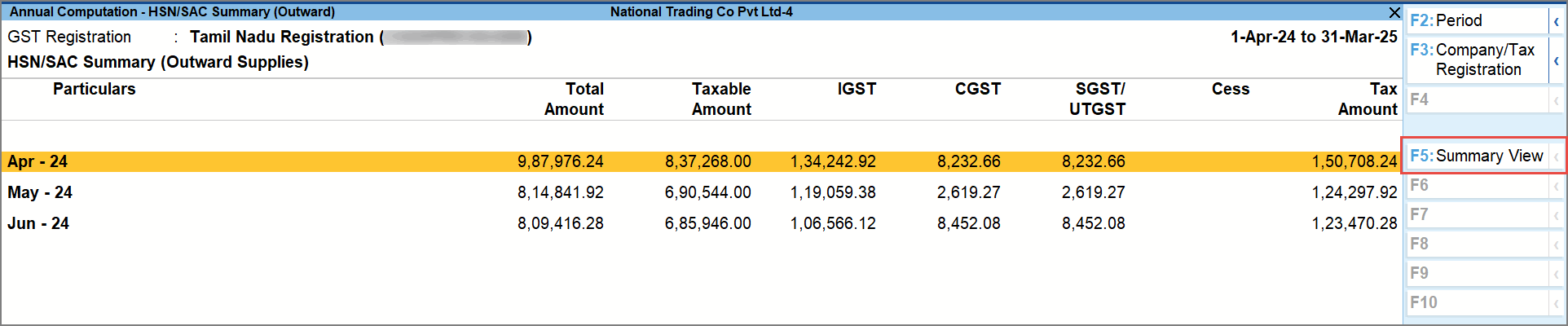
- In Summary View, you can see the summary of the HSN/SAC and drill down to view the corresponding transactions.
Description of Liability and Input Credit Tables
In this section
- Outward and Inward Supplies on Which Tax is Payable (Including Advances)
- Outward Supplies on Which Tax is not Payable
- Input Tax Credit
- ITC Reversal and Ineligible ITC Declared
- HSN/SAC Summary of Outward Supplies
- HSN/SAC Summary of Inward Supplies
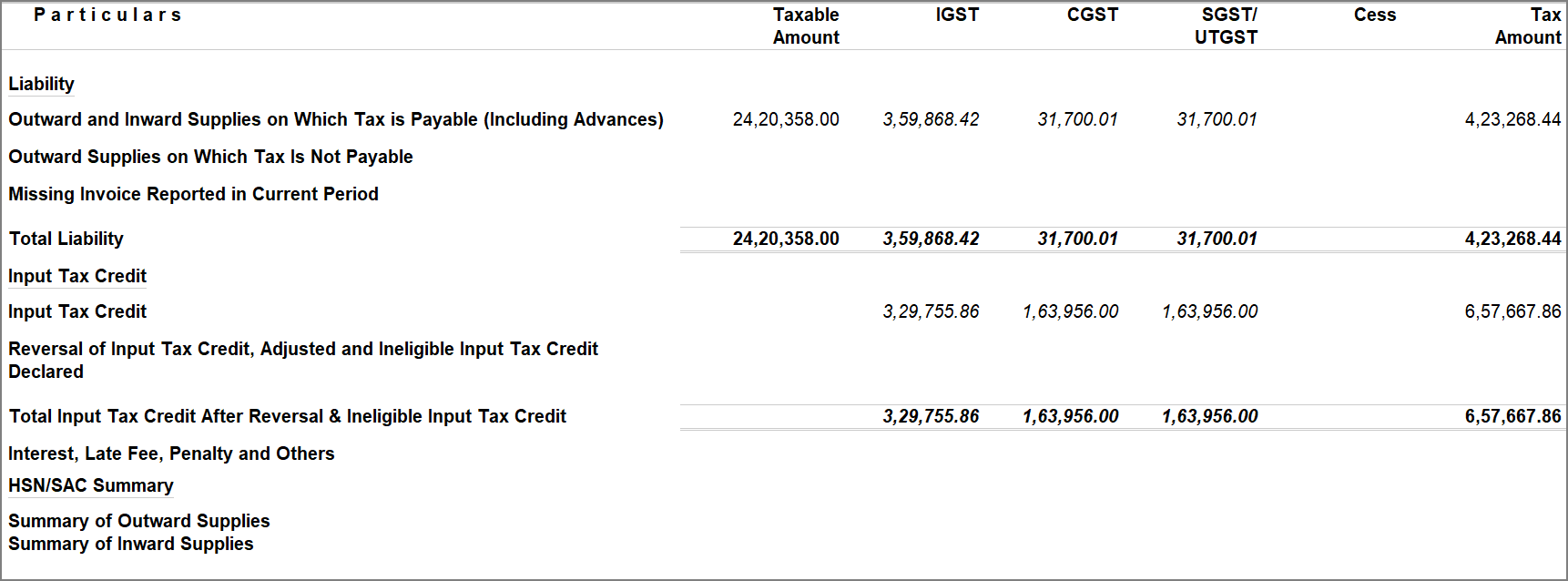
Outward and Inward Supplies on Which Tax is Payable (Including Advances)
|
Fields in Annual Computation Report |
Details Captured in Annual Computation Report |
|
|
|
|
Outward and Inward Supplies on Which Tax is Payable (Including Advances) |
Displays the assessable values, with breakup of tax values and the total invoice values for the category of transactions listed in this section. |
|
B2C supplies to unregistered persons |
Displays the net values of sales, after considering sales returns (credit note) and increase in sale values (debit note), recorded with the following details:
When the invoice has:
Displays the breakup of taxable value, and tax values in the relevant columns. |
|
B2B supplies to registered persons including credit/debit note |
Displays the net values of B2B supplies to registered persons, after considering adjustment entries towards sales returns and increase in sale values. |
|
B2B supplies to registered persons |
Displays the gross values of sales recorded with the following details:
When the invoice has:
Displays the breakup of taxable value, and tax values in the relevant columns. |
|
Credit notes issued to registered persons |
Displays the values of sales returns recorded against B2B supplies to registered persons. The values appear with a negative sign. |
|
Debit notes issued to registered persons |
Displays the values of adjustments recorded to increase the value of B2B supplies to registered persons. |
|
Exports with payment of tax including credit/debit note |
Displays the net values of Exports with payment of tax, after considering adjustment entries towards sales returns and increase in sale values. |
|
Exports with payment of tax |
Displays the gross values of sales recorded with the following details:
Displays the breakup of taxable value, and tax values in the relevant columns. For the supplies taxable under reverse charge, tax columns will be left blank. |
|
Credit notes issued for export on payment of tax |
Displays the values of sales returns recorded against Exports with payment of tax. The values appear with a negative sign. |
|
Debit notes issued for export on payment of tax |
Displays the values of adjustments recorded to increase the value of Exports with payment of tax. |
|
SEZ supplies with payment of tax including credit/debit note |
Displays the net values of SEZ supplies with payment of tax, after considering adjustment entries towards sales returns and increase in sale values. |
|
SEZ supplies with payment of tax |
Displays the gross values of sales recorded with the following details:
Displays the breakup of taxable value, and tax values in the relevant columns. For the supplies taxable under reverse charge, tax columns will be left blank. |
|
Credit notes issued to SEZs on payment of tax |
Displays the values of sales returns recorded against SEZ supplies with payment of tax. The values appear with a negative sign. |
|
Debit notes issued to SEZs on payment of tax |
Displays the values of adjustments recorded to increase the value of SEZ supplies with payment of tax. |
|
Deemed exports including credit/debit note |
Displays the net values of Deemed exports, after considering adjustment entries towards sales returns and increase in sale values. |
|
Deemed exports |
Displays the gross values of sales recorded with the following details:
Displays the breakup of taxable value, and tax values in the relevant columns. For the supplies taxable under reverse charge, tax columns will be left blank. |
|
Credit notes issued for deemed exports |
Displays the values of sales returns recorded against Deemed exports. The values appear with a negative sign. |
|
Debit notes issued for deemed exports |
Displays the values of adjustments recorded to increase the value of Deemed exports. |
|
Advances on which tax has been paid but invoice has not been issued |
Displays the values of journal vouchers recorded (nett of credit and debit) with the following details:
The breakup of tax values will appear in the relevant columns. |
|
Inward supplies on which tax is to be paid based on reverse charge |
Displays the net values of purchases under reverse charge, recorded with the following details:
In case of the journal vouchers recorded with following nature of adjustments, the tax values from the journal are considered for tax computation and not from the corresponding purchase transaction.
The breakup of tax values will appear in the relevant columns. |
Outward Supplies on Which Tax is not Payable
|
Fields in Annual Computation Report |
Details Captured in Annual Computation Report |
|
|
|
|
Outward Supplies on Which Tax is not Payable |
Displays the assessable values and total invoice values for the category of transactions listed in this section. |
|
Exports without payment of tax including credit/debit note |
Displays the net values of Exports without payment of tax, after considering adjustment entries towards sales returns and increase in sale values. |
|
Exports without payment of tax |
Displays the gross values of sales recorded with the following details:
Displays the taxable values in the relevant column. |
|
Credit notes issued for exports without payment of tax |
Displays the values of sales returns recorded against Exports without payment of tax. The values appear with a negative sign. |
|
Debit notes issued for exports without payment of tax |
Displays the values of adjustments recorded to increase the value of Exports without payment of tax. |
|
SEZ supplies without payment of tax including credit/debit note |
Displays the net values of SEZ supplies without payment of tax, after considering adjustment entries towards sales returns and increase in sale values. |
|
SEZ supplies without payment of tax |
Displays the net values of sales recorded with the following details:
Displays the taxable values in the relevant column. |
|
Credit notes issued to SEZs without payment of tax |
Displays the values of sales returns recorded against SEZ supplies without payment of tax. The values appear with a negative sign. |
|
Debit notes issued to SEZs without payment of tax |
Displays the values of adjustments recorded to increase the value of SEZ supplies without payment of tax. |
|
Outward supplies subject to reverse charge including credit/debit note |
Displays the net values of Outward supplies subject to reverse charge, after considering adjustment entries towards sales returns and increase in sale values. |
|
Outward supplies subject to reverse charge |
Displays the net values of sales recorded with the following details:
Displays the taxable values in the relevant column. |
|
Credit notes issued based on reverse charge |
Displays the values of sales returns recorded against Outward supplies subject to reverse charge. The values appear with a negative sign. |
|
Debit notes issued based on reverse charge |
Displays the values of adjustments recorded to increase the value of Outward supplies subject to reverse charge. |
|
Exempted supplies including credit/debit note |
Displays the net values of Exempted supplies, after considering adjustment entries towards sales returns and increase in sale values. |
|
Exempted supplies |
Displays the gross values of sales recorded with the following details:
Displays the taxable values in the relevant column. |
|
Credit notes issued for exempted supplies |
Displays the values of sales returns recorded against Exempted supplies. The values appear with a negative sign. |
|
Debit notes issued for exempted supplies |
Displays the values of adjustments recorded to increase the value of Exempted supplies. |
|
Nil rated supplies including credit/debit note |
Displays the net values of Nil rated supplies, after considering adjustment entries towards sales returns and increase in sale values. |
|
Nil rated supplies |
Displays the net values of sales recorded with the following details:
Displays the taxable values in the relevant column. |
|
Credit notes issued for nil rated supplies |
Displays the values of sales returns recorded against Nil rated supplies. The values appear with a negative sign. |
|
Debit notes issued for nil rated supplies |
Displays the values of adjustments recorded to increase the value of Nil rated supplies. |
|
Non-GST supplies including credit/debit note |
Displays the net values of Non-GST supplies, after considering adjustment entries towards sales returns and increase in sale values. |
|
Non-GST Supplies |
Displays the net values of sales recorded with the following details:
Displays the taxable values in the relevant column. |
|
Credit notes issued for Non-GST supplies |
Displays the values of sales returns recorded against Non-GST supplies. The values appear with a negative sign. |
|
Debit notes issued for Non-GST supplies |
Displays the values of adjustments recorded to increase the value of Non-GST supplies. |
Input Tax Credit
|
Fields in Annual Computation Report |
Details Captured in Annual Computation Report |
|
|
|
|
Input Tax Credit |
Displays the total input tax credit availed during the report period. |
|
Import of goods (including supplies from SEZs) |
Displays the net values of purchases recorded with the following details:
When a journal voucher is recorded with following nature of adjustment, the tax value from the journal is considered for computation instead of the value from purchase transactions made for import of goods.
Displays the tax values in the relevant columns. |
|
Import of services (excluding inward supplies from SEZs) |
Displays the net values of purchases recorded with the following details:
Display of transactions
Displays the tax values in the relevant columns. |
|
Inward supplies liable to reverse charge |
Displays the net values of purchases made under reverse charge, from registered and unregistered dealers. Displays information only when the option Enable tax liability on reverse charge (Purchase from unregistered dealer) is set to Yes, in the Company GST Details screen. Displays the net values of purchases recorded with the following details:
Also, displays the net values of purchases recorded with the following details:
When a journal voucher is recorded with following nature of adjustment, the tax value from the journal is considered for computation instead of the value from reverse charge purchase transactions.
|
|
Inward supplies from ISD |
Displays the net values of journal vouchers recorded with the Nature of adjustment Increase of Input Tax Credit with ISD Transfer. |
|
All other ITC |
Displays the net values of purchases recorded with the following details:
|
|
Amount of ITC reclaimed |
Displays the net values of journal vouchers recorded with the Nature of adjustment Increase of Input Tax Credit with:
|
ITC Reversal and Ineligible ITC Declared
|
Fields in Annual Computation Report |
Details Captured in Annual Computation Report |
|
|
|
|
ITC Reversal and Ineligible ITC Declared |
Displays the total value of input tax credit reversed. |
|
Non-payment of consideration to supplier (Rule 37) |
Displays the values of journal vouchers recorded with the Nature of adjustment Reversal of Input Tax Credit with Non-payment to the Supplier – Rule 37(2). |
|
ISD credit note received (Rule 39) |
Displays the values of journal vouchers recorded with the Nature of adjustment Reversal of Input Tax Credit with ISD credit note – Rule 39(1)(j)(ii). |
|
Excess ITC claimed, exempt & non-business supplies (Rule 42) |
Displays the values of journal vouchers recorded with the Nature of adjustment Reversal of Input Tax Credit with:
|
|
Capital goods being used for exempted supplies (Rule 43) |
Displays the values of journal vouchers recorded with the Nature of adjustment Reversal of Input Tax Credit with Capital credit due to exempted supplies – Rule 43(1)(h). |
|
Ineligible credit (Section 17(5)) |
Displays the values from journal vouchers recorded with the following details:
If the amount stated in Table 4D of FORM GSTR-3B was not included in table 4A of FORM GSTR-3B, then no entry should be made in table 7E of FORM GSTR-9. However, if amount mentioned in table 4D of FORM GSTR-3B was included in table 4A of FORM GSTR-3B, then entry will come in 7E of FORM GSTR-9. |
|
Other reversals |
Displays the values of journal vouchers recorded with the Nature of adjustment Reversal of Input Tax Credit with:
|
HSN/SAC Summary of Outward Supplies
For each HSN/SAC used in the transactions of outward supplies, displays the corresponding Type of Supply, UQC, quantity details and tax values. In case a HSN/SAC has multiple tax rates, each rate is shown separately.
From TallyPrime Release 5.1, you can view HSN/SAC Summary of Outward Supplies in the GST Annual Computation for the whole year or for a particular period from F5 (Summary View). You can also view the monthly breakup of the summary and drill down from each month. Additionally, you can export the HSN/SAC Summary for the year in one Excel sheet.
HSN/SAC Summary of Inward Supplies
For each HSN/SAC used in the transactions of inward supplies, displays the corresponding Type of Supply, UQC, quantity details and tax values. In case a HSN/SAC has multiple tax rates, each rate is shown separately.
From TallyPrime Release 5.1, you can view HSN/SAC Summary of Inward Supplies in the GST Annual Computation for the whole year or for a particular period from F5 (Summary View). You can also view the monthly breakup of the summary and drill down from each month. Additionally, you can export the HSN/SAC Summary for the year in one Excel sheet.
Questions & Answers
- How can I make adjustments to GST values directly from the report?
You can press Alt+J (Stat Adjustment) from the report to record adjustment entries for GST liability or input tax credit. - How can I verify GST liability and ITC values in the report?
Drill down from the Liability or Input Tax Credit sections to view month-wise, party-wise, or voucher-level details and verify the values. - Why are some vouchers not included in the GST Annual Computation report?
Vouchers are excluded if they have no GST implication, are manually excluded, or contain incomplete or incorrect GST details. In case of incomplete or incorrect GST details, the vouchers will be available in the Uncertain Transactions (Corrections needed) section, you can drill down and update the required details to include them. - What are the Exception Reports in GST Annual Computation and how do I use it?
Exception Reports in GST Annual Computation consist of vouchers in which GST is not calculated correctly. Press Ctrl+J (Exception Reports) to view such vouchers and take action.
Under the List of Exception Reports, you can see:
Transactions Accepted as Valid: Drill down to view vouchers that had issues but were manually included in GST computation. You can review them and correct the details to avoid incorrect reporting.
Vouchers Ignored with Conflicts: Drill down to view vouchers that have issues and are excluded from GST computation. You can open these vouchers, fix the errors, and include them in the computation.


