
Create Purchase Voucher with Foreign Currency in TallyPrime
When paying a foreign vendor in their currency, create the purchase voucher with foreign currency in TallyPrime. If both Last Voucher Rate and Specified Rate exist, TallyPrime uses the Last Voucher Rate.
National Handicrafts imports spare parts and transactions are in USD.
Before you begin | Prerequisites
- Before you create purchase voucher with foreign currency, create the currency you use for your business and identify its exchange rate.
- Press Alt+G (Go To) > Create Voucher > press F9 for Purchase > press Ctrl+H and select the mode.
- Provide the required details.
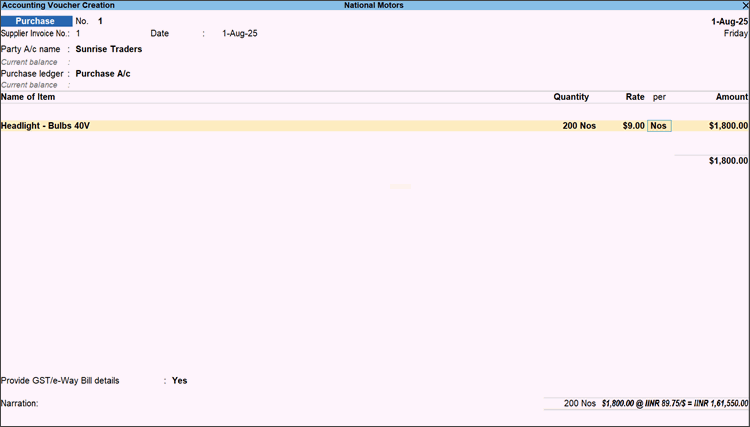
- After entering item details, enter the Rate of the item in the foreign currency by adding the currency symbol along with the rate.
- If you have already created the Rate of Exchange, the Forex Rate of Exchange screen appears.
Enter the latest Rate of Exchange.

- Press Ctrl+A to save the Forex Rate of Exchange screen.
- If you have already created the Rate of Exchange, the Forex Rate of Exchange screen appears.
- Provide other details, as needed, and press Ctrl+A to save the purchase invoice.
Questions & Answers
- I am getting an error Must use currency ‘$’ for ledger ‘Sales’ when passing a transaction with remote connection. Why does this happen?
If the Formal Name defined in a ledger while passing a transaction is not the same as defined in the company selected, such an error message will appear. Make sure that the currency names match.
Is this information useful?
YesNo


