
Create, Alter or Delete Currencies
Just like any other master, you can create a Currency Master in TallyPrime to record transactions and view reports in different currencies. When no other currency is defined, you can also alter the base currency. You may Alter or Delete currencies if necessary.
National Handicrafts handles export transactions in USD.
Before you begin | Prerequisites
- Identify name of the currency, ISO currency code, number of decimal places used in the currency, and name of the decimal units.
Create Currency
- Press Alt+G (Go To) > Create Master > Currency > and press Enter.
When only the base currency is available, you will be prompted to create a new currency or alter the existing currency. Select Create or press C to create a new currency.
- Specify the currency details.
- Symbol: Enter a unique currency symbol.
This symbol is used in your transactions. - Formal name: Enter the name of the currency accepted globally. You cannot assign a duplicate Formal name for a currency.
- ISO Currency Code: Enter the three-letter alphabetic identifier for the currency.
You may refer to the codes published by IBAN.
- Symbol: Enter a unique currency symbol.
- Number of decimal places: Enter the number of decimal places, based on the fractional units of the currency or as required by the currency.
- Set the option Show amounts in millions to Yes or No, as needed.
- Suffix symbol to amount: Yes, to ensure that the symbol appears after the amount.
- Add space between amount and symbol: Yes.
- Specify details for the word representing amount after decimal.
- Enter the Word representing amount after decimal. For example, Cent.
- Enter the No. of decimal places for amounts in words.
This number should be equal to or lesser than the number specified in Number of decimal places field.
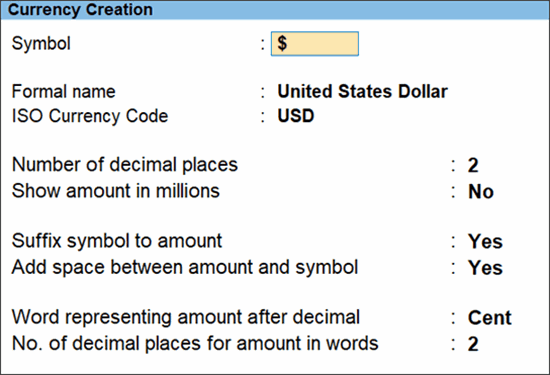
- Press Ctrl+A to save.
Alter Currency
- Press Alt+G (Go To) > type or select Alter Master > type or select Currency > select the currency you want to alter.
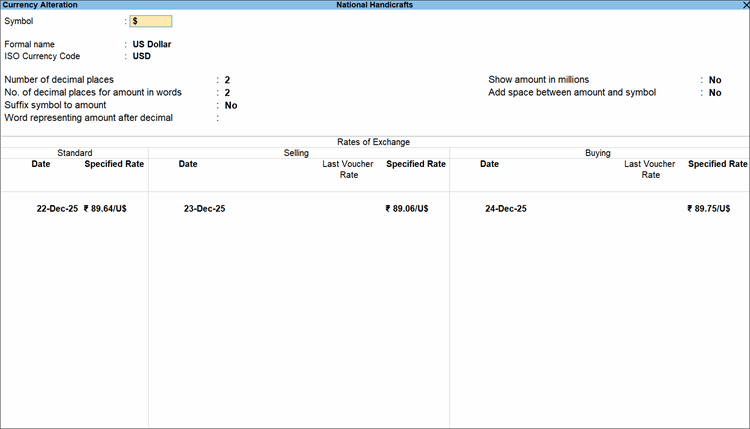
- Modify the Rates of Exchange, if required. You can provide a specific date for forex rate. Refer to the Define forex rate section to know more.
- You will not see this option if you are altering the Base currency.
- Modify other details as required.
- Press Ctrl+A to save.
You can also alter the base currency. The screen for altering it is similar to the Currency Creation screen.
Delete Currency
You can delete a currency if it is not used in transactions or opening balance for ledgers. In case the currency is used, you need make sure that it is replaced with another in your books before deletion.
- Press Alt+G (Go To) > Alter Master > Currency > select the currency > Press Alt+D (Delete).
Questions & Answers
- Why is TallyPrime adding U to the dollar symbol when I am creating a currency for American dollar?
If you use the same symbol for two currencies, TallyPrime automatically prefixes the second currency symbol with letters from its formal name (e.g., “U$”) to avoid confusion. - How do I alter exchange rate? Can it be done multiple times in a day?
To alter exchange rate:
Press Alt+G (Go To) > type or select Alter Master > type or select Currency > select the currency you want to alter. You can modify the Rates of Exchange. Yes, you can alter the exchange rate multiple times in a day. - Why am I not able to delete a currency that is not required anymore?
To delete a currency that is not required anymore, you can replace it with another currency in all relevant ledgers and transactions and ensure that no opening balances exist for the currency.


