
Set Up Forex Rates
In TallyPrime, you can define forex rates for specific dates or multiple dates to reflect currency exchange rate changes. This helps calculate forex gains or losses when transactions occur at different times. You can also update the exchange rate while recording a transaction.
National Handicrafts handles export transactions in USD and the exchange rate changes very frequently.
Before you begin | Prerequisites
- Identify the exchange rate and applicability date.
Set Up Forex Rate for One Currency
- Press Alt+G (Go To) > type or select Alter Master > type or select Currency > select the currency you want to alter.
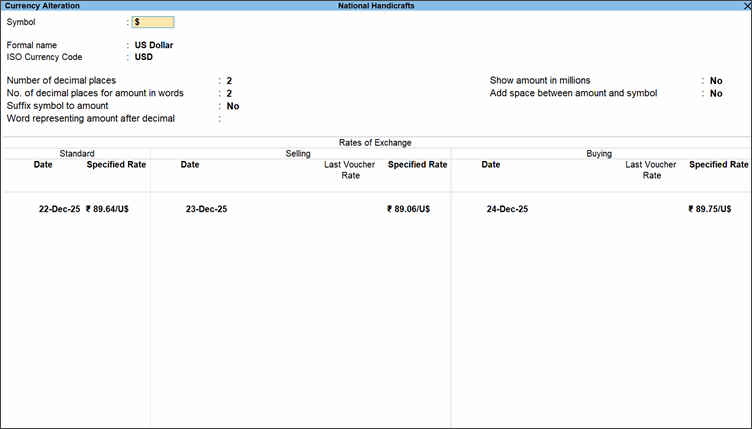
- In the Rate of Exchange section, provide the standard rate details.
- Date: Enter the date at which the rate of exchange is applicable.
- Specified Rate: Standard rate (optional) is used to calculate variances from the actual transaction rates.
- In the Rate of Exchange section, provide the forex rate details:
- Under Selling, enter the Date, the Last Voucher Rate and the Specified Rate applicable as per the supply done on that date.
- Under Buying, enter the Date, the Last Voucher Rate and the Specified Rate applicable as per the purchase done on that date.
- Press Ctrl+A to save.
For currencies that have been used in transactions, the Last Voucher Rate appears for reference.
Set Up Forex Rates for Multi-Currencies
- Press Alt+G (Go To) > type or select Chart of Accounts and press Enter > type or select Currencies and press Enter.
- Press Alt+H (Multi-Masters) > Rate of Exchange and press Enter.
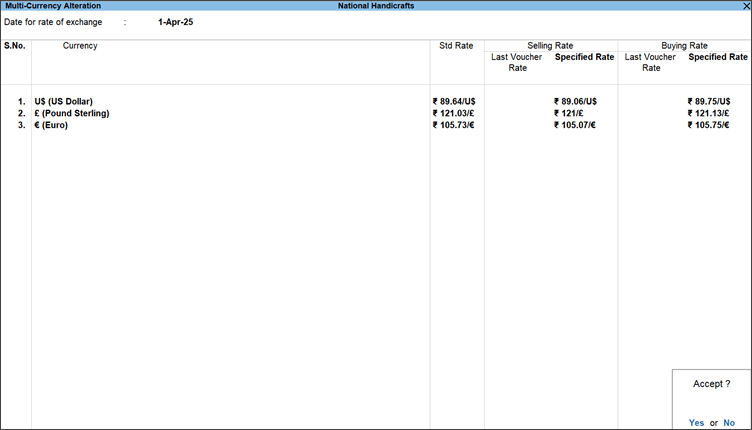
- Provide the details of forex rates.
- Std Rate: Enter the standard rate of exchange.
- Selling Rate: Enter the rate used while selling.
- Buying Rate: Enter the rate used while buying.
- Press Ctrl+A to save.
Transactions will use the exchange rates based on the date of applicability.
Questions & Answers
- Can I alter exchange rates multiple times in a day?
Yes, you can alter exchange rates multiple times in a day. - Why is the Last Voucher Rate not shown for certain currencies?
Last Voucher rate is shown only for the currencies used in transactions so far.
Is this information useful?
YesNo


