
VAT 201 Reconciliation Report in TallyPrime
The VAT 201 Reconciliation report helps you compare the values recorded in your Books with the Return summary available on the EmaraTax Portal.
This helps you identify if any changes in the values require the VAT Return to be filed again.

- Press Alt+G (Go To) > type and select VAT 201 Reconciliation.
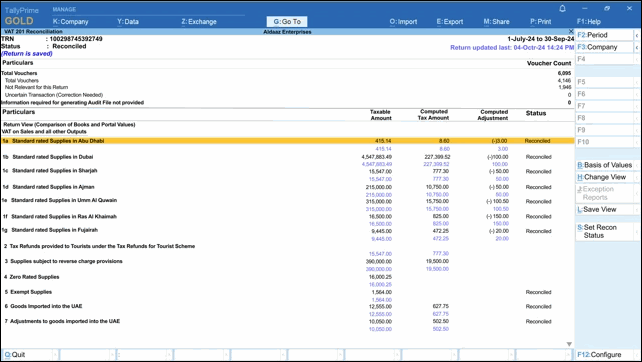
The report displays the section-wise comparison of:
- Values as per Books
- Values downloaded from the EmaraTax Portal
Each section shows its reconciliation status based on the comparison. TallyPrime automatically detects whether a section is Reconciled or Unreconciled based on the difference between the values.Only sections that display values are considered for comparison in the VAT 201 Reconciliation Report.
- Review the vouchers contributing to the Books value.
- Drill down from any section.
- Press Ctrl+Enter to open the Voucher Alteration screen and update details, if needed.
Drill-down is available only for the values in your Books and not those from the Portal.
- Press F12 (Configure) to configure the VAT 201 Reconciliation report.
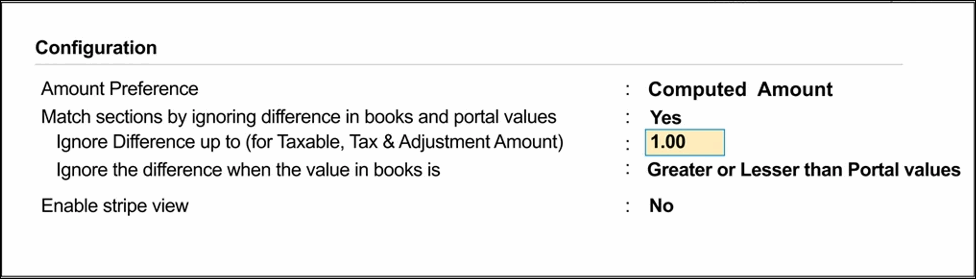
- Set the Amount Preference.
By default, the report considers the Amount Type selected during the upload of the VAT 201 Return from TallyPrime. You can change this if required. - Adjust differences in Transactions during Reconciliation, if required.
If you want TallyPrime to ignore minor differences in values between your Books and EmaraTax Portal, and consider the transactions as reconciled.- Set Match sections by ignoring differences in Books and Portal values to Yes.
- Ignore Difference up to (for Taxable, Tax & Adjustment Amount): Enter the maximum difference that can be ignored for each section. Any variation within this limit will not affect the reconciliation status.
- Ignore the difference when the value in books is: Choose whether the difference should be ignored only when the Books value is Greater, Lesser, or Greater or Lesser than the Portal value.
- Set the Amount Preference.
- Configure the display of Portal values, if required.
- Press Ctrl+B (Basis of Values) to configure how Portal values are displayed and compared in the VAT 201 Reconciliation Report.
In the Report Details screen, select the required option under Method of showing values from portal.- None: Displays only the values as per your Books. Portal values are not displayed for comparison.
- Comparison of Books & Portal Values: Displays both Books and Portal values enabling a direct comparison for each section.
- Difference in Books & Portal Values: Displays only the difference between the values in your Books and those downloaded from the EmaraTax Portal, helping you quickly identify mismatches.
- Press Ctrl+B (Basis of Values) to configure how Portal values are displayed and compared in the VAT 201 Reconciliation Report.
View Reconciliation Status of Transactions
By default, TallyPrime automatically determines the reconciliation status of the VAT 201 Reconciliation report based on the reconciliation results of individual VAT sections.
The report can display one of the following statuses:
- Reconciled:
- All relevant VAT sections are reconciled.
- Minor differences are ignored as per the reconciliation settings.
This indicates that the values in your Books and the EmaraTax Portal are aligned, and no further action is required.
- Unreconciled:
- Differences between Books and Portal values exceed the configured tolerance limits.
- One or more VAT sections remain unreconciled.
You must review the affected sections, verify the vouchers, and update the data if required.
- Manually Reconciled: When you manually reconcile transactions by pressing Alt+S (Set Recon Status), even if some sections remain unreconciled.
- Mismatch in VAT Periodicity between Books and Portal: This status is displayed when there is a mismatch between the Return periodicity defined in TallyPrime and the actual filing period of the VAT 201 Return downloaded from the EmaraTax Portal.
In such cases, reconciliation cannot be completed until the Return periodicity in TallyPrime is corrected to match the filing period available on the EmaraTax Portal.
Is this information useful?
YesNo


