
Review TCS Outstanding and Reconcile Challan in TallyPrime
Before preparing your TCS return, you can review pending TCS payments and reconcile TCS payments with the applicable challan details in TallyPrime.
Check TCS Outstandings
You can review the outstanding amount by Nature of Goods or party-wise and drill down to the transactions contributing to the pending amount.
- Press Alt+G (Go To) > type or select TCS Outstandings > press Enter.
By default, the report displays outstandings Category-wise. Press F5 (Party-wise) to view the pending TCS party-wise, if needed. - Review the pending TCS amounts by Nature of Goods or Party-wise.
- Select the required Nature of Goods or Party to view the transactions contributing to the outstanding amount.
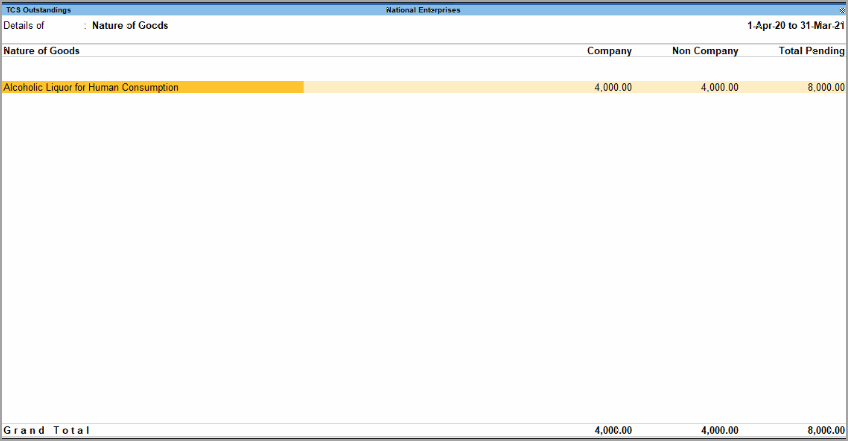
The report displays details such as:
- Company: Displays the total TCS collected from parties with Company Resident and Company Non-Resident buyer or lessee types.
- Non-Company: Displays the total TCS collected from parties with Individual/HUF – Resident and Individual/HUF – Non Resident buyer or lessee types.
- Total Pending: Displays the total outstanding TCS amount pending for payment.
You can configure the report to view additional details:
- Press Ctrl+B (Basis of Values) and select:
- Resident Type to view and compare the report for different resident types.
- Range of Bills to view the required range of bills.
- Press Ctrl+H (Change View) to view the report in different views or access related reports.
When you drill down to the transaction details, the report displays:
- Date: Date on which the payment, journal, or purchase voucher was recorded.
- Ref. No.: Reference number entered in the voucher.
- Party’s Name: Party from whom TCS was collected and for whom payment is pending.
- Opening Amount: Opening TCS amount.
- Pending Amount: TCS amount pending for payment to the government.
- Due On: Last date for making the payment.
- Overdue By Days: Number of days elapsed after the due date.
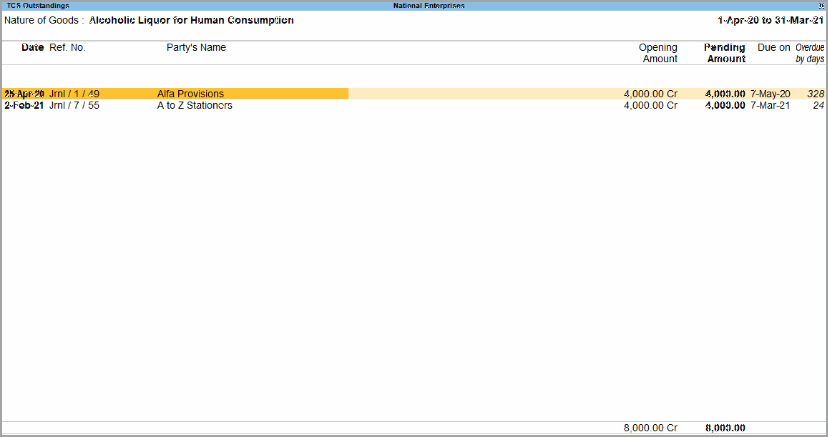
To pay the outstanding TCS, record the TCS payment using Payment voucher.
Reconcile TCS Challans
TCS payments made to the government are accompanied by an ITNS 281 challan. After recording the TCS payment, you can print the TCS challan from the payment voucher and enter the challan details in the Challan Reconciliation report.
- Press Alt+G (Go To) > type or select TCS Challan Reconciliation > press Enter.
- Press Ctrl+B (Basis of Values) > Show All Challan Types > Yes.
- Press Esc to view the default values.
- Press Alt+R (Reconcile).
- Enter the Challan No. and Challan Date, if required.
After reviewing the pending TCS and reconciling the applicable challans, you can proceed to prepare the TCS return.
Questions and Answers
How can I print the TCS challan?
- Open the TCS payment voucher.
- Press Pg Up > Alt+P (Print).
- Set Print as TCS Challan to Yes and enter the Filing Date.
- Press Ctrl+A to print the ITNS Challan.


