
Create Attendance or Production Types in TallyPrime
Attendance or Production Types define the units used to calculate employee pay. You can create attendance types with or without pay, record production details, or use a user-defined calendar to calculate per-day salary based on variable working days for each month.
Before you begin | Prerequisites
Create Attendance Type
- Press Alt+G (Go To) > Create Master > Attendance/Production Types and press Enter.
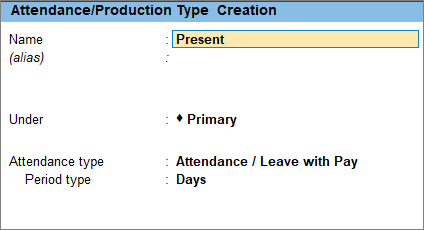
- Enter the attendance type details.
- Name: Enter the name of the attendance type, such as Present.
- Under: Select Primary from the list. If you have created any other attendance or production type, you can select that as well.
- Attendance type: Select the attendance type, such as Attendance / Leave with Pay.
The Period type appears automatically.
- Press Ctrl+A to save the master.
Similarly, you can create the Attendance Type Absent as Leave without Pay.
Create Production Type
- Press Alt+G (Go To) > Create Master > Attendance/Production Types and press Enter.
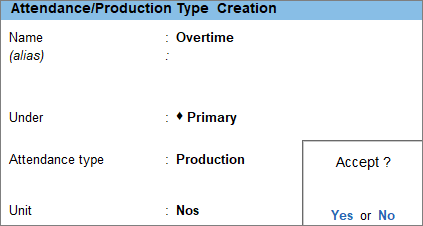
- Enter the production type details
- Name: Enter the name of the production type, such as Overtime.
- Under: Select Primary from the list.
- Attendance type: Select Production as the attendance type.
- Unit: Select the unit of measurement.
- Press Ctrl+A to save the master.
Similarly, you can create other production types according to your business requirements.
Create User-Defined Calendar Types
- Press Alt+G (Go To) > Create Master > Attendance/Production Types and press Enter.
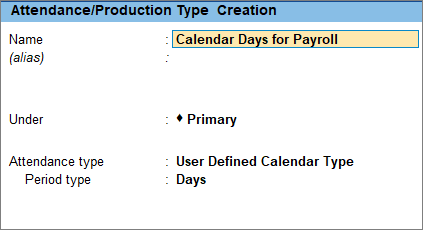
- Enter the user-defined calendar type details.
- Name: Enter the name of the attendance type, such as Calendar days for Payroll.
- Under: Select Primary from the list.
- Attendance type: Select User Defined Calendar Type as the attendance type.
The Period type appears automatically.
- Press Ctrl+A to save the master.
Is this information useful?
YesNo


