
Maintain B2C (Large) Invoices as per Threshold Limit
The threshold limit for B2C (Large) invoices (B2CL) has been revised from ₹2.5 lakh to ₹1 lakh. In TallyPrime, you can maintain your transactions as per the latest threshold by setting the appropriate effective dates for GSTR-1 and GSTR-3B, or by updating the applicable threshold in Company GST Details.

-
Ensure GST is enabled in your company.
-
Verify that you have access to GSTR-1 and GSTR-3B reports.
-
Decide whether you want to:
-
Apply the latest threshold (₹1 lakh) using effective dates, or
-
Continue with the earlier threshold (₹2.5 lakh) by configuring Company GST Details.
-
Set Up for Maintaining B2C (Large) Invoices
You can set up B2C (Large) Invoices using Effective Date and Threshold Limit. If you want to maintain your transactions as per the latest Threshold Limit of ₹1 lakh, then you can set the required applicable dates in Company GST Details.
Using Effective Date
- Press Alt+G (Go To) > GSTR-1/GSTR-3B > B2C (Large) Invoices – 5A, 5B.
- Press F2 (Period) to set the required month.
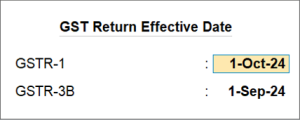
- Press Alt+L (Set Effective Date) and set the GST Return Effective Date for GSTR-1 and GSTR-3B.
If you consider the current month as September, you can set the Effective Date as October for GSTR-1 and as September for GSTR-3B. This will ensure that the liabilities for GSTR-3B are paid in the current month, that is, September, while GSTR-1 transactions are reported in the subsequent month, that is, October.
- Press Ctrl+A to save the changes.
Using Threshold Limit in Company GST Details
- Press F11 (Company Features) and set Enable Goods and Services (GST) to Yes.
- Enable Set/Alter Company GST Rate and Other Details.
The GST Rate and Other Details screen opens. - Press Ctrl+I (More Details).
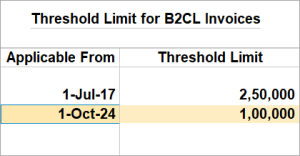
- Click Show More > Threshold Limit for B2CL Invoices.
- Enter the Applicable From date along with the Threshold Limit.
- Press Ctrl+A to save the changes.
For TallyPrime 4.1 or earlier Releases, click here.
B2C (Large) Invoices as per Notification No. 12
The 53rd meeting of the GST Council, chaired by Union Finance & Corporate Affairs Minister Smt. Nirmala Sitharaman, took place on June 22, 2024. A key recommendation from this meeting is to lower the threshold for invoice-wise reporting of B2C inter-state supplies in Table 5 of form GSTR-1 from ₹ 2.5 lakh to ₹ 1 lakh, as per Notification No. 12 of CGST. One of the major outcomes of this meeting was that starting from August 1, 2024, interstate sales to unregistered or consumer parties exceeding ₹ 1 lakh must be reported under the B2CL section in GSTR-1. Previously, this threshold was ₹ 2.5 lakh. Sales equal to or less than ₹ 1 lakh will continue to be included in the B2CS summary. This change applies to both Regular and SEZ tax units.
In TallyPrime Release 4.1, any unregistered or consumer-related interstate sales and credit/debit note transactions with values exceeding ₹ 2.5 lakh are reported as B2C (Large) Invoices – 5A, 5B and Credit or Debit Notes (Unregistered) – 9B, respectively.
As per the new rules, interstate sales to unregistered or consumers exceeding ₹ 1 lakh will be reported in the B2CL section. Interstate B2C supplies equal to or less than ₹ 1 lakh will continue to be part of the B2C (Small) summary.
As these changes are not included in the current version of TallyPrime,
- You can manually identify the unregistered or consumer-related interstate sales with a value exceeding ₹ 1 lakh and exclude them from the B2C (Small) Invoices – 7 buckets in the GSTR-1 report before filing the return.
- You can also alter/update the credit/debit notes transactions to change the original sales invoice value from ‘Less Than or Equal to 2.5 Lakhs’ to ‘More Than 2.5 Lakhs’, and save it. Those transactions will appear under the Credit or Debit Notes (Unregistered) – 9B section.
You can report or upload these excluded transactions separately until the new release of TallyPrime is available.
Exclude the Interstate Sales to Unregistered or Consumer
Effective from August 1, 2024, any interstate sales to unregistered or consumer parties exceeding ₹ 1 lakh must be reported as B2C (Large) Invoices – 5A, 5B. Currently, in TallyPrime, these transactions are categorized under B2C (Small) Invoices – 7. To comply with the new requirement, you will need to manually identify interstate sales to unregistered or consumer parties with transaction values exceeding ₹ 1 lakh, exclude them from the B2C (Small) Invoices – 7 bucket in GSTR-1, and file your GSTR-1 returns accordingly.
- Press Alt+G (Go To) > and select GSTR-1.
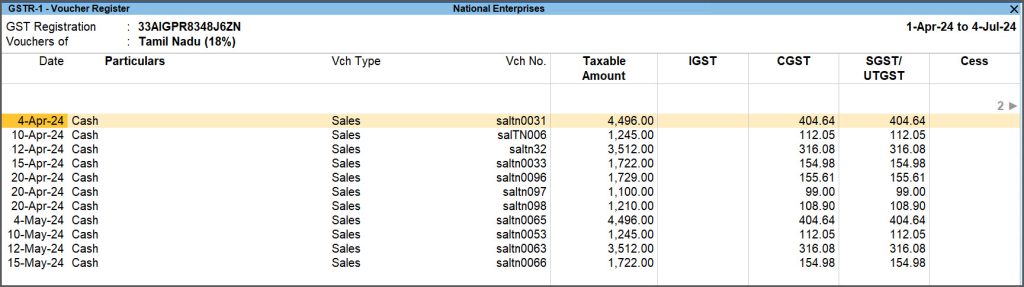
- Drill down from B2C (Small) Invoices – 7 and select interstate PoS (Place of Supply).
The detailed screen will display all transactions.
-
Drill down further to view all the transactions of that selected interstate POS.
- Mark transactions as Excluded.
- Identify and select the transactions exceeding Rs. 1 lakh.
- Press Alt+S and choose Set GST Status to mark the selected transactions as Excluded.
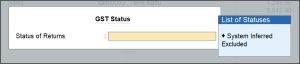
These transactions will be categorized under Not Relevant for This Return as Manually Excluded Transactions.
- Export the GSTR-1 report in JSON, Excel, or CSV format and proceed to file your returns as usual.
- You can manually enter the vouchers for B2CL transactions over ₹ 1 lakh, that are marked as excluded, in the GST portal in B2CL Section.

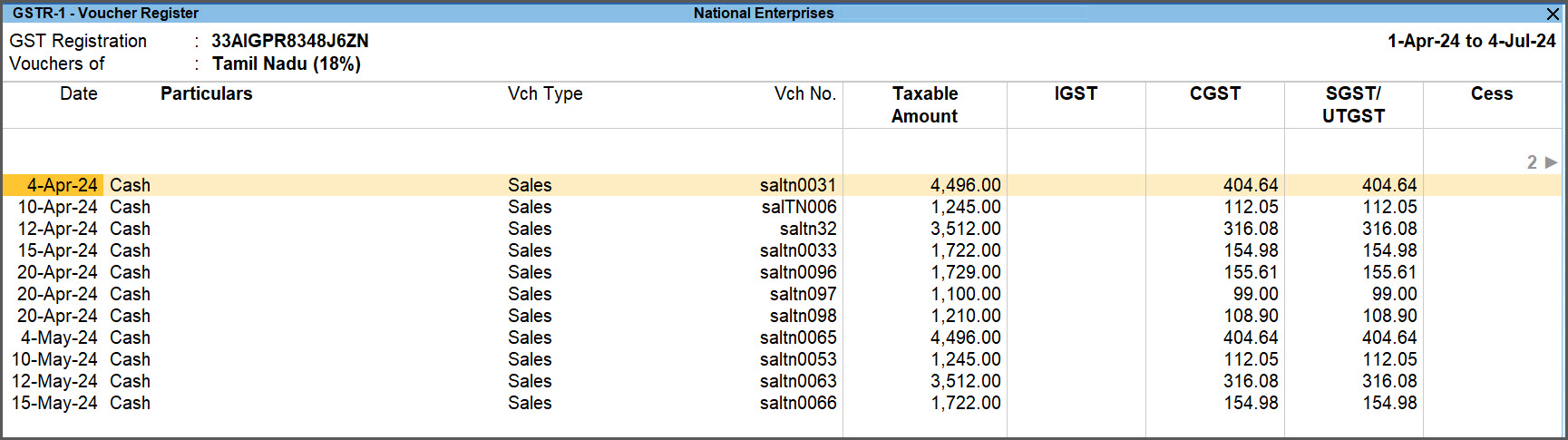
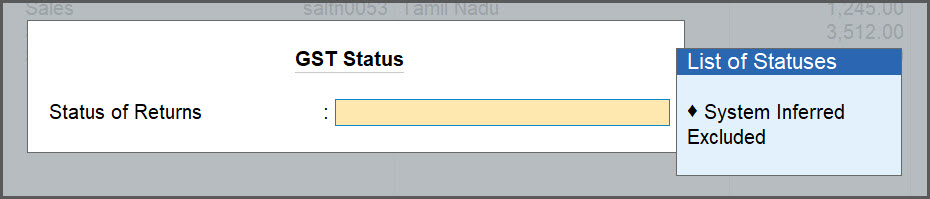
Similarly, you can identify the vouchers applicable for Amended B2C (Large) Invoices- 9A also, and mark them as excluded. Later, you can manually enter those vouchers in the GST portal.
Alter or Update Credit/Debit Notes
To alter or update the Credit/Debit Notes in the GSTR-1 Report,
- Press Alt+G (Go To) > and select GSTR-1.
- Select the B2C (Small) Invoices – 7 and select vouchers with interstate PoS (Place of Supply).
- Alter the Credit/Debit Notes, as required.
- Identify the interstate Credit/Debit notes where original sales is greater than ₹1 lakh and press Enter to open the voucher in the alteration mode.
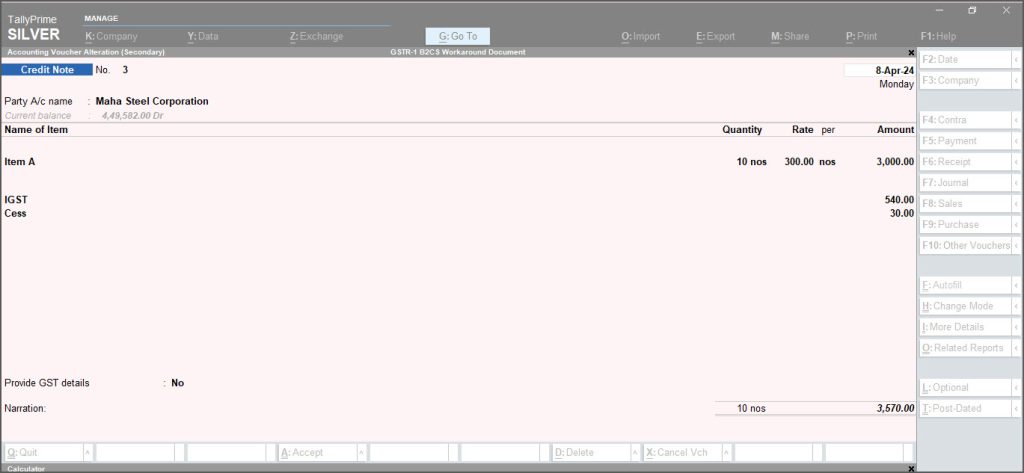
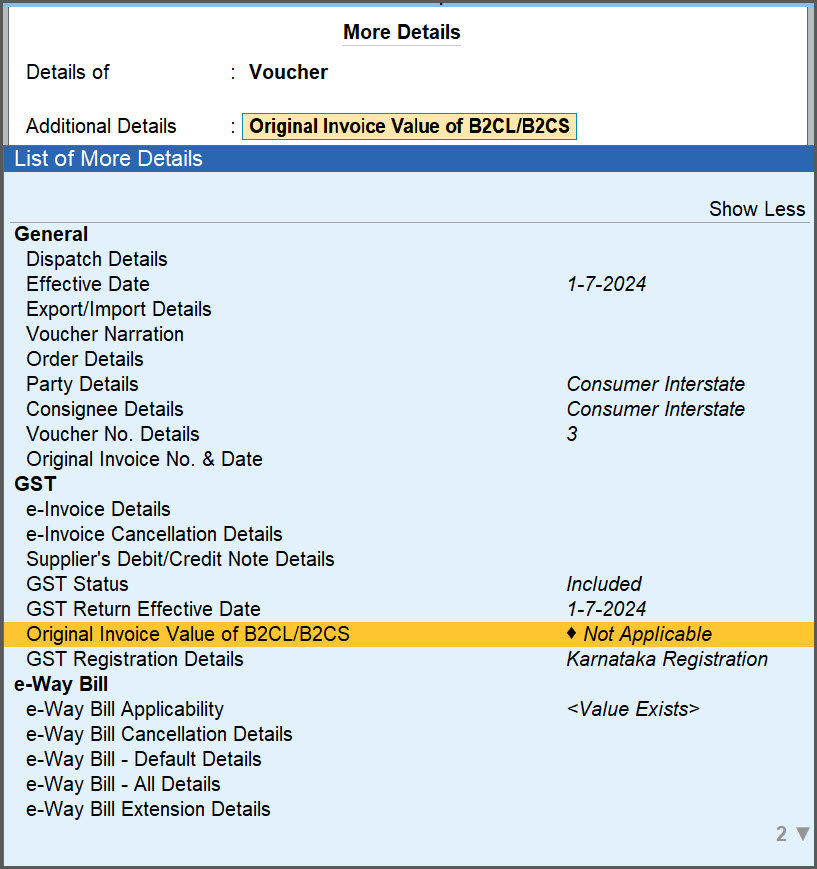
- Press Ctrl+I (More details) and select Original Invoice Value of B2CL/B2CS.
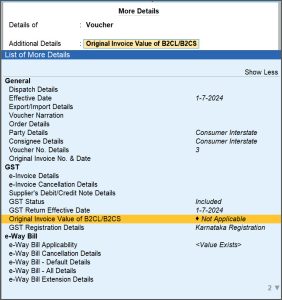
- Change Original sales invoice value from Less Than or Equal to 2.5 Lakhs to More Than 2.5 Lakhs.

- Press Ctrl+A to save.
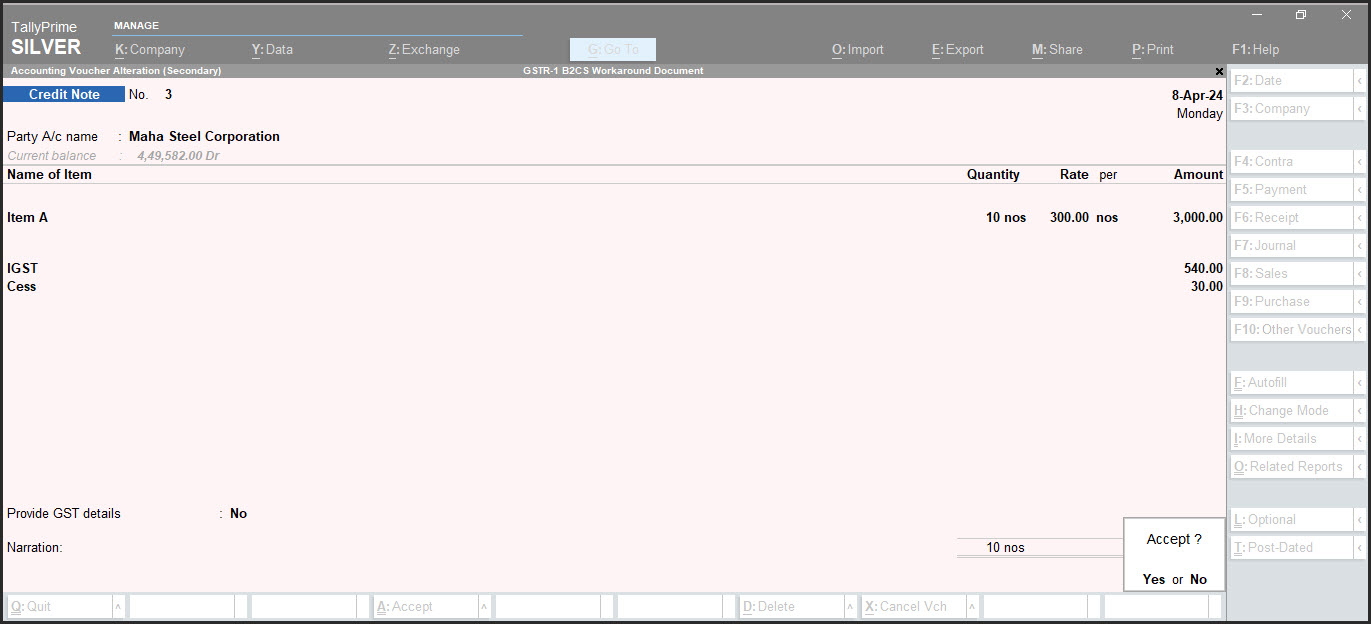
These transactions will appear under Credit or Debit Notes (Unregistered) – 9B section.If Credit/Debit notes is under Uncertain Transactions and the value is more than ₹1 lakhs, then update or resolve the uncertain as more than ₹2.5 lakhs.
- Identify the interstate Credit/Debit notes where original sales is greater than ₹1 lakh and press Enter to open the voucher in the alteration mode.
- Export the GSTR-1 report in JSON, Excel, or CSV format and proceed to file your returns as usual.
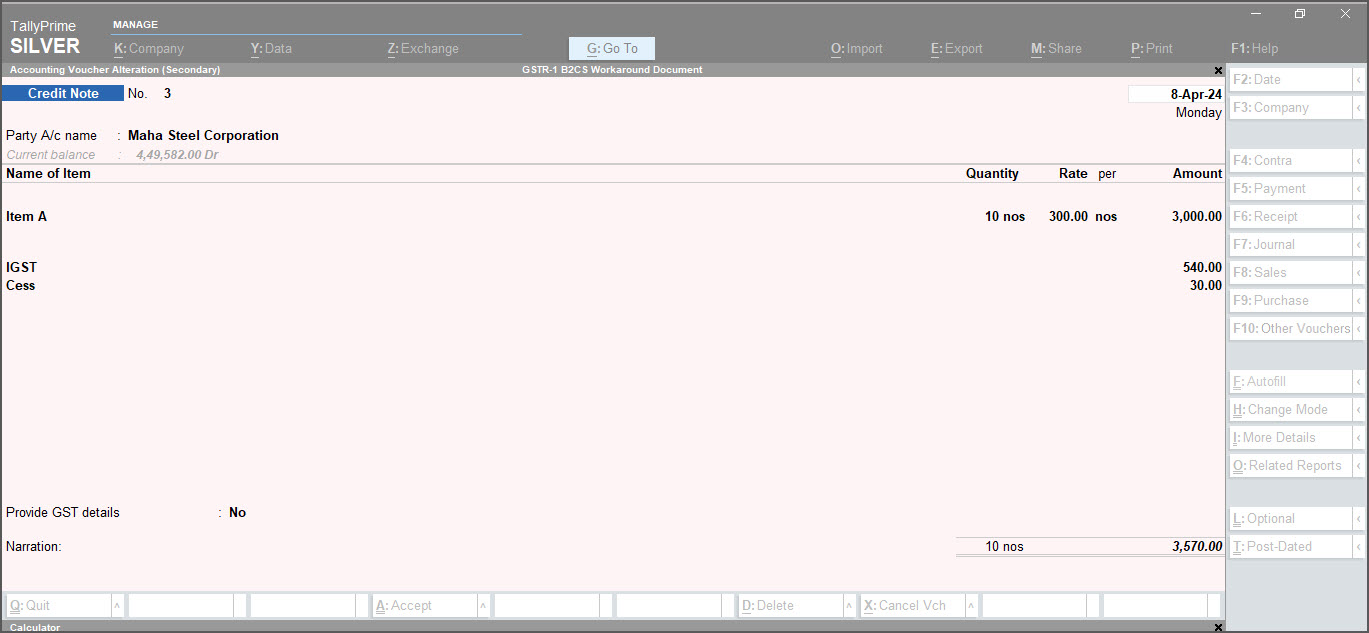
You can manually enter the vouchers for B2C (Large) transactions over ₹2.5 lakhs, that are marked as excluded, in the GST portal in B2C (Large) Section.


