
Set Up Stock Items for GST
Whether you have one or more stock items, you can define the GST applicability and provide the necessary GST details in the stock items. If you have multiple stock items, it is recommended that you define the GST Rate and HSN SAC details in each stock item or corresponding stock groups.
- Create your Stock Item, with appropriate Units.
- Configure the stock item for GST.
- Set GST applicability to Applicable.
- Set the HSN and GST Rate details, as required.
This is applicable, if you want to set the HSN/SAC and GST Rates to be picked from the Stock items. If you maintain stock items with the same details under different Stock Groups, you can define these GST details directly in the respective Stock Groups.
- Validate the HSN/SAC details with the Portal details, if needed.
- Configure the stock item for RCM.
- Press F12 (Configure) > set Enable Reverse Charge calculation to Yes.
- Set Applicable for Reverse Charge to Yes.
For TallyPrime 2.1 & earlier, set Is reverse charge applicable to Yes.
- Configure the stock item for ITC claim eligibility.
- Press F12 (Configure) > set Eligible for Input Tax Credit to Yes.
- Set Eligible for ITC as Yes.
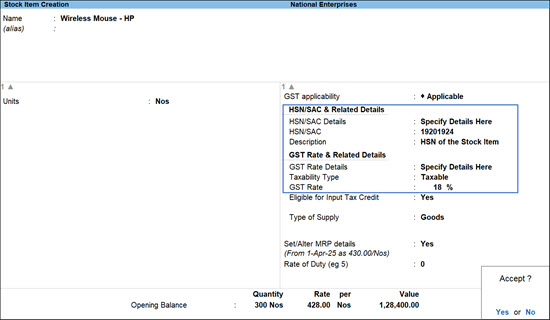
- Configure MRP for the stock items for GST calculation.
This is applicable, if your stock items have different slab rates and you want to consider MRP for calculation of GST rate under the slab rate.- Press F12 (Configure) > set Provide MRP details to Yes.
- In the stock item screen, enable Set/Alter MRP details to Yes.
- In the MRP Details screen:
- Allow MRP modification in voucher: Set this option to Yes, if you want to modify the MRP during the transaction.
- Enter the MRP Rate.
- Set the applicability date for MRP.
- Provide other necessary details, and press Ctrl+A to save.
Is this information useful?
YesNo


