
Set Up Stock Groups for e-Invoicing in TallyPrime (KSA)
When you have several stock items that are exempt, taxable, or zero-rated, you can group them under a dedicated stock group and define the VAT details at the group level. This helps you manage taxability more efficiently and avoids updating each item individually.
If the required stock groups are already in place, you can simply alter the existing groups and update the VAT details as needed.
- Create your Stock Group, as required.
- Press F12 (Configure) > enable Provide language aliases or Name and enter the name of the stock group in Arabic.
- Configure the Stock Group for VAT.
- Press F12 (Configure) and enable Set VAT details.
- Enable Set/Alter VAT details, if you have set Nature of Group as Expenses or Income.
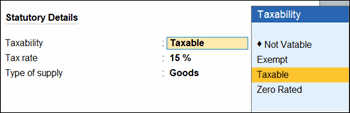
- Taxability is set to Taxable by default, as defined at the company level. Change the Taxability to Not Vatable, Exempt, or Zero Rated, as required.
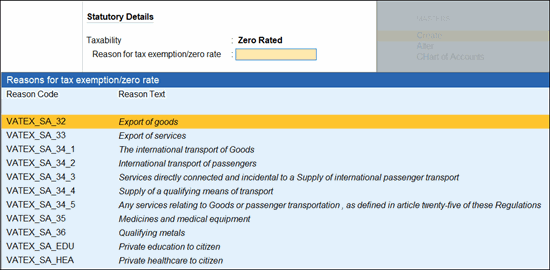
- Update the Reason for tax exemption/zero rate, if you have set Taxability as Not Vatable, Exempt, or Zero Rated.
For Taxability as Not Vatable, update the reason in local language.
- Ensure that Tax rate is updated as per the Taxability.
- 15%, if you have set Taxability as Taxable.
- 0%, if you have set Taxability as Not Vatable, Exempt, or Zero Rated.
- Provide other necessary details, and press Ctrl+A to save.
Is this information useful?
YesNo


