
Set Up Sales/Purchase Ledgers for GST
Depending on your business practices, you can configure your sales and purchase ledgers with the required GST details.
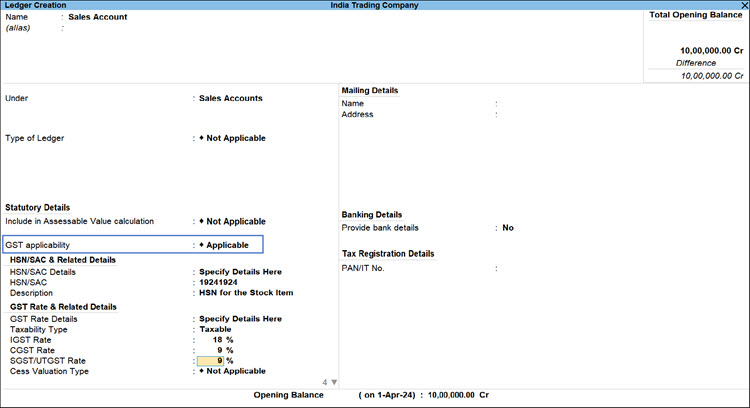
- Create your Sales/Purchase ledgers under Sales Account/Purchase Account.
- Configure the purchase ledger for GST.
- Set GST applicability to Applicable.
- Set HSN/SAC and GST Rate details, as required.
This option is needed, if you want to set the HSN/SAC and GST Rates to be considered from the ledger.
- Configure the purchase ledger for RCM.
- Press F12 (Configure) > set Enable Reverse Charge calculation to Yes.
- Set Applicable for Reverse Charge to Yes.
For TallyPrime 2.1 & earlier, set Is reverse charge applicable to Yes.
- Provide other necessary details, and press Ctrl+A to save the ledger.
Is this information useful?
YesNo


