
Set Up Expense Ledgers for GST
If your business maintains and tracks expenses and the impact of the expense on GST calculation, you can create the required expense ledgers and configure them for GST.
Set Up for GST Calculation
- Create your Expense ledgers, under Direct Expenses or Indirect Expenses.
- Configure the expense ledger for GST.
- GST applicability: Applicable.
- Set HSN/SAC and GST Rate details, as required.
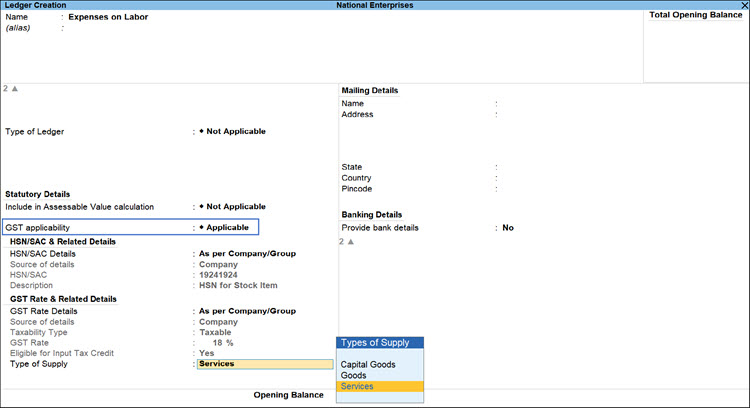
- Enter other necessary details as needed, and press Ctrl+A to save.
Set Up for Assessable Value Calculation
- Create your Expense ledgers, under Indirect Expenses.
- Type of Ledger: Not Applicable.
- Set Include in Assessable Value Calculation as GST.
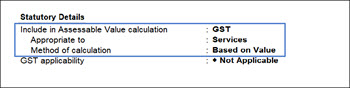
- Appropriate to: Select:
- Goods: If the expense or income value has to be included in the stock item cost.
- Services: If the expense or income value has to be included in the service value.
- Good & Services: If the expense or income value has to be included in stock item cost or service value.
- GST applicability: This is set to Not Applicable and cannot be changed.
Set Up for ITC Reversal
- Create your Expense ledgers, under Indirect Expenses.
- GST Applicability: Set to Not Applicable.
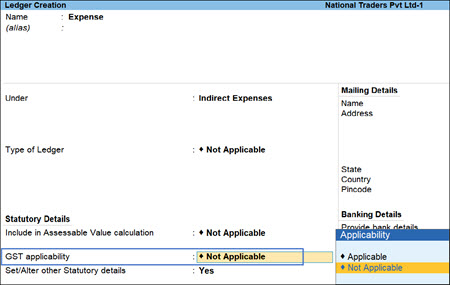
- Fill in other necessary details, and press Ctrl+A to save the ledger.
Is this information useful?
YesNo


