
Record Purchase of Fixed Assets/Capital Goods Under GST
In TallyPrime, you can create purchase vouchers for capital goods or fixed assets like buildings, machinery, equipment, vehicles, tools, and so on, and avail input tax credit.
The topic Purchases with GST in TallyPrime further showcases the business scenarios that TallyPrime handles with ease.
Let us proceed using the sample company, National Electronics, which purchases machinery.
Before you begin | Prerequisites
- Make sure you are familiar with creating Purchase vouchers in TallyPrime.
- Create a Capital Goods ledger under Fixed Assets, and ensure that the Type of Supply is set as Capital Goods.
- Create an Expense ledger under Indirect Expenses, and ensure that GST Applicability is set as Not Applicable.
Create Voucher for Purchase of Capital Goods/Fixed Assets

- Press Alt+G (Go To) > Create Voucher > F9 (Purchase), and press Ctrl+H to choose Accounting Invoice.
- Under Particulars, select the Capital Goods ledger and enter the Amount.
- Select the applicable GST ledgers.
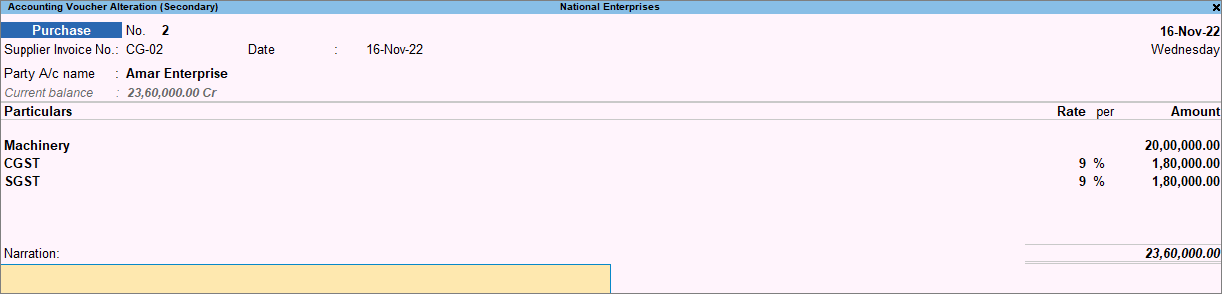
- Complete the entries, and save the voucher by pressing Ctrl+A.
You can see the transaction in GSTR-3B under Eligible for Input Tax Credit.
Reversal of ITC on Manufacturing Exempt Supplies
TallyPrime enables you to reverse the input tax credit on GST purchase of capital goods in cases of manufacturing of exempt supplies.
As per GST rules, you need to avail ITC on the purchase of capital goods in the same month of purchase. There is no provision to avail or carry forward ITC for a period of 5 years. If you are manufacturing exempted goods, calculate the ITC per month [Total ITC/60, (5 years * 12 months)]. As and when the exempted goods are manufactured, you can reverse the ITC to the extent of exempted turnover in the same month (ITC per month * exempted turnover/ total turnover). Based on the return filing period, you can compute the ITC per month or per quarter, and reverse the ITC accordingly.
- Press Alt+G (Go To) > Create Voucher > F7 (Journal).
- Press Alt+J to update the Stat Adjustment Details:
- Type of duty\tax: GST
- Nature of Adjustment: Reversal of Input Tax Credit
- Additional Details: Capital credit due to exempted supplies – Rule 43(1)(h)
- Debit the Expenses ledger where the GST Applicability is set to Not Applicable.
- Credit the CGST ledger.
Based on the Taxable Value of goods used for personal consumption, enter the ITC to be reversed. Enter the corresponding tax Rate and Taxable Value. - Credit the SGST/UTGST ledger.

- Complete the entries, and save the voucher by pressing Ctrl+A.
The transaction will appear in GSTR-3B under Input Tax Credit Reversed.


