
Record Indirect Incomes Under GST
With TallyPrime, you can easily record indirect incomes under GST using a Journal voucher.
Let us proceed using the sample company, National Electronics, which generates indirect income like a sales commission or the sale of fixed assets that are taxable under GST.
Before you begin | Prerequisites
- Make sure that GST details are configured for your Company. If you have multiple GST registrations, you may configure all registrations in the same Company.
- Though you can create masters in the flow of your transactions, it is recommended that you set up masters to ensure consistency in GST details.
- Configure GST details in party masters.
- Create necessary tax ledgers: CGST, SGST/UTGST, and IGST.
- Create an Expense ledger under Indirect Expenses, and set the Nature of transaction as Local Purchase – Taxable.
- Make sure you are familiar with creating Journal vouchers in TallyPrime.

- In the Journal voucher, press F12 (Configure) and enable Modify GST & HSN/SAC related details and Provide Reference No. and Date.
- Enter the Supplier Invoice No. and Date.
- Under Particulars, debit the income and tax ledgers and credit the party ledger.
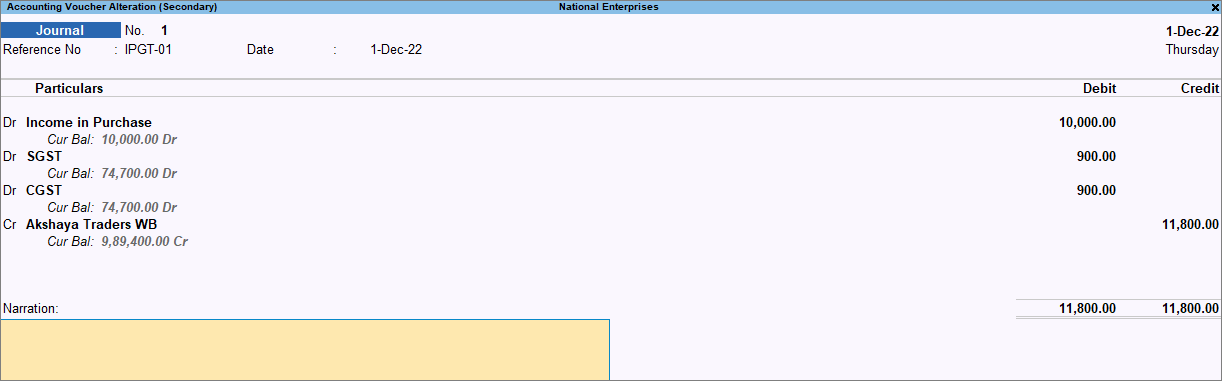
- Complete the entries and press Ctrl+A to save the Journal voucher.
The transaction will appear in GSTR-3B under Eligible for Input Tax Credit.
The topic Purchases with GST in TallyPrime further showcases the business scenarios that TallyPrime handles with ease.
Is this information useful?
YesNo


