
Record Import of Goods Under GST
TallyPrime helps you easily manage your import of goods. You can create purchase vouchers to account for imports with IGST as well as Customs Duty.
In TallyPrime Release 3.0 and later, the tax liability is raised as you record a purchase voucher. However, if you are using Release 2.1 or earlier, then you can raise the tax liability and claim input tax credit using a Journal voucher.
The topic Purchases with GST in TallyPrime further showcases the business scenarios that TallyPrime handles with ease.
Let us proceed using the sample company, National Electronics, which imports appliances for sales in their chain of outlets in India.
Before you begin | Prerequisites
- Make sure you are familiar with creating Purchase, Journal, and Payment vouchers.
- Create Customs Duty ledger.
Create Voucher for Import of Goods with GST

- Press Alt+G (Go To) > Create Voucher > F9 (Purchase), and press Ctrl+H and choose Item Invoice.
- In Party A/c name, select the ledger of the party located outside India.
- Select the items applicable for reverse chargeable.
- Select Customs Duty and IGST ledgers.
- Enable Provide GST/e-Way Bill details, and enter the Bill of Entry No., Date, and Port Code.
- Complete the entries, and save the voucher by pressing Ctrl+A.
The voucher will appear in GSTR-3B under Input Tax Credit Available (either in part or in full).
Create Voucher for Import of Goods with Customs Duty Included
You also have the option to add Customs Duty directly to the Taxable Value in the Purchase voucher.
- Press Alt+G (Go To) > Create Voucher > F9 (Purchase), and press Ctrl+H and choose Item Invoice.
- Press F12 (Configure) and enable Modify GST & HSN/SAC related details.
- In GST Rate and Related Details, press F12 (Configure) and enable Override Taxable Value.
- Enter the Amount for the stock item for which you want to add Customs Duty.
- In GST Taxable Value Details, enable Override Taxable Value and enter the total Taxable Value.

- Select the IGST ledger.
- Complete the entries, and save the voucher by pressing Ctrl+A.
The voucher will appear in GSTR-3B under Import of Goods.
If you are using TallyPrime Release 2.1 or earlier, click here.
Include Customs Duty in the Taxable Value
- Open the purchase invoice recorded earlier.
- Select the purchase ledger.
- Select the stock item, and enter the quantity and rate. The GST Details screen appears.
- Calculate the value of customs duty according to the rate specified by the department, and add it to the original taxable value. Enter the total amount in Taxable Value.

- Accept the screen. As always, you can press Ctrl+A to save.
Create Journal Voucher to Increase Tax Liability
Applicable for TallyPrime Release 2.1 & earlier versions
- Press Alt+G (Go To) > Create Voucher > F7 (Journal).
- Debit the ledger created for tax on imports under Current Assets.
In the ledger, ensure that GST applicability is set to Not Applicable. - Select the IGST ledger.
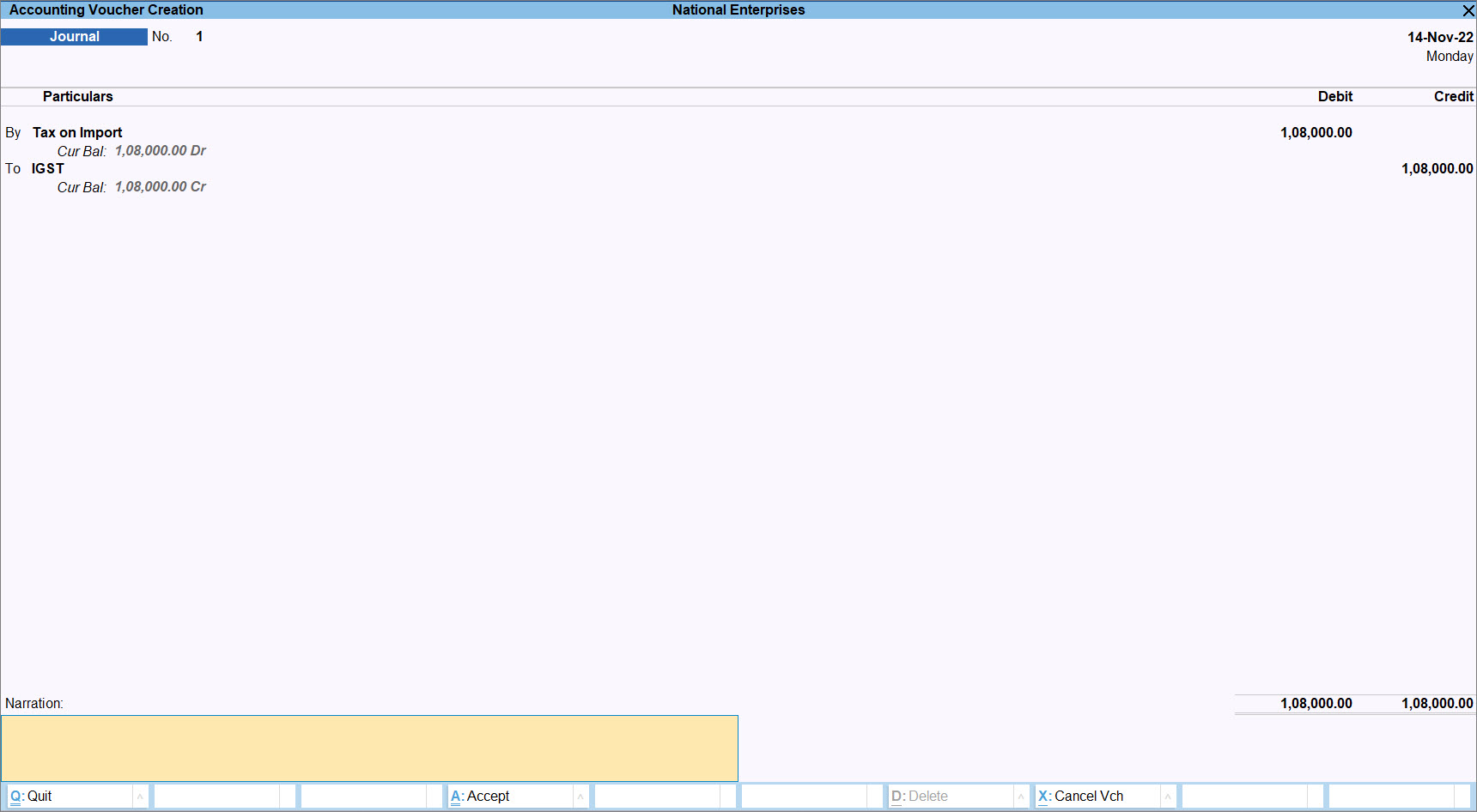
- Complete the entries, and save the voucher by pressing Ctrl+A.
In the import of goods under GST, taxes and duties are paid on a reverse charge basis, that is, the liability to pay tax on the supply of goods is on you instead of the supplier. In TallyPrime, you can record a liability in your Books of Account by creating a Journal Voucher.
Create Voucher for Payment of Custom Duty and IGST
The taxes and duties on imports have to be paid on the basis of reverse charge. After paying taxes against the import of goods, you can create a Payment voucher in TallyPrime to record the Customs Duty paid for each consignment.
- Press Alt+G (Go To) > Create Voucher and press F5 (Payment).
- Under Particulars, select the Customs Duty ledger with Inventory Values are affected set to Yes.
- In Inventory Allocations, select the item and enter only the Amount.
- Select the IGST ledger and enter the tax Amount.
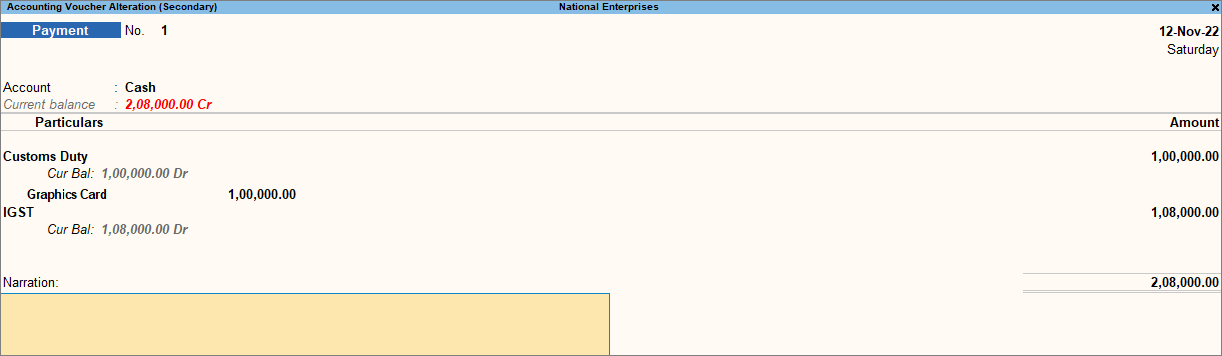
- Complete the entries, and save the voucher by pressing Ctrl+A.
Claim ITC for Tax Paid on Imports
After paying tax for the import of goods, you can claim Input Tax Credit on the liability. In TallyPrime, you can record a Journal voucher with the Nature of Adjustment as Increase in Input Tax Credit to claim ITC.
- Press Alt+G (Go To) > Create Voucher and press F7 (Journal).
- Press Alt+J and enter the Stat Adjustment Details for claiming ITC.
- Type of duty/tax: GST
- Nature of Adjustment: Increase in Input Tax Credit
- Additional Nature of Adjustment: Import of Goods
- Press Ctrl+A to save the details.
- Debit the IGST ledger and credit the ledger created for tax on imports.
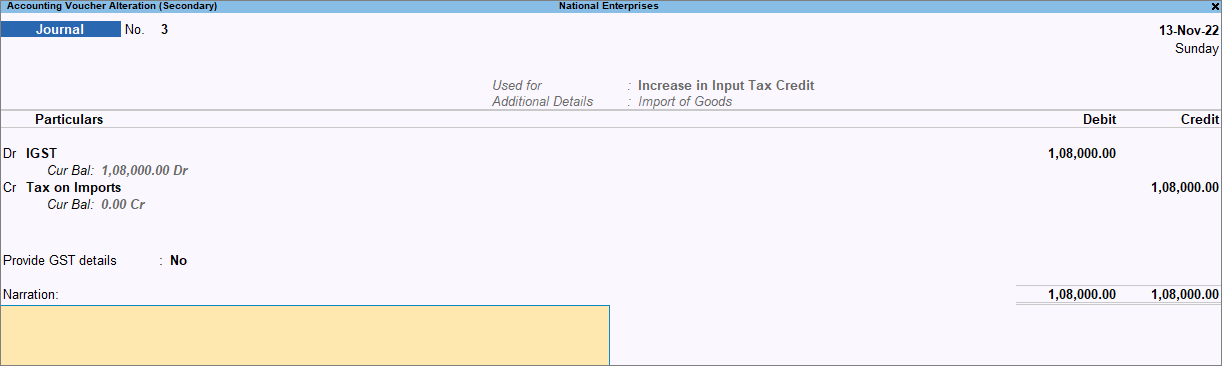
- Save the voucher by pressing Ctrl+A.
To know how to record Import of Services, refer to Import of Services in TallyPrime Under GST Reverse Charge (RCM).


