
Calculate GST on Inward Remittance of Service Value
With TallyPrime, you can easily record GST payments on the inward remittance of service value, which will appear in your GSTR-3B.
Let us proceed using the sample company, National Electronics, which provides services to a foreign party and receives payments in a foreign currency. Accordingly, the bank charges inward remittance for the foreign currency exchange. As inward remittance is part of the service value, it will not affect the books of accounts. However, the GST on remittance has to appear in GSTR-3B under Eligible for Input Tax Credit.
Before you begin | Prerequisites
- Make sure you are familiar with creating Payment vouchers in TallyPrime.
- In the Payment voucher type, enable Allow zero-valued transactions.
- In the expense ledger, set:
- Is GST Applicable to Applicable
- Set/alter GST Details to No
- Type of Supply to Service
Let us consider a scenario where 18% GST has to be charged on an inward remittance of Rs 2,750 for a service value of Rs 4,50,000.
- In the Payment voucher, press F12 (Configure) and enable Modify Tax Rate details of GST.
- Select the bank ledger and then the expense ledger.
- In GST Details, select Purchase Taxable as the Nature of Transaction, and enter the tax Rate and Taxable Value.
- Do not enter an Amount for the expense ledger, as this is a zero-valued transaction for recording GST.
- Select the GST ledgers and enter the calculated tax amount.
In this example, the total GST amount would be Rs 495 (calculated as 2,750 * 18/100 = 495).
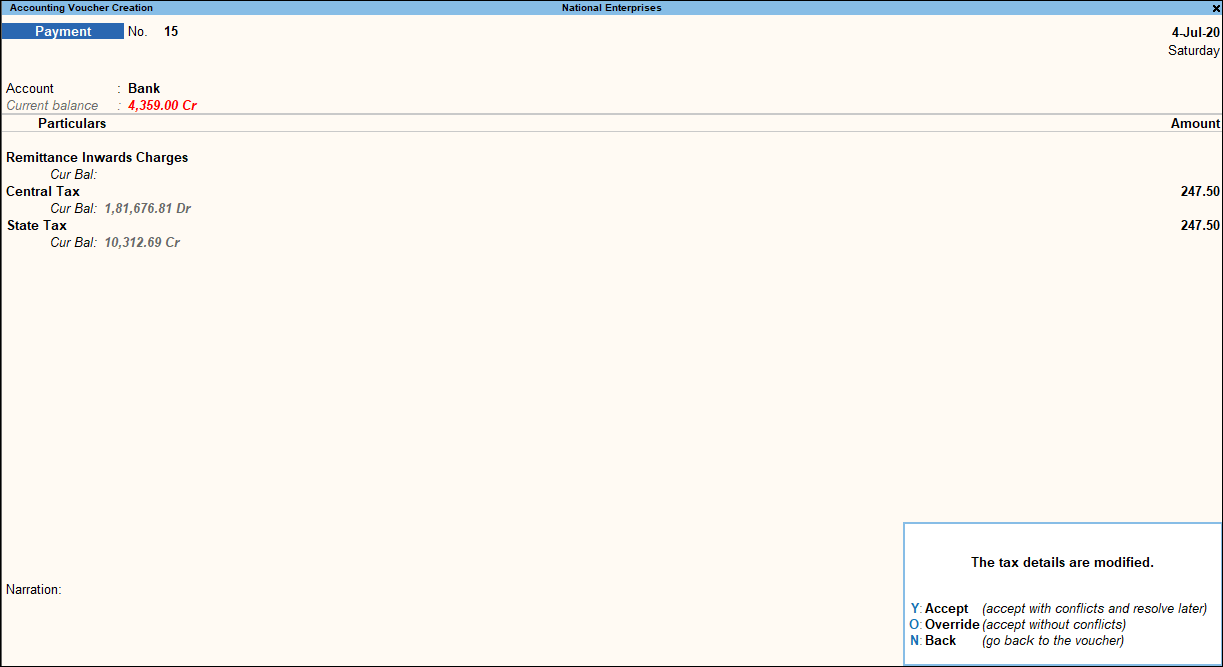
- Press O to override and save the voucher.
The transaction will appear in GSTR-3B under Eligible for Input Tax Credit.


