
Record Purchase from SEZ in TallyPrime
For TallyPrime 3.0 & later
In TallyPrime, you can record GST Purchase from SEZ, including Nil Rated, Exempt, or LUT/Bond GST purchases. TallyPrime also helps you easily handle the Bill of Entry during SEZ purchases, which is essential for customs, duty and GST compliance, and helps in ITC claims.
The topic Purchases with GST in TallyPrime further showcases the business scenarios that TallyPrime handles with ease.
Let us proceed using the sample company, National Electronics, which purchases appliances from manufacturers in SEZ.
Before you begin | Prerequisites
- Make sure you are familiar with creating Purchase vouchers in TallyPrime.
- Ensure the supplier ledger has the Registration Type set as Regular – SEZ.
Create Voucher for Purchase from SEZ – Taxable with Bill of Entry
- Press Alt+G (Go To) > Create Voucher > F9 (Purchase), and press Ctrl+H to choose Item Invoice or Accounting Invoice.
- In Party A/c name, select the supplier’s ledger with the Registration Type as Regular – SEZ.
- In Party Details, set Is Bill of Entry Available to Yes.
- Select the Purchase ledger with the Taxability Type as Taxable.
- Select the Natures of Transaction as System Inferred.
- Set Provide GST/e-Way Bill details to Yes and enter the details of the Bill of Entry in Additional Details: Purchase from SEZ – Taxable.
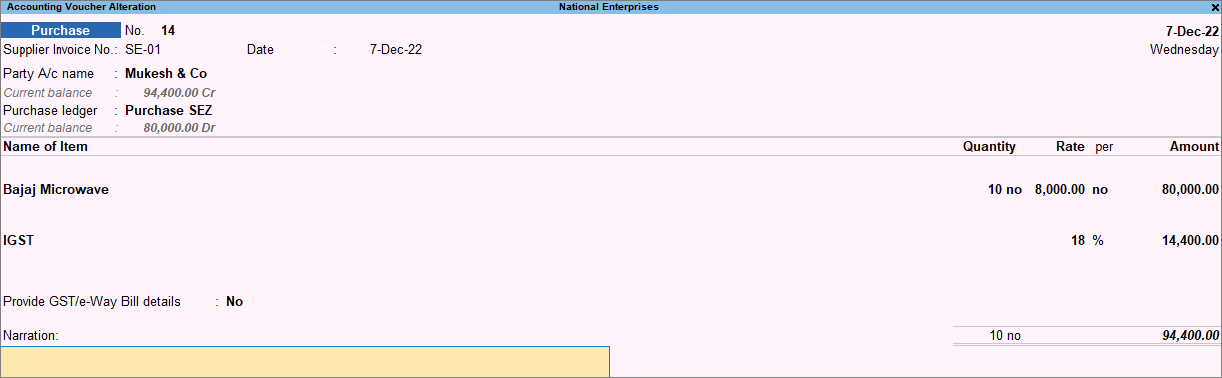
- Save the voucher by pressing Ctrl+A.
You can see the transaction in GSTR-3B under Exempt, Nil rated, and Non-GST Inward Supplies.
Create Voucher for Purchase from SEZ – Taxable Without Bill of Entry
- Refer to the steps under Taxable with Bill of Entry for creating a Purchase voucher.
- In Party Details, set Is Bill of Entry Available to No.
Create Voucher for Purchase from SEZ – Nil Rated with Bill of Entry
- Refer to the steps under Taxable with Bill of Entry for creating a Purchase voucher.
- In Party Details, ensure that Is Bill of Entry Available is set to Yes.
- Select the Purchase ledger with the Taxability Type as Nil Rated.
Create Voucher for Purchase from SEZ – Nil Rated Without Bill of Entry
- Refer to the steps under Taxable with Bill of Entry for creating a Purchase voucher.
- In Party Details, set Is Bill of Entry Available to No.
- Select the Purchase ledger with the Taxability Type as Nil Rated.
Create Voucher for Purchase from SEZ – Exempt with Bill of Entry
- Refer to the steps under Taxable with Bill of Entry for creating a Purchase voucher.
- In Party Details, ensure that Is Bill of Entry Available is set to Yes.
- Select the Purchase ledger with the Taxability Type as Exempt.
Create Voucher for Purchase from SEZ – Exempt Without Bill of Entry
- Refer to the steps under Taxable with Bill of Entry for creating a Purchase voucher.
- In Party Details, set Is Bill of Entry Available to No.
- Select the Purchase ledger with the Taxability Type as Exempt.
Create Voucher for Purchase from SEZ – LUT/Bond
No tax is applicable for GST purchase from SEZ – LUT/Bond. Such purchases can be made when your supplier has signed a letter of undertaking with the department for the sale of goods without payment of duty.
While recording the purchase, you can select either the ledger created for exempt SEZ purchases or the common purchase ledger.
Create voucher for purchase from SEZ – LUT/Bond with Bill of Entry
- Enter the LUT/Bond details in Company GST Details.
- Refer to the steps under Taxable with Bill of Entry for creating a Purchase voucher.
- In Party Details, ensure that Is Bill of Entry Available is set to Yes.
Create voucher for purchase from SEZ – LUT/Bond without Bill of Entry
- Enter the LUT/Bond details in Company GST Details.
- Refer to the steps under Taxable with Bill of Entry for creating a Purchase voucher.
- In Party Details, set Is Bill of Entry Available to No.


