
Carry Forward the Balance of Salary Advance in TallyPrime
If salary advances were not recovered in the previous financial year, you must carry forward the outstanding balance to the current year. Alternatively, if you have started using the Payroll feature in the current financial year, record the opening balance of salary advances given to employees.
Step 1: Create a new Salary Advance ledger
- Press Alt+G (Go To) > Create Master > Ledger.
- Group the ledger under Loans and Advances (Asset).
- Set the Opening Balance of this ledger equal to the closing balance of the Salary Advance pay head ledger.
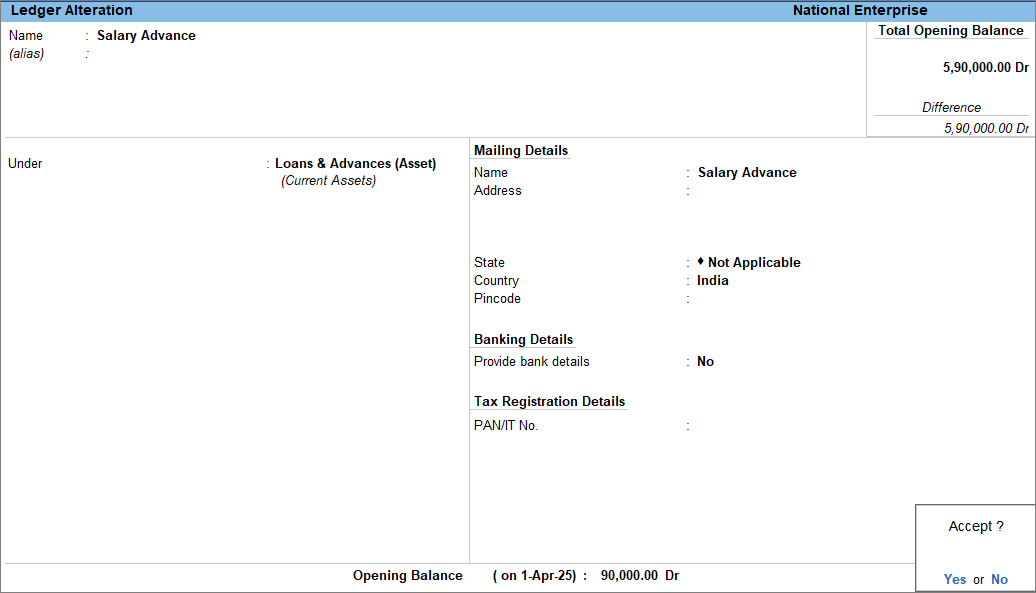
- Fill in other details, if needed, and press Ctrl+A to save.
Step 2: Record a Journal entry
- Press Alt+G (Go To) > Create Voucher > press F7 (Journal).
- Debit the Salary Advance Pay Head ledger and enter the required amount.
- Select the Employee Category, if applicable.
- Choose the employee who has an outstanding salary advance balance.
- Credit the Salary Advance accounting ledger.
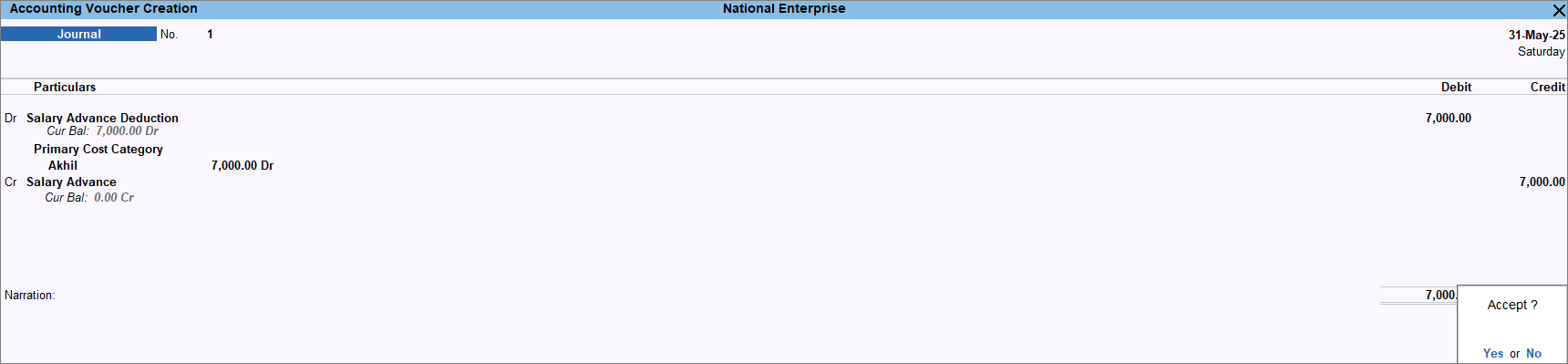
- Press Ctrl+A to save the voucher.
Once the balance is transferred, you can continue to recover the remaining amount from the employees.
Is this information useful?
YesNo


