
View Edit Log for Masters and Transactions
You can view the Edit Log for masters and transactions to track actions such as creation, alteration, and deletion, including changes to narrations, voucher numbers, and other modifications that impact company data.
- Open TallyPrime Edit Log or enable Edit Log in TallyPrime.
Once Edit Log is enabled, any subsequent changes made to masters or vouchers are recorded in the Edit Log report. - Open such master or voucher in alteration mode and press Alt+Q (Edit Log).
The Edit Log report displays Version, Activity, Username, and Date & Time.
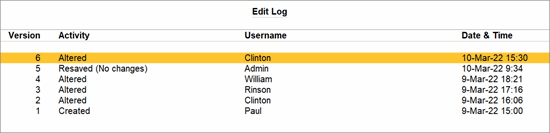
- Select any version and press Enter to view the differences between the Edit Log Versions.
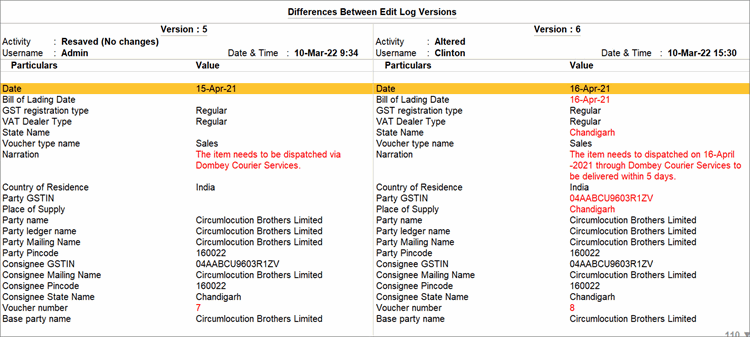
- TallyPrime highlights the changes made in the transaction as compared to its previous version in red text.
Similarly, you can drill down to any version and view the comparison between the version and its previous one.You will not be able to drill down on the Resaved version as there are no data of changes between the versions.
- To highlight only the values that you have changed in the transaction in red text, press F12 (Configure) and enable Show altered values only.
- To view the difference in the configurations of both the versions, press F12 (Configure) and enable Show configuration-based value (such as Yes/No, or change from blank to Not Applicable/Primary).
- To view the internal fields that get updated in the application as a result of alteration, press F12 (Configure) and enable Show internal fields updated by the application.
After configuring, as shown above, the changes updated in the recent version will be highlighted in red.
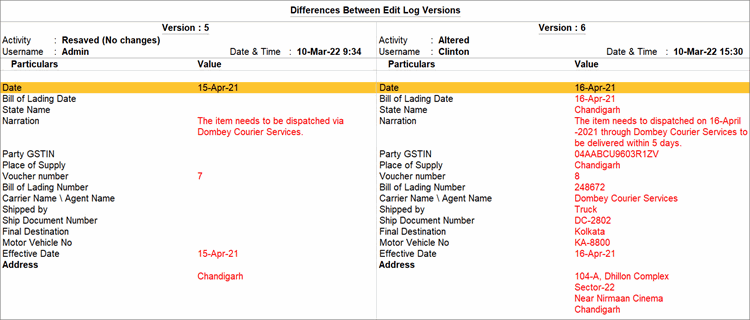
Refer to the Voucher Type-wise Summary and Master-wise Summary for more details.
Questions & Answers
- If the method of voucher numbering is set as Automatic or Multi-user Auto in a particular Voucher Type, what impact does re-numbering voucher numbers have?
If the voucher numbering method is set to Automatic or Multi-user Auto for a voucher type, deleting a voucher or modifying its date automatically re-numbers the subsequent vouchers. These actions are also recorded in the Edit Log report.
Is this information useful?
YesNo


