
Value Error While Exporting Data to GSTR-3B
Error: While exporting data to GSTR-3B Excel utility template, the #Value! error appears in the Total row. How do I resolve this issue?
Cause: This error may appear when English (United States) is used as the keyboard language. Since the English (United States) keyboard does not have the rupee symbol, the Total of values exported to GSTR-3B template may appear with the error #Value!.
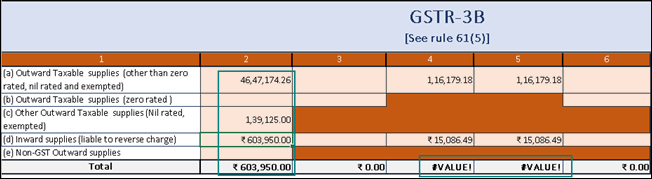
To resolve this issue:
- Change the keyboard language to English (India):
Go to Control Panel > Language > Language options, and select English (India) as the Input method. - Export your GSTR-3B data from TallyPrime to a fresh MS Excel template of GSTR-3B.
Is this information useful?
YesNo


