
GSTR-4 in TallyPrime: Review & File Your Annual Return
If you are a GST Composition dealer, then GSTR-4 is your annual return. Once your CMP-08 quarterly filings are done, you can proceed to annual filing. Accordingly, the GSTR-4 report in TallyPrime helps you in:
- Automated summaries: Groups all your outward sales, RCM purchases, imports, and exempt supplies into the exact table formats as per the GST portal.
- Complete accountability: Helps you drill down from high-level summaries to individual vouchers, so that you can account for every rupee.
- Error-free filing: Uncertain Transactions automatically flag missing party GSTIN/UIN, invalid tax rates, or incomplete voucher details before you export, ensuring your return isn’t rejected by the GST portal.
- Instant export: Generates a filing-ready Excel file, saving you hours of manual data entry on the GST portal.

Before filing GSTR-4:
- Ensure CMP-08 filing for all the four quarters.
- Cross-check your annual turnover in GSTR-4 against the sum of your quarterly CMP-08 statements.
This ensures complete consistency across your filings. - Keep the GSTR-4 Offline Tool ready for creating a JSON of your return.
- For upload and filing on the portal, ensure that you have internet connectivity and GST login credentials.
I. Review Filing Details
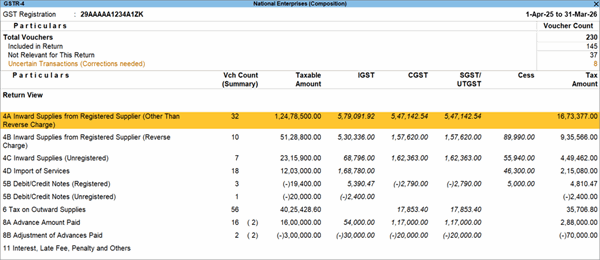
- Press Alt+G (Go To) > GSTR-4.
- Press Alt+F2 (Period) and set the full filing period, for example, 01-Apr-2025 to 31-Mar-2026.
- Review key details:
- Tables 4A & 4B: B2B purchases (regular and RCM) from registered dealers.
- Tables 4C & 4D: Unregistered purchases and RCM tax liabilities, including imported services.
- Table 5B: Debit/Credit Notes for your purchase returns from registered and unregistered dealers.
- Table 6: Your total taxable turnover and tax payable, as per GST Composition tax rates.
- Tables 8A & 8B: Your GST Advances Paid and Adjusted, along with the Nett Liability on Advances.
- Table 11: Any interest amount, late fees, penalties, and so on.
II. Resolve Uncertain Transactions
- Press Alt+G (Go To) > GSTR-4 > Uncertain Transactions.
- Drill down and correct any missing or invalid details, such as party GSTIN/UIN or State names.
If you want to retain any details, such as Taxability Type, then press Alt+J (Accept As Is).
Before exporting the returns, ensure that you have zero Uncertain Transactions.
III. Export Return Data
- In GSTR-4, press Alt+E (Export) > GSTR-4.
- Continue with Excel (Spreadsheet) as the File Format.
- Specify the Folder Path where you want to save the exported data.
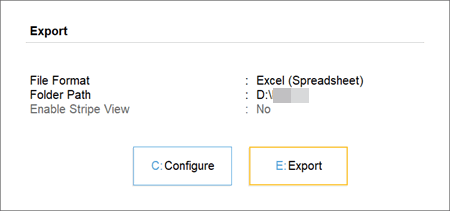
- Press E (Export) to continue.
Now you can open the Offline Tool and copy the return details from the exported Excel.
IV. Create JSON Using Offline Tool
- In the Offline Tool, click Validate Sheet to view the status of each sheet.
- In the Home tab, click Get Summary > Generate JSON File to upload.
Once the JSON is generated, you will receive a confirmation message.
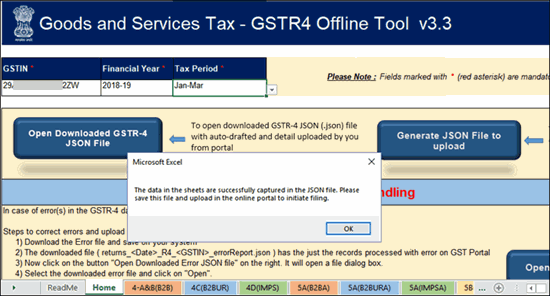
- Press Enter and save the file in your required location.
Now you can upload this JSON file on the GST portal.
V. File Returns on the GST Portal
- In the GST portal, navigate to Services > Returns > Annual Return.
- Select the Financial Year and click GSTR-4.
- Click Prepare Offline > Upload > Choose File, and select the JSON file created using the Offline Tool.
- Once the JSON is uploaded, review the auto-populated tables, verify your tax liabilities, pay any pending interest/late fees, and file using your EVC or DSC.
If your transaction volume is low, you can select Prepare Online (in step 3), refer to your GSTR-4 details in TallyPrime, and manually fill the details on the portal. For further details, refer to the official manual.
Questions & Answers
- How do I prepare the Offline Tool for creating a JSON of GSTR-4?
- On the GST portal, click Downloads > Offline Tools > GSTR-4 Offline Tool > Download.
- Click Proceed. A .zip file containing the Offline Tool will be downloaded.
- Extract the Offline Tool from the .zip file and save it in your TallyPrime installation folder.
Now you can create a JSON of your GSTR-4 details.
- Can I file GSTR-4 if I missed filing CMP-08 for a quarter?
Yes, but it is not recommended. The GST portal allows independent filing of GSTR-4, but if there are any mismatches with missing CMP-08 quarters, you may receive a notice from the GST department. It is best to complete all four CMP-08 filings first. - What should I do if the JSON upload fails on the GST portal?
Check for any formatting errors or version mismatches with the tool. In TallyPrime, resolve any Uncertain Transactions, re-export the Excel, and create a JSON. Also ensure you are uploading in the correct financial year on the portal. - On the GST portal, when should I use ‘Prepare Online’ instead of uploading the JSON?
Use the Prepare Online option only when your transaction volume is very low and you can manually enter the values. For most businesses, it is faster and less error-prone to upload the JSON from the Offline Tool using TallyPrime. - Can I revise GSTR-4 after filing?
No. GSTR-4 cannot be revised once filed. Hence, before submitting, it is important to resolve all Uncertain Transactions in TallyPrime and cross-check your turnover against CMP-08 totals.
Is this information useful?
YesNo


