
Print Income Tax Form 16 in TallyPrime (Payroll)
Form 16 is a certificate issued for tax deducted at source (TDS) on income chargeable under the Salaries head.
The format of Form 16 for the tax regime under Section 115BAC has not yet been notified by the department. Therefore, Form 16 is generated based on the format used in the previous year. The existing format continues to apply for the regular tax regime.
You can generate Form 16 along with Annexure A or Annexure B, based on the Deductor Type selected in F11 (Features) of the company:
- Annexure A: Applicable if the Deductor Type is Government
- Annexure B: Applicable if the Deductor Type is Others
Generate Form 16
- Gateway of Tally > Display More Reports > Payroll Reports > Statutory Reports > Income Tax > Form 16.
- Select the required Employee from the List of Employees and press Enter.
- Press C (Configure) for print configurations.
- Specify the Period in the respective From and To fields.
- Quarter Acknowledgement details: Enter the acknowledgement number of the TDS returns filed for the respective quarter.
- CIT (TDS) Details: Provide the address of the Commissioner of Income Tax having jurisdiction over TDS deductions for the assessee.
- Name of the Person Responsible: Specify the name of the person responsible for income tax deduction.
- Son/Daughter of: Enter the father’s name of the TDS deductor.
- Designation: Mention the designation of the person responsible for TDS deduction.
- Challan till date: Specify the date up to which challan payments should be considered.
- Type of Copy: Select whether the copy is Original or Duplicate.
- Include Previous Employer Income: Enable this option to include income earned from the previous employer in Form 16.
- Include ‘Part A’ while printing: Enable this option to include Part A details in the printed Form 16.
- Press I (Preview) or P (Print).
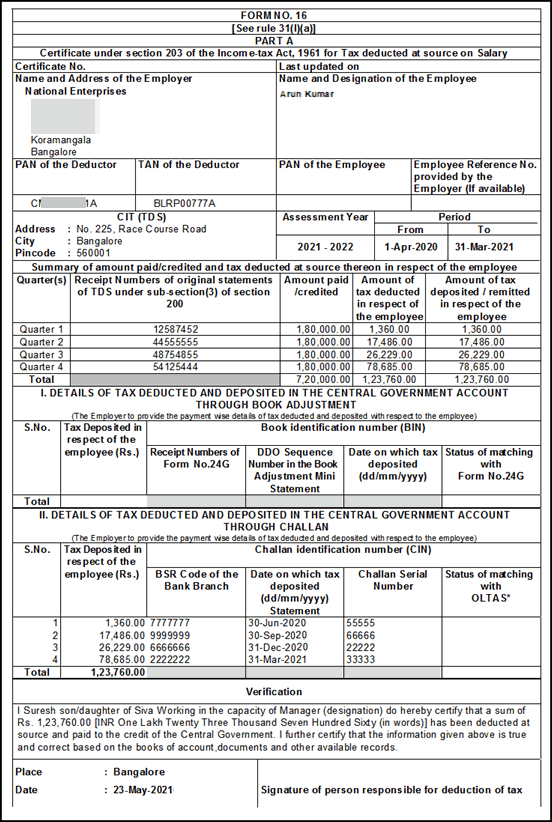

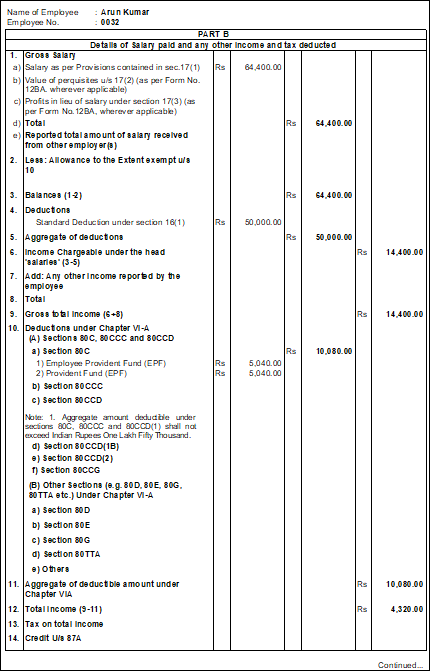
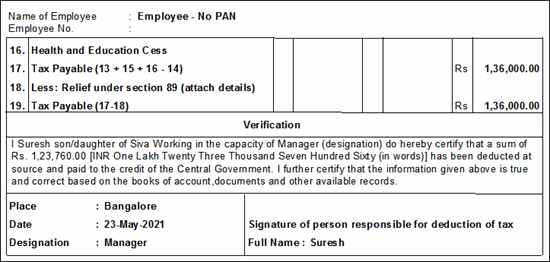
Similarly, the Form 16 can be generated for all the employees.
Note: In Form 16, the value declared for Rajiv Gandhi Equity Saving Scheme will be printed in Section 9, Deductions under Chapter VIA.
As per Finance Bill 2024-25, for employees under New Tax Regime, the Standard Deduction has been revised from Rs. 50,000 to Rs. 75,000. To know more about the latest income tax slab rates of the new tax regime, refer to the Finance Bill (No.2) 2024-25 topic.
Facility is provided to print only the duplicate copies of Form 16.
Updates Supported as per the Latest Changes in the Tool
|
Field Name |
Updates |
|
1. Gross Salary: Reported total amount of salary received from |
The field is introduced to show the salary of the previous employer separately. To view this, enable Include Previous Employer Income while printing Form 16. This includes the following:
|
|
Allowances to the extent exempt under section 10 |
Every allowance exempt under Section 10 should be printed along with the section and clause number. For example: Transport Allowance 10(5) |
|
Deductions Under Chapter VIA: Each deduction should appear along with the section details. |
|
|
(A) Section 80C, 80CCC, 80CCD, |
— |
|
(B) Other Sections (such as 80E, 80G and 80TTA) under Chapter VI-A |
As in option A, each section will have the For example: a) Section 80D <component> |
|
Surcharge |
This field should be numbered as 15. This column should be introduced after the rebate column; therefore, while computing the net tax payable, this value should be considered. |


