
Update e-Way Bill Part B Offline in TallyPrime
With TallyPrime, you can update the Part B or Transporter ID of an e-Way Bill online and offline as well. Additionally, the Get EWB Info feature in TallyPrime ensures that even transactions handled offline or in other platforms are always updated with the latest e-Way Bill details.
Before you begin | Prerequisite
- Ensure that you have created an API user profile by selecting Tally (India) Pvt Ltd as the GSP.
- Ensure that you have logged in the e-Way Bill portal.
- Ensure that you have Enabled e-Way Bill in TallyPrime.
- Press Alt+Z > Send for e-Way Bill.
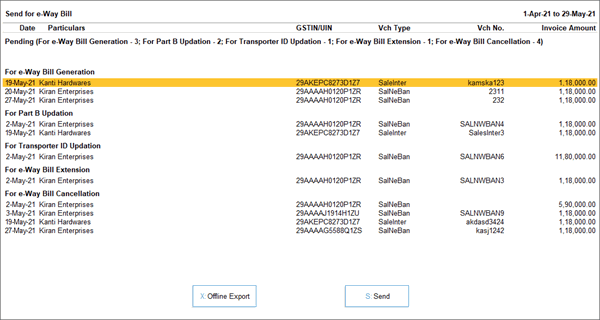
In the Send for e-Way Bill screen, you can view the transactions that are pending for generation, updation, cancellation, extension, and so on. - Select the required transactions and press X (Offline Export) to export the details. If you press X without selecting any transaction, then all the applicable transactions will be exported.
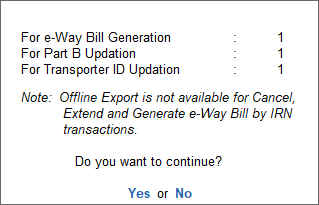
The following confirmation screen will appear, with the number of transactions lined up for e-Way Bill activities.
You can update Part B of e-Way Bills for Multi-GSTIN as well.
- In the Export screen, press C (Configure), if you want to change the details, such as the Folder path where JSON files will be exported.
- Press E (Send) to export the JSON files.
After exporting the JSON files, you can upload them on the portal and generate e-Way Bill information for the selected vouchers.
e-Way Bills for Multi-GSTIN
For TallyPrime 3.0 & later
You can update Part B of e-Way Bills even when you have multiple GST registrations.
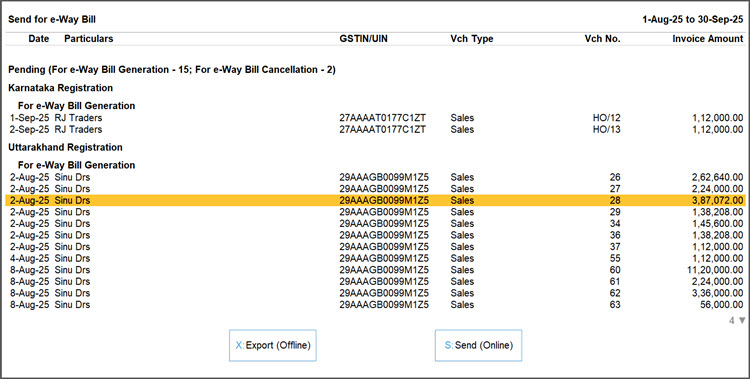
- In the Send for e-Way Bill screen, view and select vouchers for different GST registrations.
- In the e-Way Bill login screen, enter the login details for your registrations one by one.
Is this information useful?
YesNo


