
Undo IRN/e-Invoice Cancellation in TallyPrime
There might be certain instances where you might have cancelled the IRN for a particular voucher in TallyPrime, but now you want to undo this cancellation. For example, this might be needed when you had selected the wrong voucher for cancellation, or 24 hours have already passed since IRN generation, and the e-Invoice System won’t accept the cancellation anymore. In such cases, you can undo the IRN cancellation.
Before you begin | Prerequisite
-
Ensure that the IRN cancellation was performed in TallyPrime and not directly on the e-Invoice portal.
- Press Alt+G (Go To) > type or select e-Invoice > press Enter.
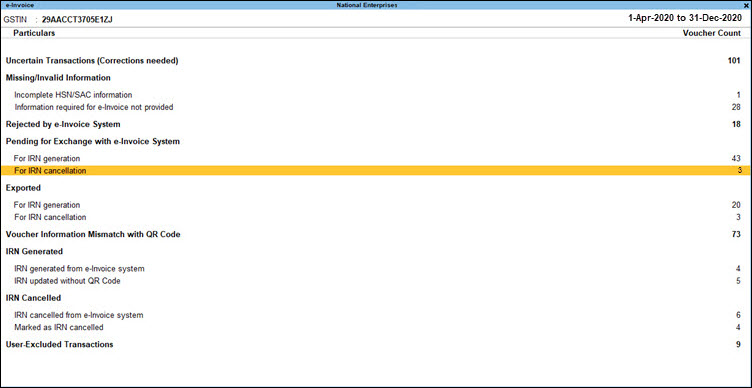
- In the e-Invoice report, drill down from the required section, which can be either Pending for IRN Cancellation, Exported for IRN Cancellation, or Marked as IRN Cancelled.

- Press Alt+F5 for more details. You can see details of the cancellation, such as Reason for Cancellation and Remarks.
- Select the voucher for which you want to undo IRN cancellation.
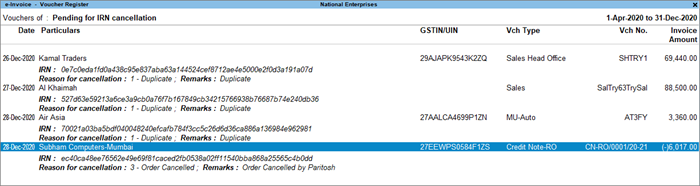
- Press Alt+F10 (Undo IRN Cancellation).
A message will appear to confirm the removal of Reason for cancellation and Remarks for the voucher.
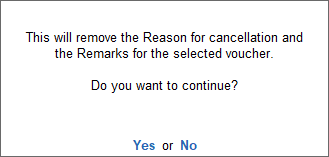
- Press Enter to proceed.
This will remove details of the cancellation (Reason for cancellation and Remarks), and the voucher will be moved to its original section.
Q&A
- Is there an option to immediately send a request to the GST portal when cancelling a voucher in TallyPrime?
No, you cannot send immediate requests to cancel a voucher from GST Portal after cancelling it from TallyPrime. When you cancel it from TallyPrime using Alt+X (Cancel), the transaction moves to the Voucher information mismatch with QR Code in e-Invoice report. You will be allowed to cancel the IRN using F10, stating the reason for cancellation. After that, you can send a cancel request to the GST portal from TallyPrime. - Are Remarks mandatory for cancellation?
Yes, Remarks are mandatory for cancellation to be sent along with Reason code for ensuring successful cancellation.
For any further queries, refer to e-Invoice – FAQ.
Is this information useful?
YesNo


