
View Expat Reports for Passport Expiry, Visa Expiry, Contract Expiry in TallyPrime (Payroll)
The Expat Reports provide a consolidated view of foreign nationals working in your organisation, whether on short or long-term assignments as regular or contract employees. They capture essential details such as passport, visa, and contract expiry dates, along with joining dates and document numbers. Information is available at both individual and group levels, giving a clear snapshot that helps track validity, plan renewals, and maintain oversight efficiently.
- Press Alt+G (Go To) > type or select Expat Passport Expiry > and press Enter.
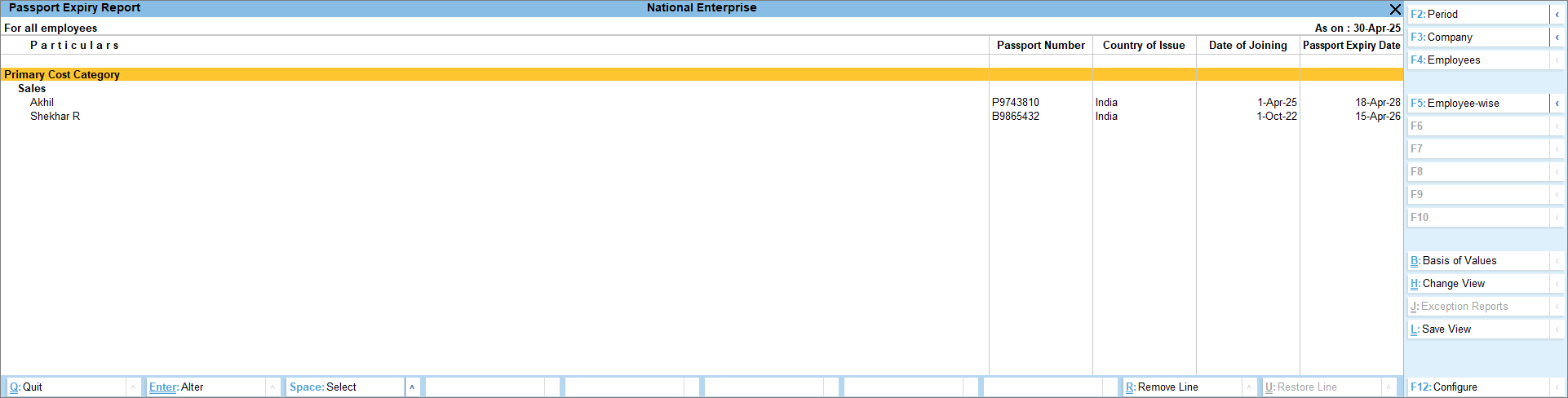
- Press F4 (Employees) and select the required category and individual employee or group.
- Press F5 (Employee-wise) to view the Passport Expiry details individually for Employees or toggle to view the report based on the Category.
- View the number of days left for expiry.
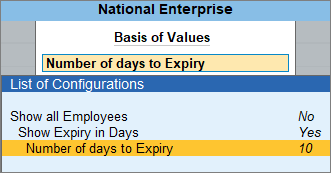
- Press Ctrl+B (Basis of Values) > disable Show all Employees > enable Show Expiry in Days.
- Enter the required number of days in Number of days to Expiry to display records that are due to expire within the specified period. For example, enter 10 to view items expiring in the next 10 days.
- To view related reports like Contract Expiry and VISA Expiry, press Ctrl+H (Change View)
Similarly, you can view the Contract and Visa Expiry report.
Is this information useful?
YesNo


