
View Single Pay Slip in TallyPrime (Payroll)
In TallyPrime, you can use the Single Pay Slip option to view the pay slip for an individual employee. You can also customise the content and layout as per your requirements, and then print or share the pay slip.
- Press Alt+G (Go To) > type or select Single Pay Slip > and press Enter.
- Select the employee for whom you want to view the pay slip.
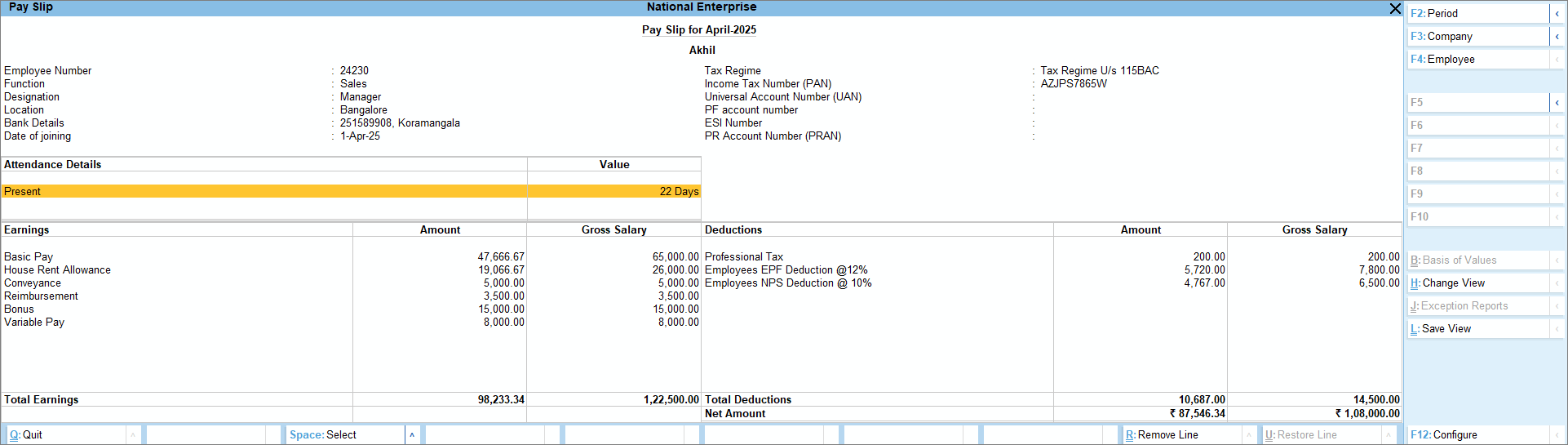
- Press F4 (Employee) to choose a different employee.
- Share the pay slip with employees.
From the Pay Slip screen, you can share the pay slip in the following ways:- Print Pay Slip: Press Ctrl+P (Current) > P (Print). To know more about printing pay slips, click here.
- E-mail Pay Slip: Press Ctrl+M (Current) > M (E-mail). To know more about e-mailing pay slips, click here.
- WhatsApp Pay Slip: Press Ctrl+Alt+W (Current) > W (WhatsApp). To know more about sharing pay slips through WhatsApp, click here.
- To view the pay slip in a vertical format or to view related reports like Pay Head Employee Breakup and IT Computation, press Ctrl+H (Change View).
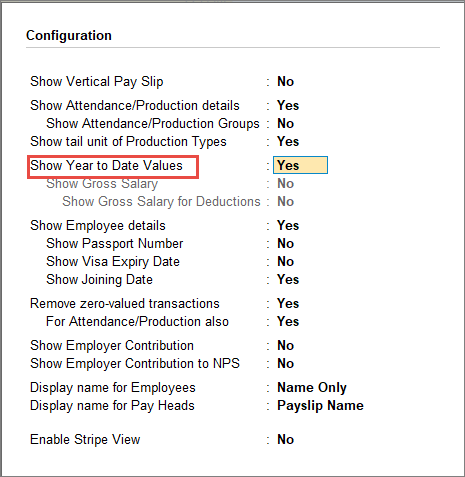
- To view cumulative attendance/production data or Earnings and Deductions for the current financial year, press F12 (Configure) and enable Show Year to Date Values.
Is this information useful?
YesNo


