
Validate and File TDS Returns in TallyPrime
After exporting the TDS return from TallyPrime, download the FVU version applicable to your return form and filing period from the Income Tax Department/Protean website. Validate the return using the FVU and complete the filing process.

Ensure that:
- You have exported the TDS return as a .txt file from TallyPrime.
- You have downloaded the FVU version applicable to your return form and filing period from the Income Tax Department/Protean website.
- You have downloaded the Challan Input File (.csi) relevant to your TDS return from the tax portal and keep it ready for filing.
Validate TDS Return
The File Validation Utility (FVU) checks whether the exported TDS return file conforms to the prescribed format.
- Download and run the FVU applicable to your return form and filing period.
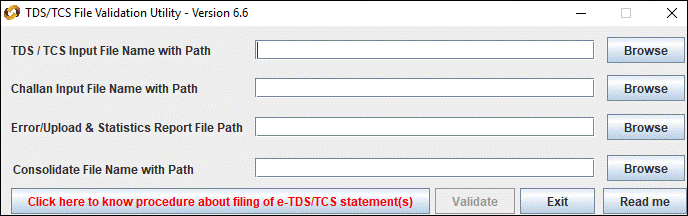
- In TDS / TCS Input File Name with Path, enter or select the exported TDS return .txt file.
- In Challan Input File Name with Path, enter or select the downloaded .csi file.
- In Error/Upload & Statistics Report File Path, specify the location where you want to save the report.
- Click Validate.
An HTML file with the same name as that of the text file is generated in the specified location.The FVU generates an error report if the return fails validation, or an upload and statistics report if the validation is successful.
If the file validation fails and the FVU displays an error,
- Open the generated HTML error report with the err suffix.
- Review the errors reported by the FVU.
- Correct the data in TallyPrime, as required.
- Re-generate the TDS return .txt file.
- Validate the updated .txt file again using the FVU.
File TDS Return
After the return is successfully validated, complete the filing process. For Form 26Q and Form 27Q returns, the FVU generates Form 27A after successful validation.
- Submit Form 27A along with the validated 26Q or 27Q .txt file at TIN-FC or upload on the NSDL website.
Questions and Answers
-
Which FVU should I use to validate the return?
Use the FVU version applicable to your return form and filing period. Check the latest FVU version and its applicable tax year on the Protean e-TDS/e-TCS download page before downloading the FVU.


