
Record Material In Voucher Under GST
For TallyPrime 3.0 & later
With TallyPrime, you can easily record the movement of your inventory with GST taxation, using the Material In voucher.
Let us proceed using the sample company, National Electronics. As a Principal Manufacturer, you can use the Material In voucher to record the receipt of finished goods from the Job Worker. As a Job Worker, you can use this voucher to account for the receipt of raw material from the Principal Manufacturer.
Before you begin | Prerequisites
- Make sure that GST details are configured for your Company. If you have multiple GST registrations, you may configure all registrations in the same Company.
- Though you can create masters in the flow of your transactions, it is recommended that you set up masters to ensure consistency in GST details.
- Configure GST details in party masters.
- Configure GST applicability in Material In voucher type.
- Create Stock Items with GST details.
- Create the required tax ledgers: CGST, SGST/UTGST, and IGST.

- In the Material In voucher, enter the Supplier Invoice No. and Date.
- In Party A/c name, select the party from whom you are getting the material.
- In Source Godown, select the godown from where you are getting the material.
- Specify the Name of Item and the Quantity & Rate.
- Select the tax ledgers.
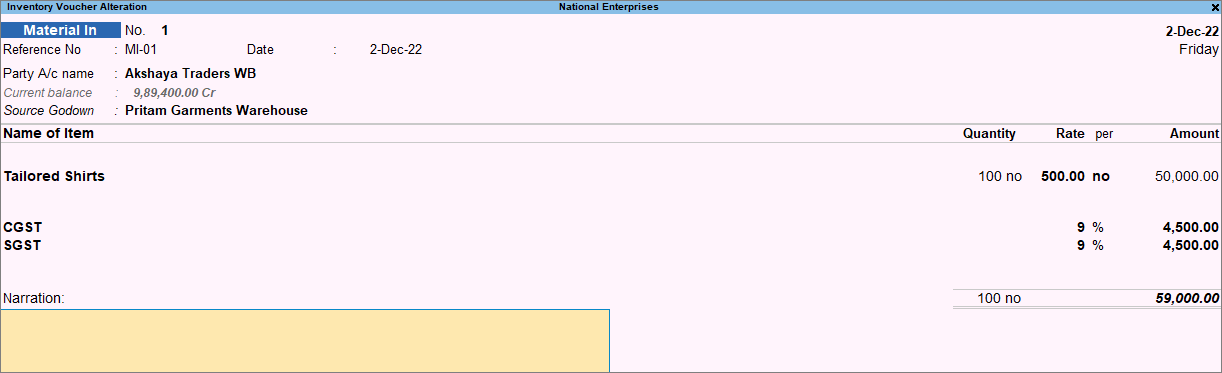
- Complete the entries and press Ctrl+A to save the Material In voucher.
Is this information useful?
YesNo


