
The State field is required
Cause
This error occurs when the State is not defined in the Company Features or in the party ledger used in the invoice, due to which the State field remains blank during e-Invoice generation.
Resolution
Update state of the Company
- Press F11 (Company Feature) > Enable Goods and Service Tax (GST): Yes.
- In the GST Details screen, update the Invoice bill from place.
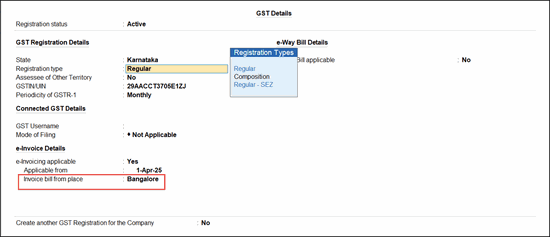
- Press Ctrl+A to save.
Update the state of the party ledger
- Press Alt+G (Go To) > Alter Master > Ledger > type or select the name of the Ledger for which the invoice is recorded, and press Enter.
- Update State under Mailing Details.
- Press Ctrl+A to save.
Update the state in the invoice
- Open the invoice in the alteration mode.
- Provide e-Invoice details: Yes.
- Update State under Dispatch From Details.
- Press Ctrl+A to save.
Is this information useful?
YesNo


