
Print ESI Form 3 & E-Return in TallyPrime (Payroll)
ESI Form 3 is a Return of Declaration that must be submitted every month, containing details of employees covered under ESI for that period. You can generate Form 3 and export the data for E-Return submission.
- Gateway of Tally > Display More Reports > Statutory Reports > Payroll Reports > Employee State Insurance > Form 3.
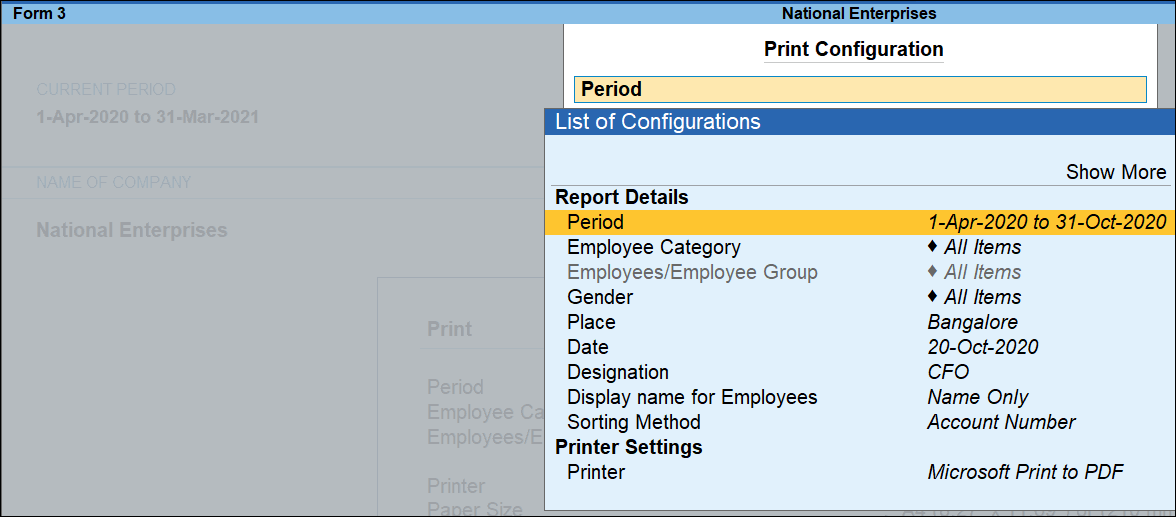
- Press C (Configure) for print configurations.
- Press I (Preview) or P (Print).
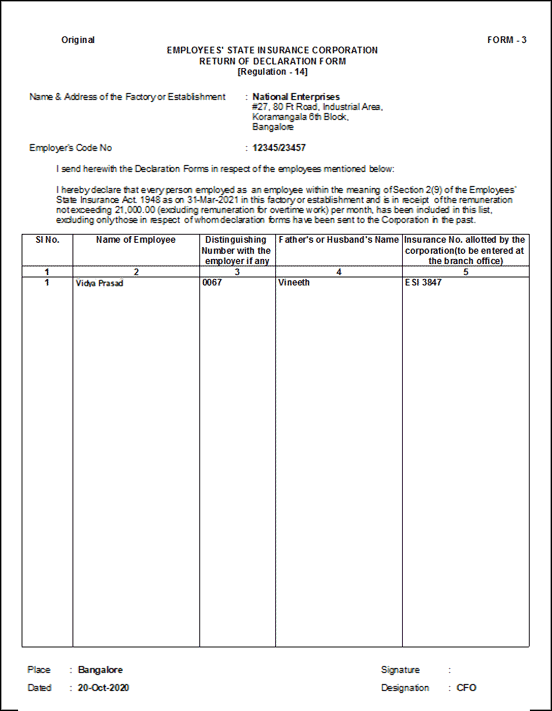
Column Details
- Name of Employee: Displays the names of employees eligible for ESI.
- Distinguishing Number with Employer if any: Displays the employee number as defined in the Employee Master.
- Father’s or Husband’s Name: Displays the father’s or husband’s name as specified in the Employee Master.
- Insurance No. allotted by the corporation (to be entered at the branch office): Displays the unique ESI number assigned by ESIC, as recorded in the Employee Master.
E-Return for ESI Form 3
- Gateway of Tally > Display More Reports > Statutory Reports > Payroll Reports > Employee State Insurance > E-Return.
- In ESI Monthly Statement screen, press C (Configure) to enter details.
- Press E (Send) to export the file.
Is this information useful?
YesNo


