
View Employee Head Count Report in TallyPrime (Payroll)
The Employee Head Count report in TallyPrime shows the number of employees available for each month and the corresponding total salary payout for that period.
- Press Alt+G (Go To) > type or select Employee Head Count > and press Enter.
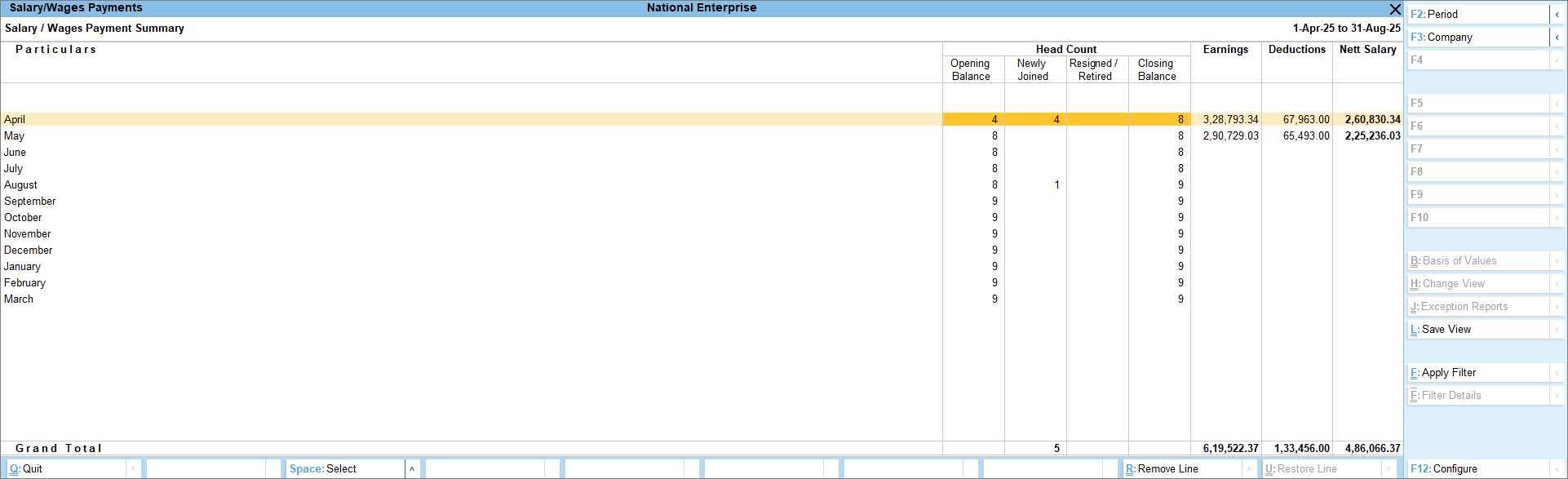
The report provides headcount details, including Opening Balance, employees who joined, those who resigned or retired during the month, and the Closing Balance.
It also presents a monthly breakdown of Earnings, Deductions, and the Net Salary paid. - To view the breakup of statutory earnings and deductions, press F12 (Configure) > disable Show Head Count > enable Show Earnings and Deductions Breakup.
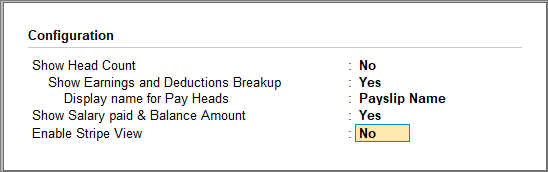
- To view the detailed breakup of net salary, salary paid, and the outstanding balance, press F12 (Configure) > enable Show Salary paid & Balance Amount.
Is this information useful?
YesNo


