
Create Gratuity Pay Head in TallyPrime
In TallyPrime, create the gratuity pay head to track the employer’s gratuity liability for employees.
Create Pay Head for Gratuity – India
- Press Alt+G (Go To) > Create Master > Pay Heads > and press Enter.
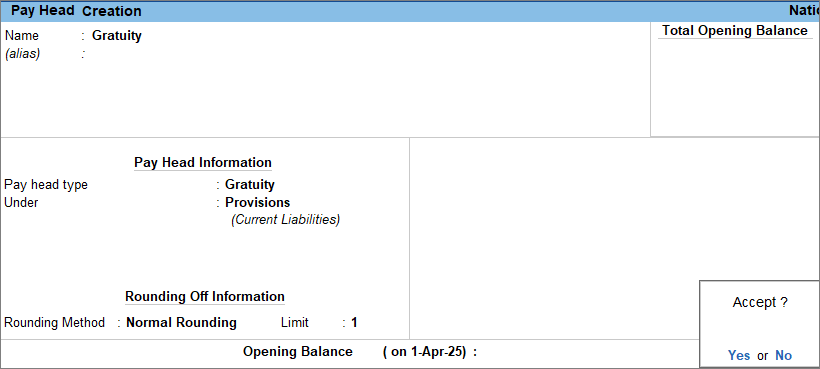
- Enter the Pay Head details.
- Name: Enter the name of the pay head as Gratuity.
- Pay head type: Select Gratuity from the List of Pay Head Types.
The Gratuity Period screen appears.
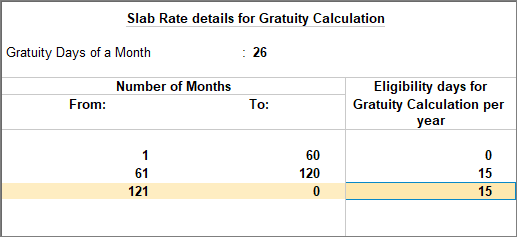
- Enter the Slab Rate details for Gratuity Calculation.
- Under: Select Provisions from the List of Groups.
- Select the Rounding Method, if applicable. To know more, click here.
- Press Ctrl+A to save the pay head master.
Create Pay Head for Gratuity with Statutory
- Create Gratuity Pay Head.
- Enter the Pay Head calculation details.
- Set / Alter Income Tax Details: Set the option to Yes.
- In the Income Tax Details screen, enter the following details:
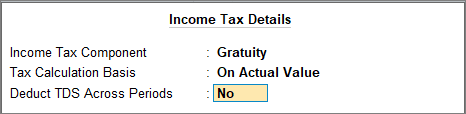
- Income Tax Component: It is auto-filled with Gratuity.
- Tax Calculation Basis: It is auto-filled as On Actual Value.
- Deduct TDS Across Periods: It is set to No because tax must be deducted in the same month.
- Press Ctrl+A to save the pay head master.
Create Pay Head for Gratuity – UAE
In the United Arab Emirates (UAE), an employment contract can be limited or unlimited. As per UAE Federal Law, an employee becomes eligible for gratuity after completing one year of continuous service, regardless of the contract type.
TallyPrime supports gratuity calculation in accordance with UAE rules and regulations. To compute gratuity in a UAE payroll-enabled company, create two gratuity pay heads, one for limited contract employees and another for unlimited contract employees.
Since an employee works under only one contract type, include only the applicable gratuity pay head in the employee’s Salary Details.
Before you begin | Prerequisites
- Ensure you enter the Employer Unique ID in the F11 (Features) screen.
Create pay head for Gratuity – Limited contract type
- Press Alt+G (Go To) > Create Master > Pay Heads > and press Enter.
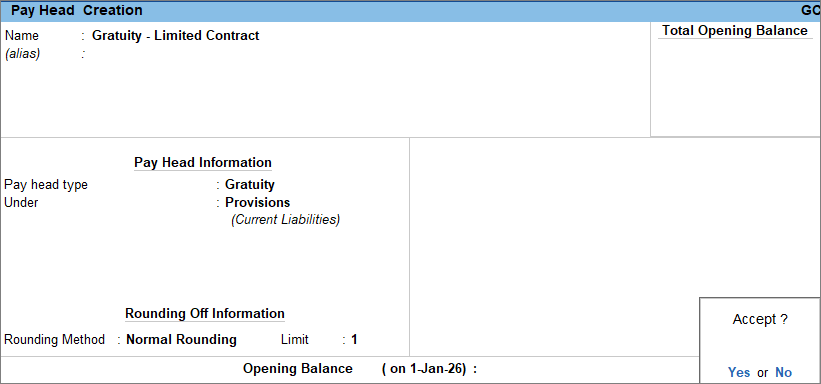
- Enter the Pay Head details.
- Name: Enter the name of the pay head as Gratuity – Limited Contract.
- Pay head type: Select Gratuity from the List of Pay Head Types.
The Gratuity Period screen appears.
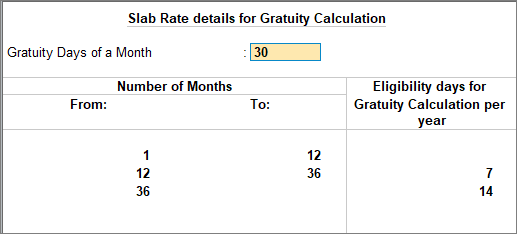
- Enter the Slab Rate details for Gratuity Calculation.
- Under: Select Provisions from the List of Groups.
- Select the Rounding Method, if applicable. To know more, click here.
- Press Ctrl+A to save the pay head master.
Similarly, create the pay head for the Unlimited Contract type.
After you add the gratuity pay head in the salary details of an employee, you can review the computation of gratuity using the Gratuity Summary report.


